


What You’ll Learn
In this lesson, you will use sed and awk together in Bash pipelines to clean structured text, filter deployment records, and reformat selected columns from command output.
- Use
sedfor line-oriented substitutions and cleanup. - Use
awkto split records into fields and apply conditions. - Combine both tools in a readable Bash pipeline.
- Recognize common delimiter, whitespace, and field-numbering problems.
The Concept
sed and awk are stream-processing tools. They read text one line at a time, which makes them especially useful in Bash pipelines.
sed is commonly used to transform text. For example, it can remove a header, replace text, or normalize whitespace around delimiters. Its s command uses the form s/pattern/replacement/flags.
awk is useful when the input has fields or columns. By default, it separates fields using whitespace. You can change the separator with -F. For pipe-delimited data, -F'|' makes the first field $1, the second field $2, and so on. The complete current line is $0.
A common pattern is to let sed normalize the input first and then let awk select records and format the result:
source command | sed 'cleanup rule' | awk 'selection and formatting rule'
Basic Example
Suppose a deployment system produces a pipe-delimited report. Some records contain spaces around the delimiters, so the first step is to normalize those separators. The pipeline then prints failed production deployments with selected columns.
#!/usr/bin/env bash

deployment_report=$(cat <<'REPORT'
service|environment|version|status|duration_s
api|production|2025.03.18|SUCCESS|142
web | production | 2025.03.18 | FAILED | 311
worker|staging|2025.03.18|FAILED|205
worker | production | 2025.03.17 | FAILED | 487
billing|production|2025.03.18|SUCCESS|198
REPORT
)

printf '%s\n' "$deployment_report" |
    sed -E 's/[[:space:]]*\|[[:space:]]*/|/g' |
    awk -F'|' '
        NR == 1 {
            next
        }

        $2 == "production" && $4 == "FAILED" {
            printf "%s\t%s\t%s\t%ss\n", $1, $3, $4, $5
        }
    '
Expected Output
web	2025.03.18	FAILED	311s
worker	2025.03.17	FAILED	487s
How the Code Works
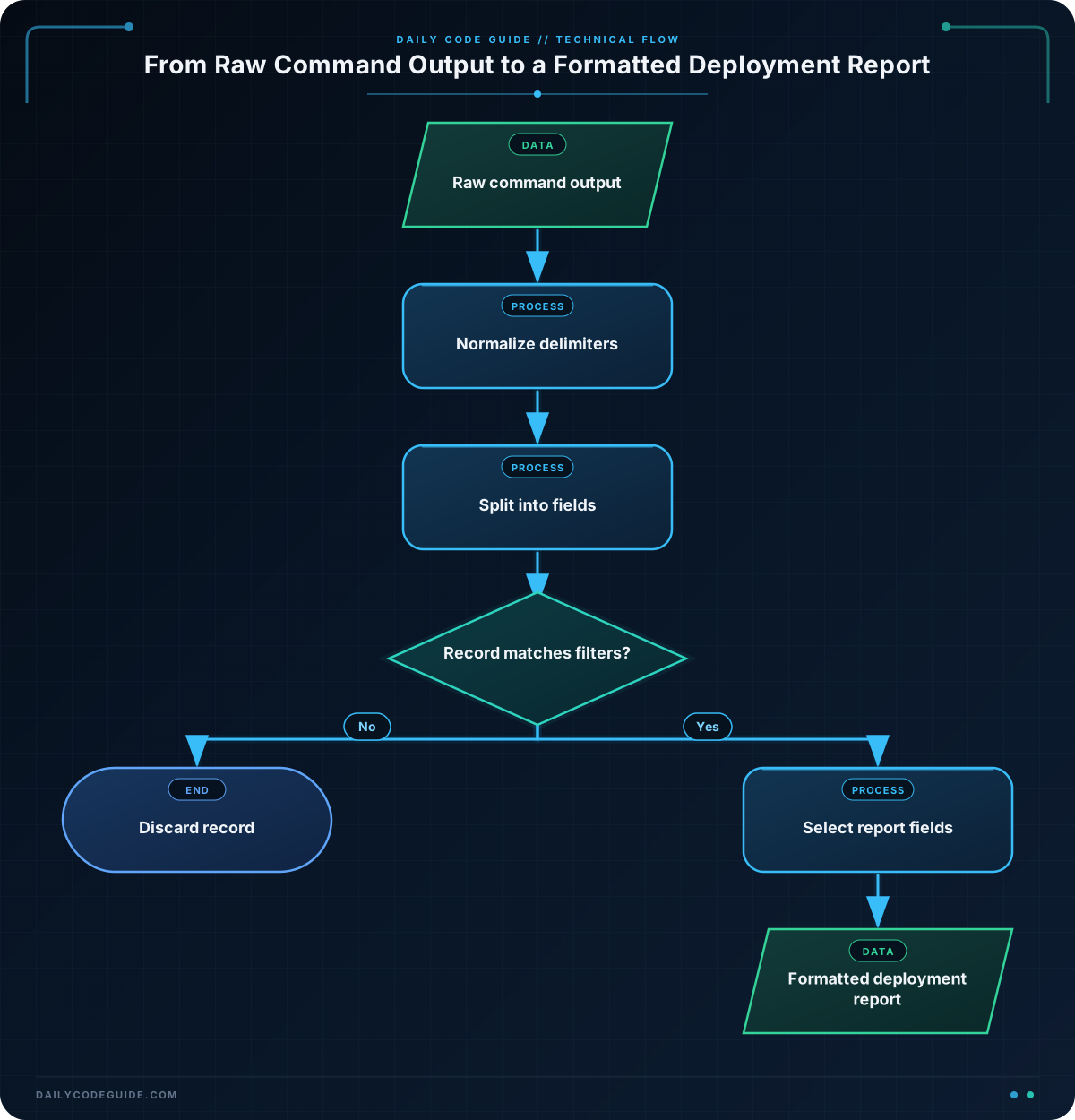
The here-document stores sample report data in the deployment_report variable. In a real script, the input could instead come from a deployment command or a report file.
The sed expression uses extended regular expressions because of the -E option:
[[:space:]]*matches zero or more whitespace characters.\|matches a literal pipe character.- The replacement is a single pipe, removing surrounding spaces.
- The
gflag applies the replacement to every delimiter on the line.
After sed runs, a record such as web | production | 2025.03.18 | FAILED | 311 becomes web|production|2025.03.18|FAILED|311.
The awk -F'|' option tells awk to use the pipe as its field separator. The first line is the header, so NR == 1 { next } skips it. Here, NR is the current input record number and next immediately moves to the next line.
The condition combines two tests: the environment must be production and the status must be FAILED. For matching records, printf outputs only the service, version, status, and duration fields, separated by tabs.
Normalization before field processing is a practical design choice. Without it, spaces around delimiters could become part of field values, causing a test such as $2 == "production" to fail.
Another Example
You can also use these tools with command output. This pipeline removes the header from df -P, then reports filesystems whose usage is at least 80 percent. The df -P option requests a predictable one-filesystem-per-line format on systems that support the POSIX form.
df -P |
    sed 1d |
    awk '$5 + 0 >= 80 {
        printf "%-30s %s used\n", $6, $5
    }'
In the df output, field $5 is the usage percentage and field $6 is the mount point. Adding zero converts a value such as 87% into the numeric value 87 for comparison. The percent sign is ignored when awk performs numeric conversion.
This command produces environment-dependent output because each machine has different filesystems and usage levels. It is useful in monitoring scripts, deployment checks, and maintenance reports.
Common Mistakes
- Using the wrong field separator: If the data is pipe-delimited but you omit
-F'|',awkmay treat the entire line as one field. - Forgetting that fields are one-indexed: The first field is
$1, not$0. The variable$0represents the complete line. - Filtering before cleaning: A value such as
" production "is not equal to"production". Normalize delimiters or trim fields before comparing them. - Assuming every command has identical columns: Command output can vary by operating system, options, locale, or filenames containing spaces. Prefer stable machine-readable formats when a command provides them.
- Confusing regular expressions with shell expansion: Patterns inside single quotes are passed to
sedorawkwithout Bash interpreting special characters.
Try It Yourself
Use the following deployment report as input. Write a pipeline that removes spaces around pipe delimiters, skips the header, and prints the service and duration for successful production deployments.
deployment_report=$(cat <<'REPORT'
service | environment | version | status | duration_s
api | production | 2025.03.18 | SUCCESS | 142
web | production | 2025.03.18 | FAILED | 311
worker | staging | 2025.03.18 | SUCCESS | 205
billing | production | 2025.03.18 | SUCCESS | 198
REPORT
)

# Add your sed and awk pipeline here.
Challenge
Create a Bash pipeline for the following deployment report. It must:
- Normalize spaces around pipe delimiters with
sed. - Skip the header row with
awk. - Select only production records whose duration is greater than 300 seconds.
- Print the service, status, and duration in the format
service: status (duration seconds).
deployment_report=$(cat <<'REPORT'
service|environment|version|status|duration_s
api | production | 2025.03.18 | SUCCESS | 142
web | production | 2025.03.18 | FAILED | 311
worker | staging | 2025.03.18 | FAILED | 405
search | production | 2025.03.18 | SUCCESS | 356
billing | production | 2025.03.18 | FAILED | 287
REPORT
)

# Build the pipeline here.
Solution
#!/usr/bin/env bash

deployment_report=$(cat <<'REPORT'
service|environment|version|status|duration_s
api | production | 2025.03.18 | SUCCESS | 142
web | production | 2025.03.18 | FAILED | 311
worker | staging | 2025.03.18 | FAILED | 405
search | production | 2025.03.18 | SUCCESS | 356
billing | production | 2025.03.18 | FAILED | 287
REPORT
)

printf '%s\n' "$deployment_report" |
    sed -E 's/[[:space:]]*\|[[:space:]]*/|/g' |
    awk -F'|' '
        NR == 1 {
            next
        }

        $2 == "production" && $5 > 300 {
            printf "%s: %s (%s seconds)\n", $1, $4, $5
        }
    '
The normalized data gives awk consistent fields. The environment is field $2, the status is field $4, and the duration is field $5. Because the duration is numeric text, awk can compare it directly with 300.
Expected Output
web: FAILED (311 seconds)
search: SUCCESS (356 seconds)
Key Takeaways
sedis well suited to line-by-line cleanup and substitution.awkis useful for field-based filtering, comparisons, and formatted output.- Use
-Fwhen the input delimiter is not whitespace. - Clean inconsistent delimiters before comparing field values.
- Combining
sedandawkcreates compact, practical Bash data-processing pipelines.

