


What You’ll Learn
In this lesson, you’ll learn how Python type hints work with mypy, a static type checker. You will annotate functions, run mypy from the command line, and use its feedback to catch incompatible arguments and return values before code reaches production.
- Use type hints for function parameters and return values.
- Run mypy against a Python file.
- Interpret common errors involving arguments and return values.
- Understand what static checking can and cannot detect.
The Concept
Python is dynamically typed, so it normally allows a function to receive values of many different types. That flexibility is useful, but it also means some mistakes are not discovered until a particular line runs.
A type hint documents the type a function expects or returns:
def calculate_total(quantity: int, unit_price: float) -> float:
    return quantity * unit_price
Here, quantity should be an integer, unit_price should be a floating-point number, and the function should return a floating-point number.
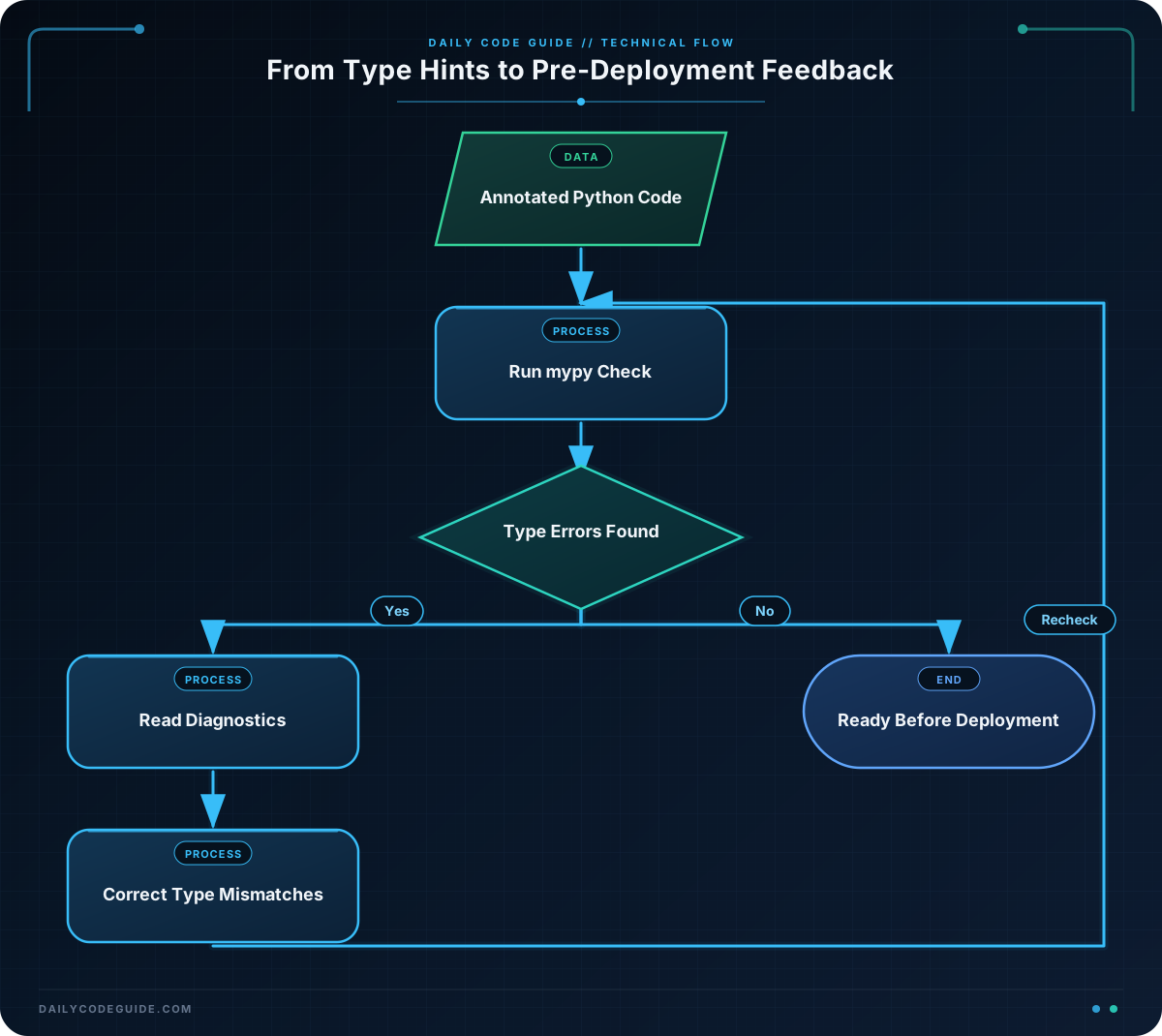
Python does not enforce these annotations while the program runs. Instead, mypy reads them before execution and reports code that is inconsistent with them. This is called static type checking.
Install mypy in your development environment with:
python -m pip install mypyThen check a file by passing its name to the mypy command:
mypy order_summary.pyType checking is especially useful at boundaries between functions. For example, if one function produces an order total and another function sends that total to a payment service, annotations can reveal when a string, integer, or missing value is passed accidentally.
Basic Example
The following program represents a small order-processing workflow. Each function states what it accepts and what it returns.
def calculate_order_total(item_count: int, unit_price: float) -> float:
    return item_count * unit_price


def create_payment_message(order_id: str, amount: float) -> str:
    return f"Payment approved for {order_id}: ${amount:.2f}"


def main() -> None:
    order_id = "ORD-1042"
    item_count = 3
    unit_price = 24.50

    total = calculate_order_total(item_count, unit_price)
    message = create_payment_message(order_id, total)

    print(message)


if __name__ == "__main__":
    main()
Expected Output
Payment approved for ORD-1042: $73.50Save the file as order_summary.py, then run both the program and the type checker:
python order_summary.py
mypy order_summary.py
The program prints the payment message, and mypy should report that there are no issues.
How the Code Works
The annotation item_count: int tells mypy that callers should provide an integer. The annotation unit_price: float describes the second parameter. The arrow syntax, -> float, describes the value returned by the function.
The create_payment_message function accepts an order identifier as a string and a payment amount as a float. Because it returns formatted text, its return type is str.
main is annotated with -> None because it performs actions but does not return a useful value. This is a common annotation for application entry-point functions.
Now imagine that a later refactor passes text instead of a number:
def send_refund(order_id: str, amount: float) -> str:
    return f"Refund queued for {order_id}: ${amount:.2f}"


refund_message = send_refund("ORD-1042", "15.00")
This code is syntactically valid Python, but the second argument has the wrong type. Mypy can report the problem before the function is called in production:
order_summary.py:6: error: Argument 2 to "send_refund" has incompatible type "str"; expected "float" [arg-type]Return annotations catch a similar problem. The following function promises to return text but returns an integer:
def format_receipt_number(receipt_id: int) -> str:
    return receipt_id
Mypy reports that the return value does not match the declared return type. These checks do not replace tests, but they catch a category of mistakes without requiring a particular runtime path to execute.
Another Example
Type hints are also useful for classes and structured data. A dataclass can describe the fields of a deployment record, while typed functions describe how that record is used. For more on combining annotations with structured objects and validation, see Python dataclasses and validation.
from dataclasses import dataclass


@dataclass
class Deployment:
    service_name: str
    version: str
    replica_count: int
    all_checks_passing: bool


def can_deploy(deployment: Deployment, minimum_replicas: int) -> bool:
    return (
        deployment.replica_count >= minimum_replicas
        and deployment.all_checks_passing
    )


def deployment_report(deployment: Deployment) -> str:
    status = "ready" if can_deploy(deployment, 2) else "blocked"
    return (
        f"{deployment.service_name} {deployment.version}: "
        f"{status} ({deployment.replica_count} replicas)"
    )


def main() -> None:
    deployment = Deployment(
        service_name="checkout-api",
        version="2025.03.18",
        replica_count=3,
        all_checks_passing=True,
    )

    print(deployment_report(deployment))


if __name__ == "__main__":
    main()
Because deployment_report requires a Deployment object, mypy can catch an accidental call with a dictionary, string, or unrelated object. It can also detect a misspelled field or an assignment such as replica_count = "three" when the value is expected to be an integer.
Type hints become more valuable as data moves through several functions. A function that accepts a Deployment can rely on the fields described by the class, and callers receive immediate feedback when they provide the wrong kind of object.
Common Mistakes
Assuming annotations validate values at runtime
Python does not automatically reject a value just because it conflicts with a type hint. Mypy performs its checks separately, so your application still needs runtime validation for untrusted input such as request data, configuration files, or user input.
Using a type that is too broad
Annotating everything as Any suppresses many useful checks. Mypy generally allows operations on an Any value because it assumes the value could support them. Use a specific type whenever you know what the value should contain.
Confusing integer and floating-point values
Mypy treats int and float as different types. If a function requires a monetary amount represented as a float, passing a string such as "15.00" is an error even though the text looks numeric. Convert and validate external data before passing it to the typed function.
Ignoring the first useful error
One incorrect assignment can cause several later errors. Start with the earliest reported problem, correct it, and run mypy again. Later messages may disappear once the original type mismatch is fixed.
Try It Yourself
Create a file named shipment_status.py. Add annotations to the functions so that the program runs correctly and mypy can check it without errors.
def estimate_delivery_days(distance_miles, priority) -> int:
    if priority == "express":
        return 1
    return distance_miles // 300 + 1


def create_shipment_label(tracking_code, delivery_days) -> str:
    return f"{tracking_code}: estimated delivery in {delivery_days} days"


distance = 620
priority = "standard"
tracking_code = "PKG-8831"

days = estimate_delivery_days(distance, priority)
print(create_shipment_label(tracking_code, days))
Choose suitable parameter types and return types, run the file, and then run mypy shipment_status.py. Consider what type the priority parameter should have based on how the function compares it.
Challenge
A deployment pipeline needs a typed function that decides whether a release can proceed. Implement release_decision with these requirements:
service_namemust be a string.failed_checksmust be an integer.approval_requiredmust be a boolean.- The function must return a string.
- Return
"Deploying {service_name}"only when there are zero failed checks and approval is not required. - Otherwise, return
"Blocked: {service_name}".
Call the function with a realistic service name and print the result. Then run mypy against the file. As an additional test, temporarily pass a string for failed_checks and observe the argument error.
Solution
def release_decision(
    service_name: str,
    failed_checks: int,
    approval_required: bool,
) -> str:
    if failed_checks == 0 and not approval_required:
        return f"Deploying {service_name}"

    return f"Blocked: {service_name}"


result = release_decision(
    service_name="billing-api",
    failed_checks=0,
    approval_required=False,
)

print(result)
Expected Output
Deploying billing-apiThe parameter annotations describe every input, and -> str guarantees that the function is expected to produce text. The boolean condition combines both deployment rules. If a caller changes failed_checks=0 to failed_checks="0", mypy reports an incompatible argument before the deployment decision runs.
Key Takeaways
- Type hints describe the inputs and outputs that functions are designed to use.
- Mypy checks those annotations before runtime and can catch incompatible arguments and return values.
- Use specific types instead of relying on
Anywhen practical. - Static checking complements tests and runtime validation; it does not replace them.
- Running mypy during development or in continuous integration helps prevent type-related mistakes before deployment.

