


What You’ll Learn
In this lesson, you will learn how Python’s @dataclass decorator makes record-like classes easier to write and maintain. You will also learn how to validate values when a record is created.
- Use
@dataclassto reduce class boilerplate. - Understand the automatically generated
__init__,__repr__, and equality methods. - Validate customer data with
__post_init__. - Recognize what type hints do and do not validate automatically.
The Concept
A dataclass is a class designed mainly to store related data. Without a dataclass, you usually need to write an __init__ method to assign each attribute yourself.
Python’s @dataclass decorator can generate that setup code for you. It can also generate a useful string representation and an equality comparison method.
For example, a regular class might need code to accept a customer ID, name, and email address, then assign each value to an attribute. With a dataclass, you declare the fields and their types:
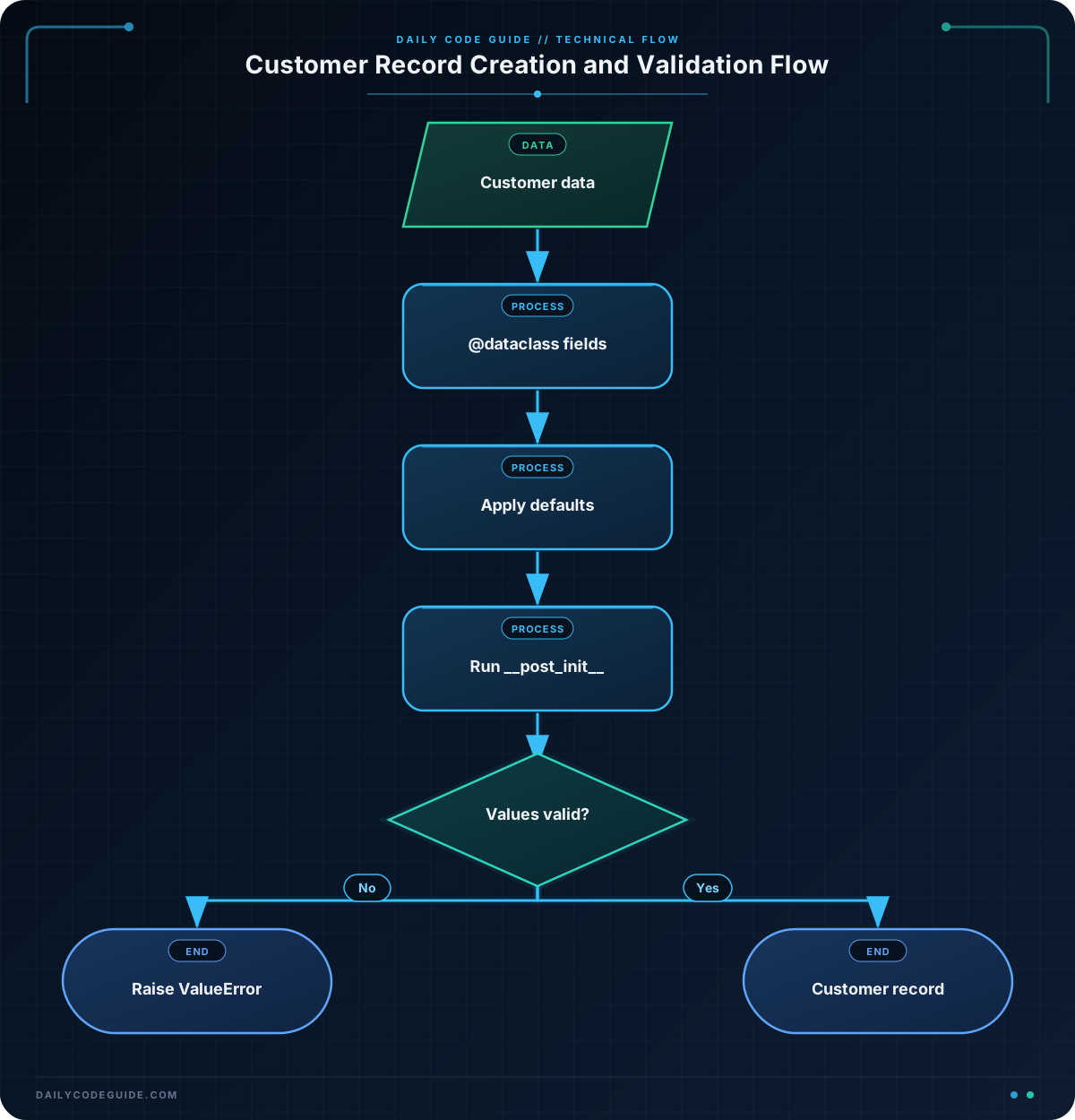
@dataclass does not validate type hints by itself. If a field is annotated as int, Python will not automatically reject a string. For validation, you can define a __post_init__ method. Python calls this method immediately after the generated initializer finishes.
Basic Example
The following example models a customer record. The dataclass creates the initializer, while __post_init__ checks that the record contains sensible values.
from dataclasses import dataclass


@dataclass
class CustomerRecord:
    customer_id: int
    name: str
    email: str
    loyalty_points: int = 0

    def __post_init__(self):
        if self.customer_id <= 0:
            raise ValueError("customer_id must be positive")

        if len(self.name.strip()) < 2:
            raise ValueError("name must contain at least two characters")

        if "@" not in self.email:
            raise ValueError("email must contain @")

        if self.loyalty_points < 0:
            raise ValueError("loyalty_points cannot be negative")


customer = CustomerRecord(
    customer_id=1042,
    name="Maya Chen",
    email="maya.chen@example.com",
    loyalty_points=120,
)

same_customer = CustomerRecord(
    customer_id=1042,
    name="Maya Chen",
    email="maya.chen@example.com",
    loyalty_points=120,
)

print(customer)
print(customer == same_customer)
Expected Output
CustomerRecord(customer_id=1042, name='Maya Chen', email='maya.chen@example.com', loyalty_points=120)
True
How the Code Works
The import makes the decorator available:
from dataclasses import dataclass
The @dataclass line tells Python to process CustomerRecord as a dataclass. The fields below it become attributes and constructor parameters:
customer_id: intstores the customer’s numeric ID.name: strstores the customer’s name.email: strstores the email address.loyalty_points: int = 0has a default value of zero.
Because the dataclass generates the initializer, this works without writing an __init__ method:
CustomerRecord(customer_id=1042, name="Maya Chen", email="maya.chen@example.com", loyalty_points=120)
The __post_init__ method runs after those values have been assigned. Each if statement checks one rule. If a rule fails, ValueError stops the creation of the invalid record.
The decorator also generates a readable representation. That is why printing customer displays the class name and all its fields instead of an unhelpful memory address.
Dataclasses also generate equality behavior by default. The two customer objects contain the same field values, so customer == same_customer produces True.
Another Example
A customer support system might store a separate contact record. This example uses default values for optional contact information and validates the preferred contact method.
from dataclasses import dataclass


@dataclass
class CustomerContact:
    customer_id: int
    preferred_method: str = "email"
    phone_number: str = ""

    def __post_init__(self):
        valid_methods = {"email", "phone"}

        if self.customer_id <= 0:
            raise ValueError("customer_id must be positive")

        if self.preferred_method not in valid_methods:
            raise ValueError("preferred_method must be email or phone")

        if self.preferred_method == "phone" and not self.phone_number:
            raise ValueError("phone_number is required for phone contact")

    def summary(self) -> str:
        if self.preferred_method == "phone":
            return f"Call customer {self.customer_id} at {self.phone_number}."

        return f"Email customer {self.customer_id}."


contact = CustomerContact(
    customer_id=1042,
    preferred_method="phone",
    phone_number="555-0142",
)

print(contact)
print(contact.summary())
The dataclass still generates the initializer and representation, but the class also contains a regular method, summary. Dataclasses do not prevent you from adding methods when your record needs behavior.
Common Mistakes
- Expecting type hints to validate values: The annotation
customer_id: intdocuments the intended type, but it does not automatically reject every non-integer value. Add explicit checks when validation matters. - Forgetting to raise an exception: A validation condition should raise an exception such as
ValueErrorif the record must not be created. - Using the wrong method name: The dataclass hook must be named exactly
__post_init__, with two underscores before and after each part. - Assuming validation continues forever:
__post_init__runs when the object is created. If a mutable attribute is changed later, the validation method does not run again automatically. - Putting a required field after a default field: Dataclass fields without defaults should come before fields with defaults. In the first example,
loyalty_pointscorrectly comes last.
Try It Yourself
Create a few CustomerRecord objects based on the basic example. Try one valid record and at least two invalid records. For the invalid records, test a negative customer ID and an email address without an @ character. Observe the ValueError messages.
Challenge
Create a dataclass named MembershipCustomer for a customer membership system.
- Add fields named
customer_id,name,email, andactive. - Use
int,str,str, andbooltype hints respectively. - Give
activea default value ofTrue. - Use
__post_init__to reject non-positive IDs. - Reject names containing only one character or whitespace.
- Reject email addresses that do not contain
@. - Create one valid customer, print it, and print its
activevalue.
Solution
from dataclasses import dataclass


@dataclass
class MembershipCustomer:
    customer_id: int
    name: str
    email: str
    active: bool = True

    def __post_init__(self):
        if self.customer_id <= 0:
            raise ValueError("customer_id must be positive")

        if len(self.name.strip()) < 2:
            raise ValueError("name must contain at least two characters")

        if "@" not in self.email:
            raise ValueError("email must contain @")


customer = MembershipCustomer(
    customer_id=2077,
    name="Jordan Lee",
    email="jordan.lee@example.com",
)

print(customer)
print(customer.active)
The solution declares all four required fields and gives active a default value. The generated initializer creates the object, and __post_init__ checks each validation rule before the object is used.
Key Takeaways
@dataclassreduces boilerplate for classes that mainly store data.- Field annotations describe expected types but do not perform complete runtime validation.
__post_init__is a convenient place to validate values after initialization.- Dataclasses automatically provide a readable representation and value-based equality by default.
- Validation prevents invalid customer records from being created, but later attribute changes are not checked automatically.

