What You’ll Learn
In this lesson, you’ll learn how to use PostgreSQL full-text search to find relevant words and phrases in long-form text, such as product descriptions and support tickets. You’ll also create a search index and rank matching rows by relevance.
- Understand how full-text search differs from substring matching with
LIKE. - Create a PostgreSQL GIN index for searchable text.
- Search with
plainto_tsqueryandwebsearch_to_tsquery. - Sort matching products or tickets by relevance with
ts_rank.
The Concept
Traditional string searches look for an exact sequence of characters. For example, description LIKE '%wireless headphones%' searches for those characters in that order. This can be useful for simple substring matching; you can learn more about SQL string search with LIKE when you need that behavior.
Full-text search is designed for searching natural-language content. PostgreSQL breaks text into searchable terms, normalizes words, removes some stop words, and can match related forms of a word. It can also rank matches so that the most relevant products or support tickets appear first.
PostgreSQL represents searchable text with a tsvector and represents a user’s search terms with a tsquery. The @@ operator tests whether a document matches a query:
to_tsvector('english', description)converts text into searchable tokens.plainto_tsquery('english', 'wireless headphones')converts ordinary user input into a search query.websearch_to_tsquery('english', '"payment failed"')accepts search-style syntax, including quoted phrases.ts_rankcalculates a relevance score for matching rows.
For production searches, index the expression used to create the tsvector. A GIN index is a common choice because it makes searches across many text rows much faster.
Basic Example
The following example creates a product catalog, indexes the product descriptions, and searches for products related to wireless headphones. The query uses plainto_tsquery, which is appropriate when the search text comes from a simple search box.
CREATE TABLE products (
    product_id integer GENERATED ALWAYS AS IDENTITY PRIMARY KEY,
    product_name text NOT NULL,
    description text NOT NULL
);

INSERT INTO products (product_name, description)
VALUES
    (
        'Trailhead Wireless Headphones',
        'Noise-cancelling wireless headphones with a 30-hour battery and comfortable ear cushions.'
    ),
    (
        'Studio Monitor Headphones',
        'Wired over-ear headphones designed for accurate audio monitoring in a recording studio.'
    ),
    (
        'Pocket Bluetooth Speaker',
        'A compact wireless speaker with water resistance and a twelve-hour battery.'
    ),
    (
        'Travel Charging Case',
        'A protective charging case for earbuds with a compact design and USB-C support.'
    );

CREATE INDEX products_description_search_idx
ON products
USING gin (to_tsvector('english', description));

WITH search AS (
    SELECT plainto_tsquery('english', 'wireless headphones') AS query
)
SELECT
    product_name,
    ts_rank(
        to_tsvector('english', description),
        search.query
    ) AS relevance
FROM products
CROSS JOIN search
WHERE to_tsvector('english', description) @@ search.query
ORDER BY relevance DESC, product_name;
Expected Output
The exact relevance numbers can vary with PostgreSQL configuration, but the matching products and their order should be similar to this:
product_name               | relevance
---------------------------+----------
Trailhead Wireless Headphones
Pocket Bluetooth Speaker
The speaker matches wireless, while the Trailhead headphones match both search terms and contain a more direct product-description match. The ranking score is database-generated, so the important result is the relative ordering rather than a fixed numeric value.
How the Code Works
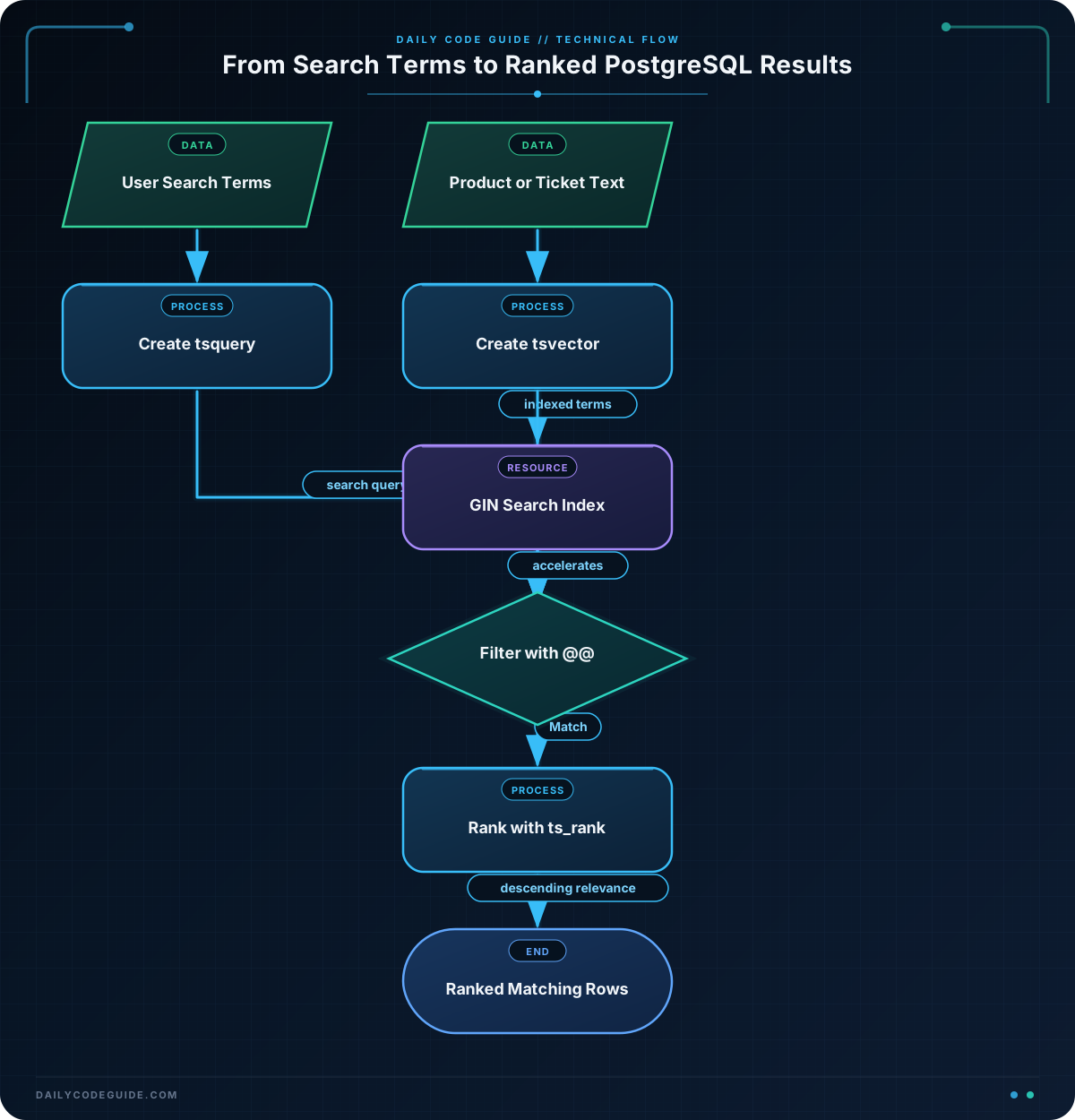
The GIN index stores searchable terms extracted from each description:
to_tsvector('english', description)uses PostgreSQL’s English text-search configuration. This configuration can normalize words and ignore common words.USING ginselects a generalized inverted index, which is well suited to finding rows that contain particular terms.- The index expression must match the expression in the search condition. If the index uses the
englishconfiguration, the query should use that same configuration.
plainto_tsquery turns the input into a safe search query instead of requiring the application to construct tsquery syntax manually. It is a good default for ordinary user-entered words. The @@ condition filters out products that do not match.
The query calculates ts_rank for each matching row and sorts by that score in descending order. The secondary sort by product_name gives consistent ordering when two rows receive the same score.
For very large tables, consider storing a generated tsvector column instead of recalculating the vector in every query. An expression index is simpler and works well for many applications, but a stored vector can be useful when combining several fields or assigning different weights to titles and descriptions.
Another Example
Support teams often need to find tickets describing a particular incident. websearch_to_tsquery supports search-box syntax that users commonly expect. In this example, quoted words form a phrase, while the word OR allows either phrase to match.
CREATE TABLE support_tickets (
    ticket_id integer GENERATED ALWAYS AS IDENTITY PRIMARY KEY,
    subject text NOT NULL,
    body text NOT NULL,
    status text NOT NULL
);

INSERT INTO support_tickets (subject, body, status)
VALUES
    (
        'Payment failed at checkout',
        'Several customers received a payment failed message after confirming their order.'
        ,
        'open'
    ),
    (
        'Card payment declined',
        'The checkout page reports that card payment was declined for some customers.'
        ,
        'open'
    ),
    (
        'Invoice email delayed',
        'Invoices are created successfully, but email delivery can take several minutes.'
        ,
        'pending'
    ),
    (
        'Refund status question',
        'A customer is waiting for confirmation that a refund has been processed.'
        ,
        'closed'
    );

CREATE INDEX support_tickets_text_search_idx
ON support_tickets
USING gin (
    to_tsvector('english', coalesce(subject, '') || ' ' || coalesce(body, ''))
);

WITH search AS (
    SELECT websearch_to_tsquery(
        'english',
        '"payment failed" OR "card payment"'
    ) AS query
)
SELECT
    ticket_id,
    subject,
    status,
    ts_rank(
        to_tsvector(
            'english',
            coalesce(subject, '') || ' ' || coalesce(body, '')
        ),
        search.query
    ) AS relevance
FROM support_tickets
CROSS JOIN search
WHERE to_tsvector(
    'english',
    coalesce(subject, '') || ' ' || coalesce(body, '')
) @@ search.query
ORDER BY relevance DESC, ticket_id;
This search indexes both the subject and body, so an important phrase in the subject can contribute to the match. The coalesce calls protect the concatenation if either field is allowed to contain NULL. If both columns are guaranteed to be NOT NULL, they are not strictly necessary.
Common Mistakes
- Using
LIKEfor every text search:LIKEdoes not provide linguistic tokenization or relevance ranking, and a leading wildcard such asLIKE '%battery%'often cannot use a normal B-tree index efficiently. - Using different text configurations: An index built with
to_tsvector('english', description)will not match a query that uses a different configuration or expression. Keep the indexed and searched expressions consistent. - Expecting an exact phrase from
plainto_tsquery: Plain text queries generally search for terms, not necessarily an exact phrase. Usewebsearch_to_tsquerywith quoted text when phrase behavior is important. - Forgetting to filter before ranking:
ts_rankcalculates a score, but it does not decide whether a row matches. Keep the@@condition in theWHEREclause. - Assuming every visible word is searchable: PostgreSQL’s text configuration can remove stop words and normalize terms. Test searches with the configuration and language used by your application.
Try It Yourself
Add a category column to the product table and insert two more products. Then modify the search so it returns only products in a chosen category while still ranking matches for the words battery and wireless.
Challenge
Using the existing products table, write a query that:
- Searches for the terms
wirelessandnoise cancellation. - Returns only matching products.
- Displays the product name and a relevance score rounded to three decimal places.
- Orders results from most relevant to least relevant, with the product name as a tie-breaker.
Use a full-text query rather than LIKE. Assume the expression index from the basic example already exists.
Solution
WITH search AS (
    SELECT plainto_tsquery(
        'english',
        'wireless noise cancellation'
    ) AS query
)
SELECT
    product_name,
    round(
        ts_rank(
            to_tsvector('english', description),
            search.query
        )::numeric,
        3
    ) AS relevance
FROM products
CROSS JOIN search
WHERE to_tsvector('english', description) @@ search.query
ORDER BY relevance DESC, product_name;
The query converts the three search terms into a PostgreSQL text query, filters with @@, and calculates a score only for matching products. Casting the score to numeric allows round to format it to three decimal places. The final ordering places the strongest matches first and makes ties predictable.
Key Takeaways
- Full-text search is designed for natural-language fields such as descriptions, ticket bodies, and article content.
- PostgreSQL uses
tsvectorfor indexed document text andtsqueryfor search terms. - A GIN index can significantly improve searches over large text columns.
- Use
plainto_tsqueryfor ordinary search input andwebsearch_to_tsquerywhen users need phrase and search-style operators. - Use
ts_rankto order matching rows by relevance, while keeping@@in the filter condition.