What You’ll Learn
In this lesson, you will use AWS CLI API Gateway REST API commands to inspect an existing REST API, connect a resource to a Lambda function, deploy the configuration to a stage, and verify the endpoint.
- Find REST API resources and their IDs.
- Create a resource and configure a Lambda proxy integration.
- Grant API Gateway permission to invoke Lambda.
- Create deployments and manage stage variables.
- Test an endpoint directly through API Gateway.
The Concept
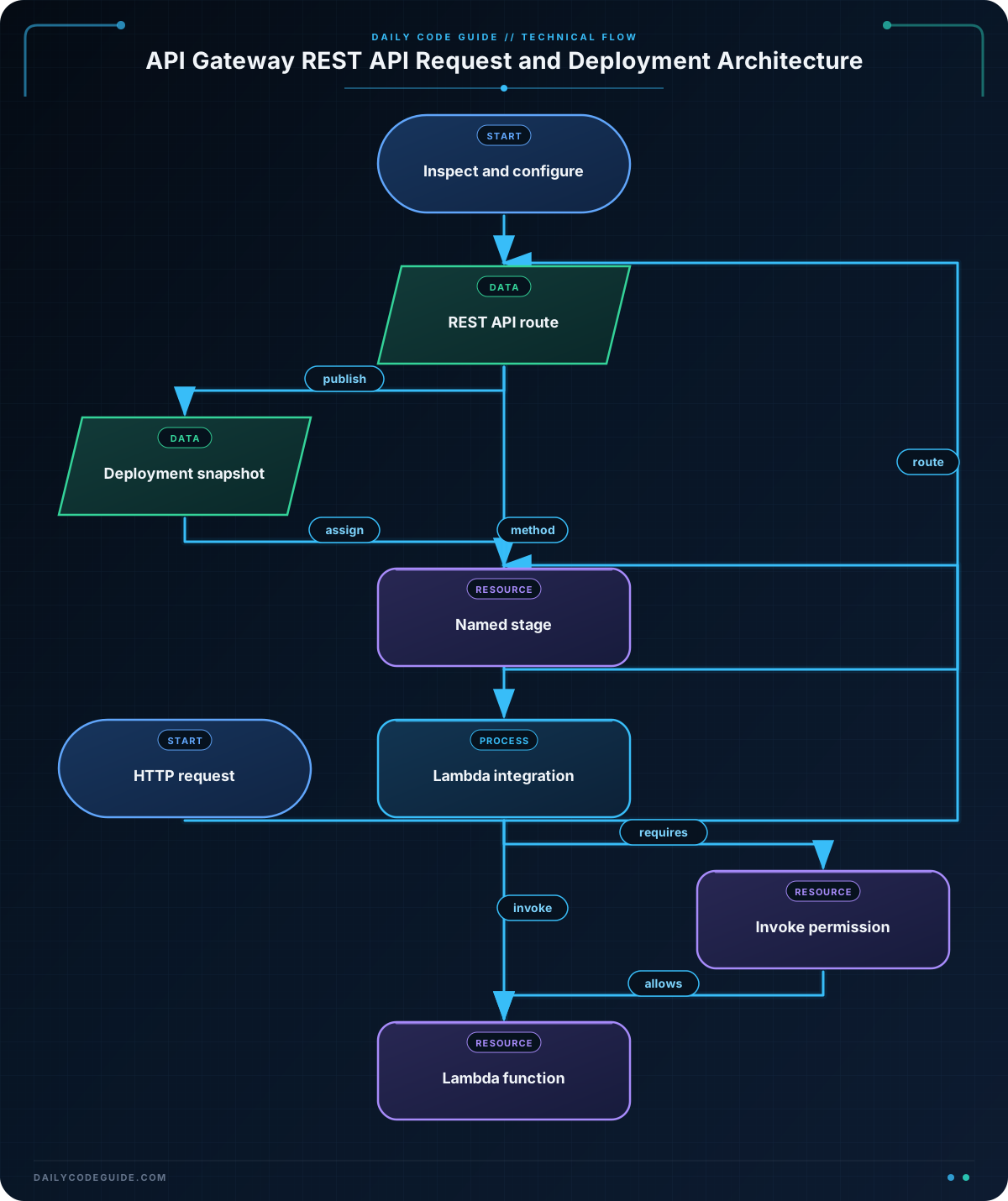
Amazon API Gateway REST APIs are organized into several related objects:
- REST API: The API container.
- Resource: A URL path such as
/statusor/orders. - Method: An HTTP operation such as
GETorPOSTon a resource. - Integration: The backend that receives the request. In this lesson, the backend is AWS Lambda.
- Deployment: A snapshot of the API configuration.
- Stage: A named environment, such as
devorprod, that points to a deployment.
A common workflow is to inspect the API, modify its resources and integrations, create a deployment, and then invoke the stage URL. Creating or changing a method does not automatically make the change available at a deployed stage.
The AWS CLI is useful when these steps need to be repeatable in scripts or CI/CD jobs. The same inspect, configure, deploy, and verify pattern also applies to other AWS resources; for a related command-driven resource workflow, see these AWS CLI SNS commands.
The examples assume that you already have:
- An AWS CLI profile with permissions for API Gateway, Lambda, and IAM-related Lambda permissions.
- An existing API Gateway REST API.
- A deployed or deployable Lambda function.
- A region selected in your AWS CLI configuration.
Basic Example
The following Bash script creates a GET /status endpoint backed by a Lambda function. Replace the API ID and function name with resources in your account.
#!/usr/bin/env bash
set -euo pipefail

AWS_REGION="us-east-1"
REST_API_ID="a1b2c3d4e5"
FUNCTION_NAME="orders-status"
STAGE_NAME="dev"

ROOT_RESOURCE_ID=$(aws apigateway get-resources \
    --rest-api-id "$REST_API_ID" \
    --region "$AWS_REGION" \
    --query 'items[?path==`/`].id' \
    --output text)

RESOURCE_ID=$(aws apigateway create-resource \
    --rest-api-id "$REST_API_ID" \
    --parent-id "$ROOT_RESOURCE_ID" \
    --path-part "status" \
    --region "$AWS_REGION" \
    --query 'id' \
    --output text)

aws apigateway put-method \
    --rest-api-id "$REST_API_ID" \
    --resource-id "$RESOURCE_ID" \
    --http-method GET \
    --authorization-type NONE \
    --region "$AWS_REGION"

LAMBDA_ARN=$(aws lambda get-function \
    --function-name "$FUNCTION_NAME" \
    --region "$AWS_REGION" \
    --query 'Configuration.FunctionArn' \
    --output text)

INTEGRATION_URI="arn:aws:apigateway:${AWS_REGION}:lambda:path/2015-03-31/functions/${LAMBDA_ARN}/invocations"

aws apigateway put-integration \
    --rest-api-id "$REST_API_ID" \
    --resource-id "$RESOURCE_ID" \
    --http-method GET \
    --type AWS_PROXY \
    --integration-http-method POST \
    --uri "$INTEGRATION_URI" \
    --region "$AWS_REGION"

ACCOUNT_ID=$(aws sts get-caller-identity \
    --query 'Account' \
    --output text)

SOURCE_ARN="arn:aws:execute-api:${AWS_REGION}:${ACCOUNT_ID}:${REST_API_ID}/*/GET/status"

aws lambda add-permission \
    --function-name "$FUNCTION_NAME" \
    --statement-id "apigateway-${REST_API_ID}-status" \
    --action "lambda:InvokeFunction" \
    --principal apigateway.amazonaws.com \
    --source-arn "$SOURCE_ARN" \
    --region "$AWS_REGION"

DEPLOYMENT_ID=$(aws apigateway create-deployment \
    --rest-api-id "$REST_API_ID" \
    --stage-name "$STAGE_NAME" \
    --description "Deploy GET /status Lambda integration" \
    --region "$AWS_REGION" \
    --query 'id' \
    --output text)

echo "Created deployment: $DEPLOYMENT_ID"

aws apigateway test-invoke-method \
    --rest-api-id "$REST_API_ID" \
    --resource-id "$RESOURCE_ID" \
    --http-method GET \
    --path-with-query-string "/status" \
    --region "$AWS_REGION"
Expected Output
The deployment ID and response body depend on your account and Lambda code. A successful test invocation normally includes an HTTP status of 200 and the response returned by the function.
Created deployment: m1n2o3

{
    "status": 200,
    "body": "{\"service\":\"orders\",\"status\":\"ok\"}",
    "headers": {
        "Content-Type": "application/json"
    }
}
How the Code Works
get-resources returns the resources already present in the REST API. Every REST API has a root resource whose path is /. The JMESPath query selects that resource so it can become the parent of /status.
create-resource creates the path segment, but it does not create an HTTP method. The separate put-method command adds the unauthenticated GET method. In a production API, you would normally choose an authorization strategy instead of using NONE.
The Lambda integration URI has a specific API Gateway format. Although clients send a GET request, API Gateway invokes Lambda using the integration HTTP method POST. With AWS_PROXY, API Gateway passes the request to Lambda in the Lambda proxy event format and uses the function’s response to form the HTTP response.
Creating the integration is not enough by itself. The lambda add-permission command allows the API Gateway service principal to invoke this function. The source ARN narrows that permission to this API and the GET /status route.
Finally, create-deployment publishes the current API configuration to the dev stage. The test-invoke-method command tests the method through API Gateway without requiring you to construct the public stage URL. You can also call the deployed endpoint with a URL like this:
curl "https://${REST_API_ID}.execute-api.${AWS_REGION}.amazonaws.com/${STAGE_NAME}/status"Be aware that rerunning the first script will usually fail at create-resource, because /status already exists, and may fail at add-permission because the statement ID already exists. Deployment scripts should make these operations idempotent by inspecting existing resources first or by using stable update logic.
Another Example
Deployment management is separate from resource configuration. This example lists existing deployments, adds a stage variable, creates a new deployment, and explicitly points the dev stage at that deployment.
#!/usr/bin/env bash
set -euo pipefail

AWS_REGION="us-east-1"
REST_API_ID="a1b2c3d4e5"
STAGE_NAME="dev"

echo "Resources:"
aws apigateway get-resources \
    --rest-api-id "$REST_API_ID" \
    --region "$AWS_REGION" \
    --query 'items[*].[path,id,resourceMethods]' \
    --output table

printf '\nDeployments:\n'
aws apigateway get-deployments \
    --rest-api-id "$REST_API_ID" \
    --region "$AWS_REGION" \
    --query 'items[*].[id,createdDate,description]' \
    --output table

printf '\nCurrent stage:\n'
aws apigateway get-stage \
    --rest-api-id "$REST_API_ID" \
    --stage-name "$STAGE_NAME" \
    --region "$AWS_REGION" \
    --query '{stageName:stageName,deploymentId:deploymentId,variables:variables}' \
    --output json

aws apigateway update-stage \
    --rest-api-id "$REST_API_ID" \
    --stage-name "$STAGE_NAME" \
    --patch-operations op=add,path=/variables/release,value=2025-03 \
    --region "$AWS_REGION"

DEPLOYMENT_ID=$(aws apigateway create-deployment \
    --rest-api-id "$REST_API_ID" \
    --description "Promote reviewed API configuration" \
    --region "$AWS_REGION" \
    --query 'id' \
    --output text)

aws apigateway update-stage \
    --rest-api-id "$REST_API_ID" \
    --stage-name "$STAGE_NAME" \
    --patch-operations op=replace,path=/deploymentId,value="$DEPLOYMENT_ID" \
    --region "$AWS_REGION"

echo "Stage $STAGE_NAME now uses deployment $DEPLOYMENT_ID"
Here, get-resources and get-deployments provide an inspection trail before the change. The stage variable can be read by an integration or mapping configuration, while the final update-stage changes which deployment the stage serves.
Common Mistakes
- Forgetting to deploy: Creating a method changes the API configuration, but an existing stage continues serving its previous deployment until you create or assign a new deployment.
- Using the wrong resource ID: API Gateway commands require a resource ID, not a path string. Use
get-resourcesto find the ID for the root or a child path. - Using
GETas the Lambda integration method: For a Lambda integration, the client-facing method can beGET, but--integration-http-method POSTis required. - Missing Lambda permission: API Gateway can return a
500response if the function policy does not allowapigateway.amazonaws.comto invoke the function. - Duplicating resources or permission statements: Repeated create operations are not automatically idempotent. Inspect existing resources and use stable statement IDs in automation.
- Testing the wrong stage: A successful
test-invoke-methodcall does not prove that the public stage URL points to the newest deployment. Check the stage’sdeploymentIdwithget-stage.
Try It Yourself
Use an existing REST API and Lambda function to create a GET /health endpoint.
- Find the root resource ID with
get-resources. - Create the
healthresource. - Add a
GETmethod with the authorization type set toNONE. - Configure an
AWS_PROXYLambda integration. - Grant API Gateway permission to invoke the function.
- Deploy the API to a stage named
test. - Use
test-invoke-methodto verify the response.
Before running the commands, decide how you will handle reruns. A useful improvement is to check whether /health already exists before calling create-resource.
Challenge
Create a Lambda-backed POST /orders endpoint on an existing REST API and deploy it to the dev stage.
Your solution should:
- Find the root resource dynamically.
- Create the
ordersresource. - Configure a public
POSTmethod. - Use Lambda proxy integration.
- Grant permission only for
POST /orders. - Create a deployment with a descriptive message.
- Test the route with a JSON request body.
Solution
#!/usr/bin/env bash
set -euo pipefail

AWS_REGION="us-east-1"
REST_API_ID="a1b2c3d4e5"
FUNCTION_NAME="orders-create"
STAGE_NAME="dev"

ROOT_RESOURCE_ID=$(aws apigateway get-resources \
    --rest-api-id "$REST_API_ID" \
    --region "$AWS_REGION" \
    --query 'items[?path==`/`].id' \
    --output text)

ORDERS_RESOURCE_ID=$(aws apigateway create-resource \
    --rest-api-id "$REST_API_ID" \
    --parent-id "$ROOT_RESOURCE_ID" \
    --path-part "orders" \
    --region "$AWS_REGION" \
    --query 'id' \
    --output text)

aws apigateway put-method \
    --rest-api-id "$REST_API_ID" \
    --resource-id "$ORDERS_RESOURCE_ID" \
    --http-method POST \
    --authorization-type NONE \
    --region "$AWS_REGION"

LAMBDA_ARN=$(aws lambda get-function \
    --function-name "$FUNCTION_NAME" \
    --region "$AWS_REGION" \
    --query 'Configuration.FunctionArn' \
    --output text)

INTEGRATION_URI="arn:aws:apigateway:${AWS_REGION}:lambda:path/2015-03-31/functions/${LAMBDA_ARN}/invocations"

aws apigateway put-integration \
    --rest-api-id "$REST_API_ID" \
    --resource-id "$ORDERS_RESOURCE_ID" \
    --http-method POST \
    --type AWS_PROXY \
    --integration-http-method POST \
    --uri "$INTEGRATION_URI" \
    --region "$AWS_REGION"

ACCOUNT_ID=$(aws sts get-caller-identity \
    --query 'Account' \
    --output text)

SOURCE_ARN="arn:aws:execute-api:${AWS_REGION}:${ACCOUNT_ID}:${REST_API_ID}/*/POST/orders"

aws lambda add-permission \
    --function-name "$FUNCTION_NAME" \
    --statement-id "apigateway-${REST_API_ID}-orders-post" \
    --action "lambda:InvokeFunction" \
    --principal apigateway.amazonaws.com \
    --source-arn "$SOURCE_ARN" \
    --region "$AWS_REGION"

DEPLOYMENT_ID=$(aws apigateway create-deployment \
    --rest-api-id "$REST_API_ID" \
    --stage-name "$STAGE_NAME" \
    --description "Deploy POST /orders Lambda integration" \
    --region "$AWS_REGION" \
    --query 'id' \
    --output text)

echo "Created deployment: $DEPLOYMENT_ID"

aws apigateway test-invoke-method \
    --rest-api-id "$REST_API_ID" \
    --resource-id "$ORDERS_RESOURCE_ID" \
    --http-method POST \
    --path-with-query-string "/orders" \
    --body '{"customerId":"cus-2048","items":[{"sku":"sku-100","quantity":2}]}' \
    --region "$AWS_REGION"
The solution uses a different HTTP method and route, and the Lambda permission is restricted to that exact route. The JSON body is passed to the Lambda proxy event by test-invoke-method. In a real deployment, replace the public authorization setting with an appropriate authorizer or IAM-based access control.
Key Takeaways
- Use
get-resourcesto map API paths to the resource IDs required by later commands. - Lambda proxy integrations use
POSTas the API Gateway-to-Lambda integration method. - API Gateway must be granted permission to invoke the Lambda function.
- Resource and method changes become available to clients only after a deployment is associated with a stage.
- Inspect the stage’s deployment ID and use
test-invoke-methodto verify routing before testing a public URL.