


What You’ll Learn
In this lesson, you will use the AWS CLI to create and inspect AWS Backup recovery points for a critical Amazon EBS volume. You will also learn how backup vaults, backup jobs, recovery points, and snapshots relate to one another.
- Start an on-demand AWS Backup job.
- Check the status of a backup job.
- List and inspect recovery points in a backup vault.
- Use AWS CLI queries to find useful backup information.
- Recognize common operational and permission-related mistakes.
The Concept
AWS Backup provides a centralized way to protect supported AWS resources. Instead of managing every service’s backup process separately, you can use backup vaults, backup jobs, and recovery points through one service.
A backup vault is a container for recovery points. A recovery point is a point-in-time backup that can be used for recovery. A backup job is the operation that creates the recovery point. For an Amazon EBS volume, the resulting recovery point is backed by an EBS snapshot, but you generally manage it through AWS Backup rather than treating it as an ordinary manually created snapshot.
The main workflow is:
- Start a backup job for a resource.
- Use the returned backup job ID to monitor the operation.
- List recovery points in the vault.
- Inspect a specific recovery point before using or deleting it.
You need an existing backup vault, an AWS Backup IAM role, and an ARN for the resource you want to protect. The AWS CLI profile must also have permission to call AWS Backup and to access the protected resource.
The same backup role needs permission to read the EC2 volume, which is the same identity you use when you start and stop instances with the AWS CLI. Command reference: start-backup-job.
Basic Example
The following Bash example starts an on-demand backup for an EBS volume, checks the backup job, and then lists completed recovery points in the vault. Replace the example IDs and region with values from your account.
#!/usr/bin/env bash
set -euo pipefail

AWS_REGION="us-east-1"
BACKUP_VAULT="critical-resources"
RESOURCE_ARN="arn:aws:ec2:us-east-1:123456789012:volume/vol-0123456789abcdef0"
IAM_ROLE_ARN="arn:aws:iam::123456789012:role/service-role/AWSBackupDefaultServiceRole"

BACKUP_JOB_ID="$(
    aws backup start-backup-job \
        --backup-vault-name "$BACKUP_VAULT" \
        --resource-arn "$RESOURCE_ARN" \
        --iam-role-arn "$IAM_ROLE_ARN" \
        --region "$AWS_REGION" \
        --query 'BackupJobId' \
        --output text
)"

printf 'Started backup job: %s\n' "$BACKUP_JOB_ID"

aws backup describe-backup-job \
    --backup-job-id "$BACKUP_JOB_ID" \
    --region "$AWS_REGION" \
    --query '{State:State,StatusMessage:StatusMessage,PercentDone:PercentDone,RecoveryPointArn:RecoveryPointArn}' \
    --output table

printf '\nCompleted recovery points in %s:\n' "$BACKUP_VAULT"

aws backup list-recovery-points-by-backup-vault \
    --backup-vault-name "$BACKUP_VAULT" \
    --region "$AWS_REGION" \
    --query 'RecoveryPoints[?Status==`COMPLETED`].[RecoveryPointArn,CreationDate,ResourceType]' \
    --output table
Expected Output
The backup job may initially be in CREATED or RUNNING state. The recovery point appears in the final listing after the job completes. The exact job ID, timestamps, and ARN vary by account.
Started backup job: 8d8f3e7a-1234-4b2e-9876-abcdef012345

--------------------------------------
|          DescribeBackupJob         |
+----------------+-------------------+
|  PercentDone   |  0                |
|  State         |  RUNNING          |
|  StatusMessage |  Created         |
|  RecoveryPointArn | None            |
+----------------+-------------------+

Completed recovery points in critical-resources:
--------------------------------------------------------------------------------
|                           ListRecoveryPointsByBackupVault                  |
+--------------------------------------------------------------------------+
| arn:aws:backup:us-east-1:123456789012:recovery-point:... | EBS | COMPLETED |
+--------------------------------------------------------------------------+
How the Code Works
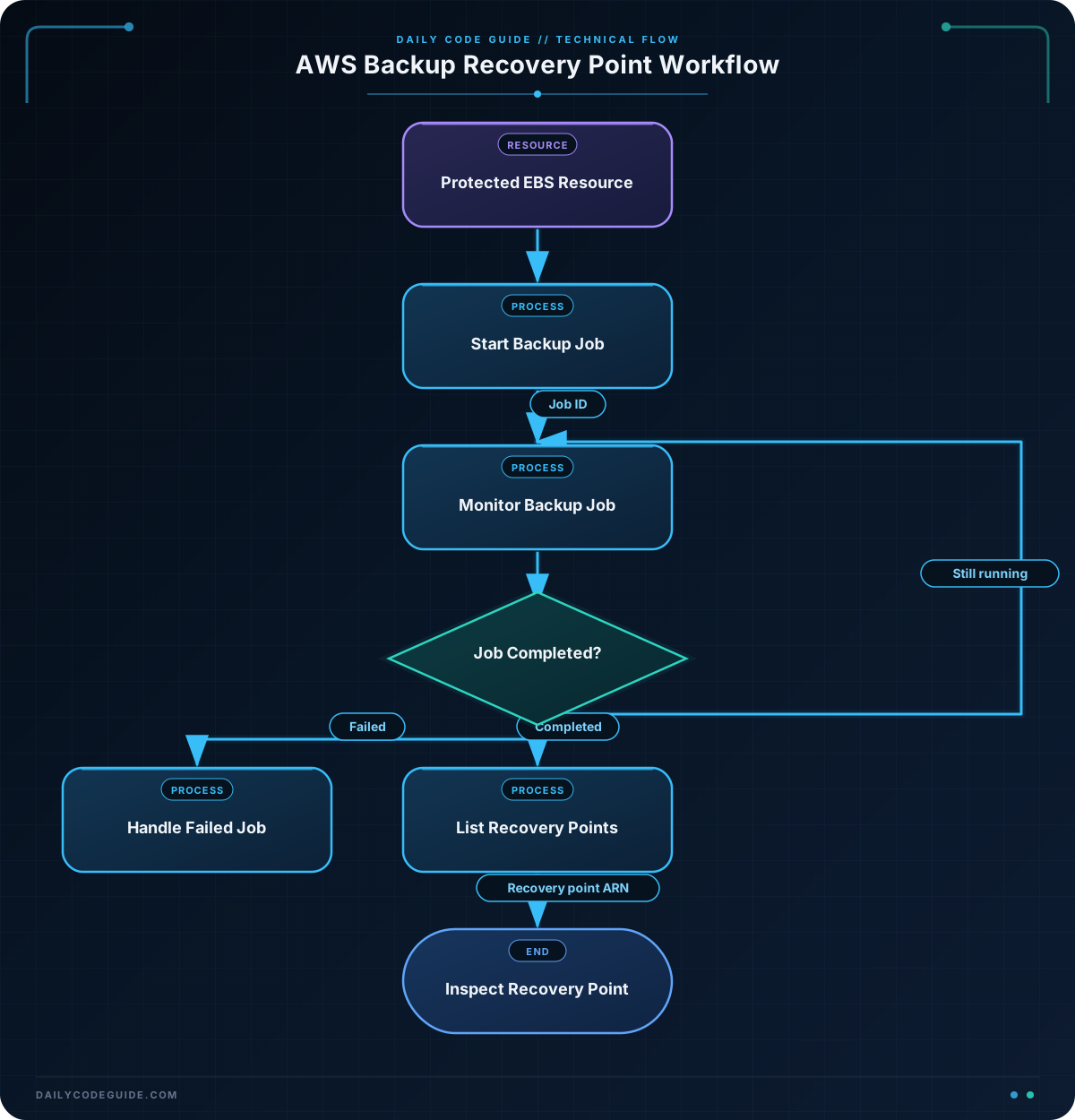
start-backup-job creates an on-demand backup operation. Its important arguments are:
--backup-vault-name: The destination vault.--resource-arn: The EBS volume or other supported resource to protect.--iam-role-arn: The IAM role that AWS Backup assumes to perform the backup.--region: The AWS Region containing the resource and vault.
The command returns a backup job ID. The example uses --query 'BackupJobId' and --output text so that only the ID is stored in BACKUP_JOB_ID.
describe-backup-job gives operational details about that job. The State field can indicate states such as CREATED, RUNNING, COMPLETED, or FAILED. A recovery point ARN may not be available while the job is still running.
list-recovery-points-by-backup-vault returns recovery points stored in the selected vault. The JMESPath expression filters the result to recovery points whose status is COMPLETED, then selects only the ARN, creation time, and resource type. AWS CLI queries are useful when scripts need a small, stable subset of a large JSON response.
For a real automation workflow, do not assume that the backup is complete immediately after start-backup-job returns. Poll describe-backup-job until the job reaches a terminal state, and handle FAILED separately.
Another Example
The next example audits a backup vault before a recovery or cleanup operation. It lists vault metadata, finds backup jobs for one resource, and describes the newest completed recovery point. It does not delete anything, which makes it suitable for an inspection step in an operational script.
#!/usr/bin/env bash
set -euo pipefail

AWS_REGION="us-east-1"
BACKUP_VAULT="critical-resources"
RESOURCE_ARN="arn:aws:ec2:us-east-1:123456789012:volume/vol-0123456789abcdef0"

printf '%s\n' 'Backup vault details:'
aws backup describe-backup-vault \
    --backup-vault-name "$BACKUP_VAULT" \
    --region "$AWS_REGION" \
    --query '{Name:BackupVaultName,Arn:BackupVaultArn,RecoveryPoints:NumberOfRecoveryPoints,Locked:LockDate}' \
    --output table

printf '\n%s\n' 'Backup jobs for the protected volume:'
aws backup list-backup-jobs \
    --by-resource-arn "$RESOURCE_ARN" \
    --region "$AWS_REGION" \
    --query 'BackupJobs[].[BackupJobId,State,CreationDate,CompletionDate]' \
    --output table

LATEST_RECOVERY_POINT="$(
    aws backup list-recovery-points-by-backup-vault \
        --backup-vault-name "$BACKUP_VAULT" \
        --by-resource-arn "$RESOURCE_ARN" \
        --region "$AWS_REGION" \
        --query 'sort_by(RecoveryPoints[?Status==`COMPLETED`], &CreationDate)[-1].RecoveryPointArn' \
        --output text
)"

if [[ "$LATEST_RECOVERY_POINT" == "None" || -z "$LATEST_RECOVERY_POINT" ]]; then
    printf '\nNo completed recovery point was found.\n'
    exit 0
fi

printf '\nLatest completed recovery point:\n'
aws backup describe-recovery-point \
    --backup-vault-name "$BACKUP_VAULT" \
    --recovery-point-arn "$LATEST_RECOVERY_POINT" \
    --region "$AWS_REGION" \
    --query '{Arn:RecoveryPointArn,Status:Status,Created:CreationDate,SizeBytes:BackupSizeInBytes,Encrypted:EncryptionKeyArn}' \
    --output table
Common Mistakes
- Using the wrong Region: Backup vaults and protected resources are regional. A vault in
us-east-1cannot be queried by accidentally using--region us-west-2. - Confusing a backup job with a recovery point: The job ID identifies the operation. The recovery point ARN identifies the completed backup created by that operation.
- Assuming an immediate completion: Starting a job is asynchronous. Always inspect the job state before treating the backup as usable.
- Using an incorrect IAM role: The role must exist in the same account and must have the permissions required by AWS Backup for the resource type. The default service role is commonly named
AWSBackupDefaultServiceRole, but account policies may require a different role. - Deleting the wrong recovery point: Recovery point deletion is operationally significant. Confirm the vault, resource, creation time, and status before issuing a delete command. Vault Lock and retention settings can also prevent deletion.
- Treating every recovery point as a directly managed snapshot: An EBS recovery point is associated with snapshot-backed backup data, but AWS Backup metadata, retention, encryption, and lifecycle settings should be managed through AWS Backup commands.
Try It Yourself
Choose an existing backup vault and a resource ARN that your AWS Backup role can access. Use the commands from the examples to:
- List the vaults available in your selected Region.
- Start an on-demand backup job.
- Describe the job until its state becomes
COMPLETEDorFAILED. - List completed recovery points for the resource.
- Describe one recovery point and record its encryption key ARN and creation time.
Do not delete a recovery point while practicing unless you have confirmed that it is disposable and is not required by a retention policy.
Challenge
Write a Bash script that audits the newest completed recovery point for a critical EBS volume.
Your script should:
- Store the Region, vault name, and resource ARN in variables.
- Find the newest completed recovery point in the vault for that resource.
- Exit successfully with a clear message if no completed recovery point exists.
- Describe the recovery point when one exists.
- List backup jobs for the resource so an operator can compare the recovery point with its originating job.
Use AWS CLI queries to avoid printing unnecessary fields, and make sure the script does not attempt to delete or modify any backup data.
Solution
#!/usr/bin/env bash
set -euo pipefail

AWS_REGION="us-east-1"
BACKUP_VAULT="critical-resources"
RESOURCE_ARN="arn:aws:ec2:us-east-1:123456789012:volume/vol-0123456789abcdef0"

LATEST_RECOVERY_POINT="$(
    aws backup list-recovery-points-by-backup-vault \
        --backup-vault-name "$BACKUP_VAULT" \
        --by-resource-arn "$RESOURCE_ARN" \
        --region "$AWS_REGION" \
        --query 'sort_by(RecoveryPoints[?Status==`COMPLETED`], &CreationDate)[-1].RecoveryPointArn' \
        --output text
)"

if [[ "$LATEST_RECOVERY_POINT" == "None" || -z "$LATEST_RECOVERY_POINT" ]]; then
    printf 'No completed recovery point was found for %s.\n' "$RESOURCE_ARN"
    exit 0
fi

printf 'Newest completed recovery point:\n'
aws backup describe-recovery-point \
    --backup-vault-name "$BACKUP_VAULT" \
    --recovery-point-arn "$LATEST_RECOVERY_POINT" \
    --region "$AWS_REGION" \
    --query '{Arn:RecoveryPointArn,Status:Status,Created:CreationDate,ResourceType:ResourceType,SizeBytes:BackupSizeInBytes}' \
    --output table

printf '\nBackup jobs for the resource:\n'
aws backup list-backup-jobs \
    --by-resource-arn "$RESOURCE_ARN" \
    --region "$AWS_REGION" \
    --query 'BackupJobs[].[BackupJobId,State,CreationDate,CompletionDate,RecoveryPointArn]' \
    --output table
The solution filters recovery points to completed items, sorts them by CreationDate, and selects the last item as the newest one. The None check prevents describe-recovery-point from being called with an empty result. The final command lists the resource’s backup jobs, giving the operator context for how the recovery point was created.
Key Takeaways
- A backup job creates a recovery point in a backup vault; these are different AWS Backup objects.
- Use
describe-backup-jobto monitor an asynchronous backup operation. - Use
list-recovery-points-by-backup-vaultanddescribe-recovery-pointto inspect completed backups. - JMESPath queries make AWS CLI output easier to use in scripts and operational reports.
- Always verify the Region, resource ARN, vault, status, and retention implications before managing recovery points.

