What You’ll Learn
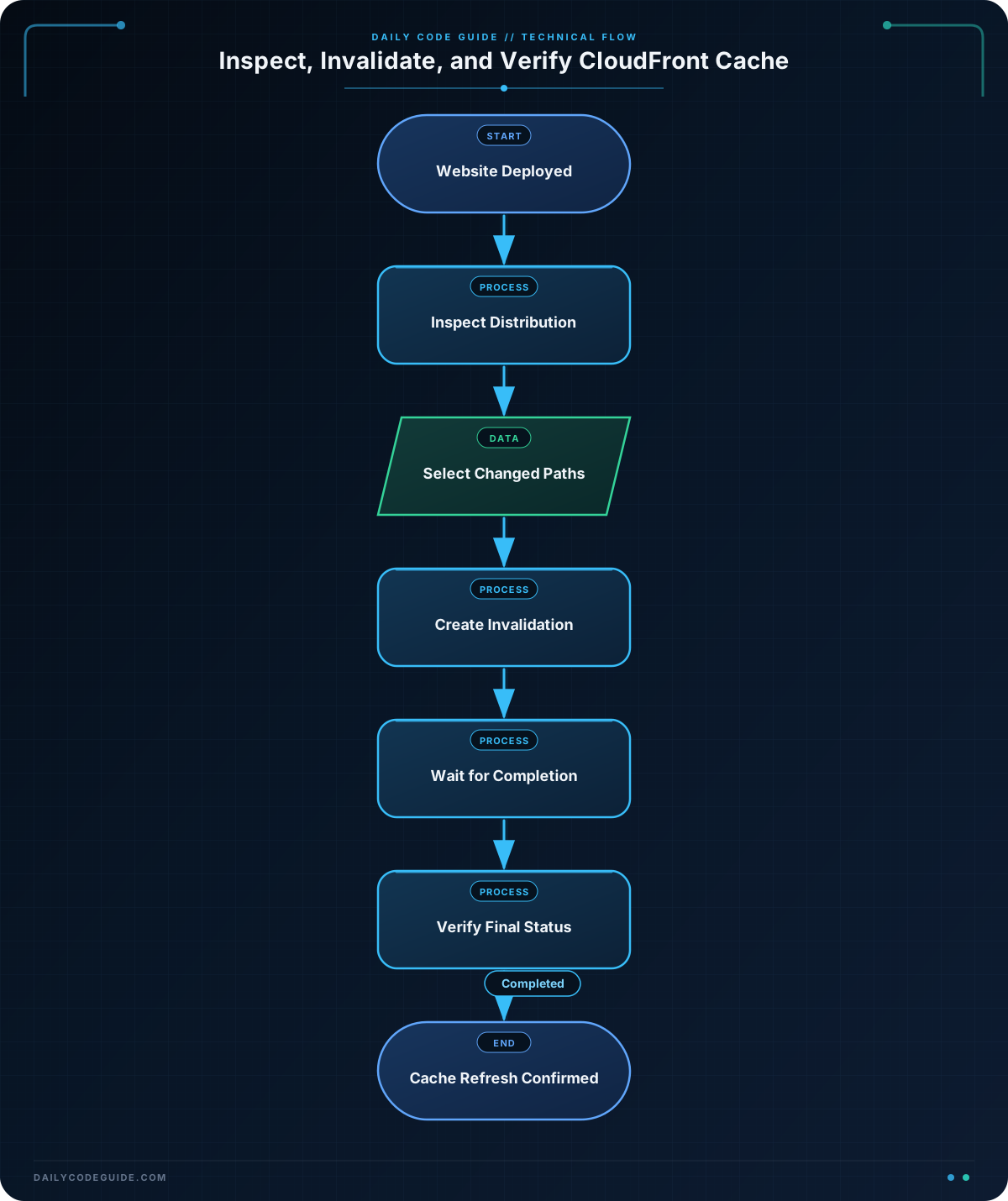
In this lesson, you will use the AWS CLI to inspect a CloudFront distribution and invalidate cached files after deploying website updates.
- Find a distribution and inspect its status and domain name.
- Create an invalidation for specific files and wildcard paths.
- Monitor an invalidation until CloudFront reports that it is complete.
- Troubleshoot common distribution and invalidation mistakes.
The Concept
CloudFront caches files at edge locations so visitors can receive website content quickly. After a deployment, however, an edge location might still serve an older cached version of a file.
A cache invalidation asks CloudFront to remove matching cached objects. The next request for an invalidated object retrieves the current version from the origin, such as an Amazon S3 bucket or an application load balancer.
The AWS CLI provides several useful CloudFront commands:
list-distributionsfinds distributions in the current AWS account and region context.get-distributionretrieves the configuration and deployment status of one distribution.create-invalidationrequests removal of cached objects.get-invalidationchecks the status of one invalidation.wait invalidation-completedpauses until an invalidation finishes.
CloudFront distributions are global resources. You do not normally need to specify a region for these commands, although your AWS CLI profile and credentials still need permission to access CloudFront.
Basic Example
Suppose a website deployment updated index.html, the main stylesheet, and JavaScript files. First, inspect the available distributions and then create an invalidation for those paths.
aws cloudfront list-distributions \
    --query 'DistributionList.Items[*].[Id,DomainName,Status,Comment]' \
    --output table

DISTRIBUTION_ID="E1EXAMPLE123456"

aws cloudfront get-distribution \
    --id "$DISTRIBUTION_ID" \
    --query 'Distribution.[Id,Status,DistributionConfig.Enabled,DistributionConfig.DefaultRootObject]' \
    --output table

aws cloudfront create-invalidation \
    --distribution-id "$DISTRIBUTION_ID" \
    --paths "/index.html" "/assets/styles.css" "/assets/app.js"
Expected Output
The distribution commands return information about your own account, so the IDs and domain names will differ. A table may look similar to this:
---------------------------------------------------------
|                   ListDistributions                   |
+------------------+----------------------+-------------+
|  E1EXAMPLE123456 | d111example.cloudfront.net | Deployed |
+------------------+----------------------+-------------+

---------------------------------------------------------
|                   GetDistribution                    |
+------------------+-------------+--------+------------+
|  E1EXAMPLE123456 | Deployed    | True   | index.html |
+------------------+-------------+--------+------------+
The invalidation command returns a response containing an invalidation ID and an initial status, commonly InProgress. The invalidation request is asynchronous, so submitting the request does not mean that every edge location has finished removing the cached files.
How the Code Works
The first command uses a JMESPath query to select useful fields from the distribution list. The expression selects each distribution’s ID, domain name, deployment status, and comment. Using --output table makes the result easier to scan during an operational check.
The DISTRIBUTION_ID variable stores the identifier used by later commands. A CloudFront distribution ID is not the same as its domain name, such as d111example.cloudfront.net; invalidation commands require the distribution ID.
The get-distribution command checks the selected distribution. The query displays:
- The distribution ID.
- The distribution status, such as
Deployed. - Whether the distribution is enabled.
- The configured default root object.
The final command invalidates only the changed files. This is usually preferable to invalidating every object with /*, because targeted invalidations reduce unnecessary cache misses and make the deployment intent clearer.
For deployment workflows that change many files, a wildcard can be useful. For example, /assets/* matches cached objects beneath the /assets/ path. CloudFront invalidation paths are case-sensitive, and a wildcard must be used in a supported path pattern rather than inserted arbitrarily in the middle of a filename.
If you are also automating the deployment itself, the same inspect-deploy-verify pattern appears in other AWS CLI workflows, such as these AWS CLI deployment and verification commands.
Another Example
This example captures the invalidation ID, waits for CloudFront to finish, and then retrieves the final status. This pattern is useful in a deployment script that should not report success until the cache refresh request has completed.
#!/usr/bin/env bash
set -euo pipefail

DISTRIBUTION_ID="E1EXAMPLE123456"

INVALIDATION_ID="$(
    aws cloudfront create-invalidation \
        --distribution-id "$DISTRIBUTION_ID" \
        --paths "/index.html" "/assets/*" \
        --query 'Invalidation.Id' \
        --output text
)"

printf 'Created invalidation: %s\n' "$INVALIDATION_ID"

aws cloudfront wait invalidation-completed \
    --distribution-id "$DISTRIBUTION_ID" \
    --id "$INVALIDATION_ID"

aws cloudfront get-invalidation \
    --distribution-id "$DISTRIBUTION_ID" \
    --id "$INVALIDATION_ID" \
    --query 'Invalidation.[Id,Status,CreateTime]' \
    --output table

printf 'CloudFront invalidation completed.\n'
The waiter polls CloudFront until the invalidation reaches a completed state. With set -e, the script stops if an AWS CLI command fails, which helps prevent a deployment pipeline from continuing after an unsuccessful invalidation request.
Common Mistakes
- Using the domain name instead of the distribution ID: Use a value such as
E1EXAMPLE123456with--distribution-id, not the distribution’scloudfront.nethostname. - Invalidating the wrong path: The path must match the URL path requested by visitors. An origin filesystem path or local build directory is not necessarily the same path.
- Assuming the request is immediately complete:
create-invalidationsubmits a request. Useget-invalidationor the waiter when a script must verify completion. - Invalidating everything for every deployment:
/*is convenient but can cause many objects to be fetched again. Prefer specific files or a targeted directory when possible. - Forgetting about browser caching: A CloudFront invalidation does not necessarily remove a file already stored in a visitor’s browser cache. Cache-Control headers and versioned asset filenames are still important.
- Checking an old distribution: If the AWS CLI profile points to a different account,
list-distributionsmay show a different website. Confirm the active credentials and account before invalidating files.
Try It Yourself
Choose a test distribution and create an invalidation for one HTML file and one asset directory. Capture the returned invalidation ID, retrieve its status, and confirm whether it is still in progress or has completed.
Then run the distribution inspection command again and verify that the distribution itself remains enabled and deployed. Do not use /* unless you intentionally want to invalidate every cached object.
Challenge
Write a Bash script for a website deployment workflow with these requirements:
- Store the distribution ID in a variable.
- Invalidate
/index.htmland all files under/assets/. - Extract the invalidation ID from the AWS CLI response.
- Wait for the invalidation to complete.
- Print the final invalidation ID and status.
- Stop if any AWS CLI command fails.
Use a query and text output to extract the ID rather than manually copying it from a full JSON response.
Solution
#!/usr/bin/env bash
set -euo pipefail

DISTRIBUTION_ID="E1EXAMPLE123456"

INVALIDATION_ID="$(
    aws cloudfront create-invalidation \
        --distribution-id "$DISTRIBUTION_ID" \
        --paths "/index.html" "/assets/*" \
        --query 'Invalidation.Id' \
        --output text
)"

aws cloudfront wait invalidation-completed \
    --distribution-id "$DISTRIBUTION_ID" \
    --id "$INVALIDATION_ID"

FINAL_STATUS="$(
    aws cloudfront get-invalidation \
        --distribution-id "$DISTRIBUTION_ID" \
        --id "$INVALIDATION_ID" \
        --query 'Invalidation.Status' \
        --output text
)"

printf 'Invalidation %s finished with status: %s\n' \
    "$INVALIDATION_ID" \
    "$FINAL_STATUS"
The script requests the two required path patterns, extracts the generated invalidation ID with a JMESPath query, and waits before checking the final status. The shell’s set -euo pipefail setting causes the script to fail instead of silently continuing when a command returns an error or a required value is unavailable.
Key Takeaways
- Use
list-distributionsandget-distributionto verify that you are working with the correct CloudFront distribution. - Use
create-invalidationto remove selected cached website files after a deployment. - CloudFront invalidations are asynchronous; monitor them with
get-invalidationorwait invalidation-completed. - Target specific paths when practical instead of invalidating every object with
/*. - Invalidation does not replace sensible browser cache headers or versioned asset filenames.