


What You’ll Learn
In this lesson, you will use AWS CLI SQS queue commands to create a queue, send asynchronous task messages, receive and delete messages, and inspect queue attributes.
- Create a standard SQS queue and retrieve its queue URL.
- Send messages for background processing.
- Receive messages using long polling and delete them after successful processing.
- Inspect queue configuration and approximate message counts.
The Concept
Amazon Simple Queue Service (SQS) is a managed message queue. An application can place a task in a queue without waiting for another application to process it immediately. A worker can later retrieve the task, perform the work, and delete the message when processing succeeds.
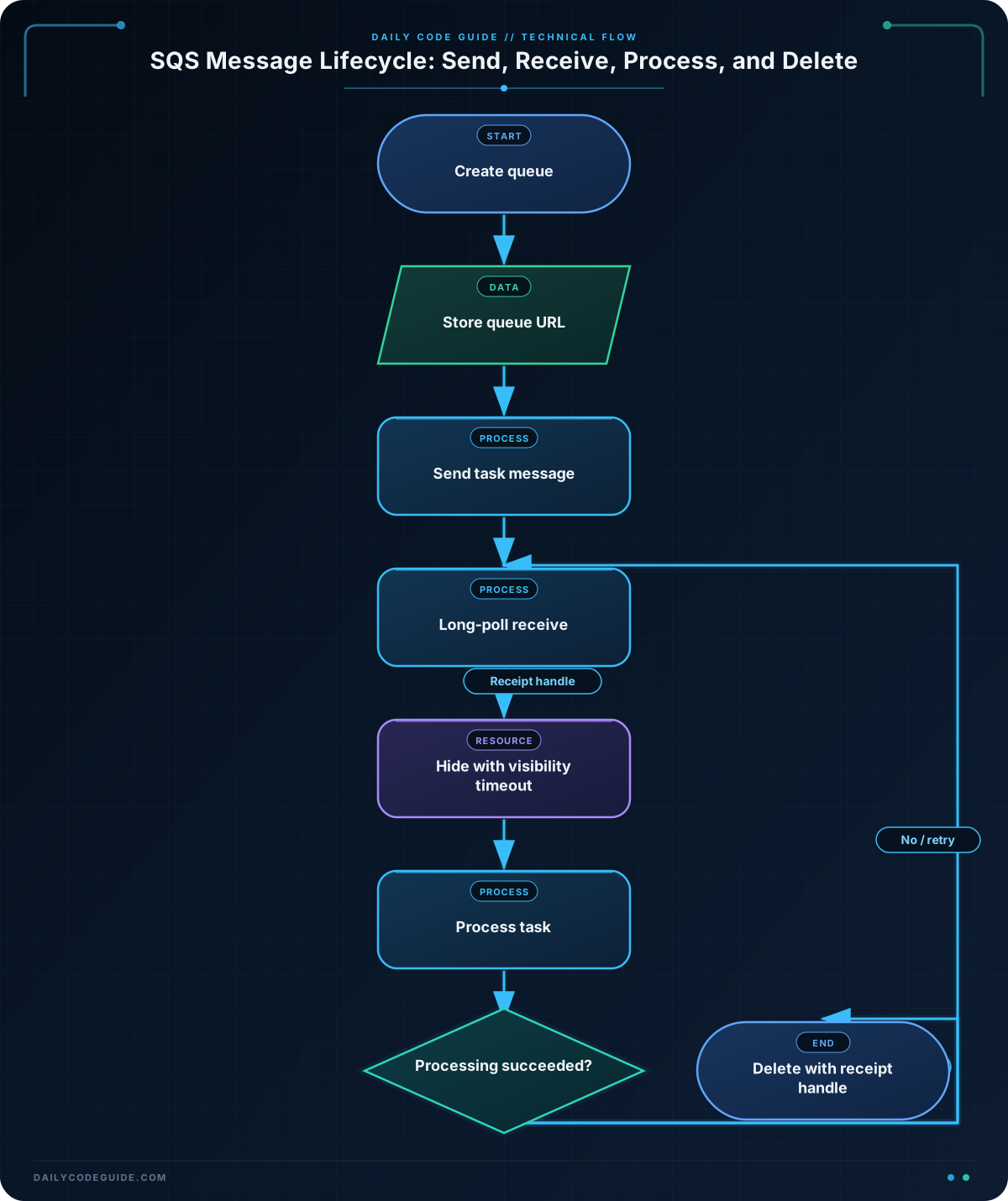
SQS commands generally require the queue URL rather than only the queue name. The typical workflow is:
- Create or locate a queue.
- Send one or more messages with
send-messageorsend-message-batch. - Receive messages with
receive-message. - Process each message.
- Delete the message with its receipt handle.
Receiving a message does not remove it immediately. SQS hides it for the visibility timeout. If the worker does not delete it before that timeout expires, the message can become visible again and another worker may receive it. This behavior supports retrying tasks that fail, but it also means task processing should be designed to tolerate duplicates.
Basic Example
The following Bash sequence creates a standard queue for image-processing tasks, sends a task message, receives it, deletes it after processing, and checks the queue attributes.
QUEUE_NAME="image-processing-demo-$RANDOM"

QUEUE_URL=$(aws sqs create-queue \
    --queue-name "$QUEUE_NAME" \
    --query 'QueueUrl' \
    --output text)

echo "Created queue: $QUEUE_URL"

MESSAGE_ID=$(aws sqs send-message \
    --queue-url "$QUEUE_URL" \
    --message-body '{"job_id":"job-1042","image_key":"uploads/photo-1042.jpg","operation":"thumbnail"}' \
    --query 'MessageId' \
    --output text)

echo "Sent message: $MESSAGE_ID"

RECEIPT_HANDLE=$(aws sqs receive-message \
    --queue-url "$QUEUE_URL" \
    --visibility-timeout 30 \
    --wait-time-seconds 10 \
    --query 'Messages[0].ReceiptHandle' \
    --output text)

if [[ "$RECEIPT_HANDLE" != "None" && -n "$RECEIPT_HANDLE" ]]; then
    echo "Worker received the image-processing task."

    aws sqs delete-message \
        --queue-url "$QUEUE_URL" \
        --receipt-handle "$RECEIPT_HANDLE"

    echo "Message deleted after successful processing."
else
    echo "No message was available during the receive request."
fi

aws sqs get-queue-attributes \
    --queue-url "$QUEUE_URL" \
    --attribute-names VisibilityTimeout ApproximateNumberOfMessages \
    --output table
Expected Output
The queue URL, message ID, and receipt handle are generated by AWS, so their exact values will differ. After the message is deleted, the approximate visible message count should normally be zero.
Created queue: https://sqs.us-east-1.amazonaws.com/123456789012/image-processing-demo-18452
Sent message: 8f7e0d4b-1d5a-4c2d-9e7a-123456789abc
Worker received the image-processing task.
Message deleted after successful processing.

------------------------------------------------
|               GetQueueAttributes             |
+-------------------------------+--------------+
|  ApproximateNumberOfMessages  |  0           |
|  VisibilityTimeout            |  30          |
+-------------------------------+--------------+
How the Code Works
create-queue creates a standard queue. The --query 'QueueUrl' option uses a JMESPath expression to select only the URL from AWS’s response, and --output text makes the result easy to store in a Bash variable.
The queue URL is reused for every later operation. Storing it in QUEUE_URL avoids repeatedly looking up the queue and prevents accidentally sending a message to a similarly named queue.
send-message accepts a string as its message body. In this example, the string contains JSON describing an image-processing task. SQS stores the message but does not interpret the JSON; the worker is responsible for understanding its fields.
The receive command uses two important options:
--wait-time-seconds 10enables short polling for up to ten seconds. Long polling can reduce empty responses compared with repeatedly polling immediately.--visibility-timeout 30hides the received message for 30 seconds while the worker processes it.
The receipt handle identifies this particular receive operation. It is not the same as the message ID. A worker must use the receipt handle returned by receive-message when calling delete-message.
After the queue is receiving messages, check its CloudWatch metrics and alarms. Command reference: AWS CLI SQS.
Another Example
A background worker commonly receives a message, processes it, and deletes it only after success. The following worker handles up to three messages. It requests both the receipt handle and body in one AWS CLI call, placing the receipt handle first so Bash can separate it from the remaining message body.
QUEUE_URL="https://sqs.us-east-1.amazonaws.com/123456789012/report-tasks"
MAX_MESSAGES=3

for ((attempt=1; attempt<=MAX_MESSAGES; attempt++)); do
    received=$(aws sqs receive-message \
        --queue-url "$QUEUE_URL" \
        --max-number-of-messages 1 \
        --wait-time-seconds 10 \
        --visibility-timeout 60 \
        --query 'Messages[0].[ReceiptHandle,Body]' \
        --output text)

    if [[ "$received" == "None" || -z "$received" ]]; then
        echo "No report task is available."
        break
    fi

    read -r receipt_handle message_body <<< "$received"

    echo "Processing report task: $message_body"

    # Replace this section with the actual report-generation command.
    processing_succeeded=true

    if [[ "$processing_succeeded" == true ]]; then
        aws sqs delete-message \
            --queue-url "$QUEUE_URL" \
            --receipt-handle "$receipt_handle"

        echo "Report task deleted."
    else
        echo "Processing failed; the message will become visible after the timeout."
    fi
done
This pattern is useful for asynchronous report generation, email delivery, video transcoding, or other work that should happen outside a web request. In production, the processing section should handle failures explicitly. If it fails, leaving the message undeleted allows SQS to make it available for retry.
Common Mistakes
- Deleting with the message ID:
delete-messagerequires the receipt handle from the receive operation, not the message ID returned bysend-message. - Deleting before processing finishes: Delete only after the task succeeds. Otherwise, a temporary processing failure can permanently lose the task.
- Assuming receive-message always returns a message: A queue can be empty, especially when short polling is used. Check for
Noneor an empty result before using the receipt handle. - Using the queue name where a URL is required: Most message operations require
--queue-url. Retrieve the URL withget-queue-urlwhen the queue already exists. - Setting a visibility timeout that is too short: If processing takes longer than the timeout, another worker may receive the same message. Set an appropriate timeout or extend visibility while a long task is running.
If a queue’s configuration changed unexpectedly, AWS CloudTrail can help identify who created, configured, or modified it. The AWS CLI CloudTrail event lookup workflow is useful for auditing those API calls.
Try It Yourself
Create a queue named email-delivery-demo and use the AWS CLI to:
- Retrieve its queue URL.
- Send a JSON message containing a recipient address and an email template name.
- Receive the message with a 45-second visibility timeout.
- Inspect the message body and receipt handle.
- Delete the message after simulating successful delivery.
- Display the queue’s approximate visible and in-flight message counts.
Use a temporary queue name or delete the queue afterward so repeated practice does not leave unused resources.
Challenge
Write a Bash script for a background task queue named billing-task-demo that does all of the following:
- Creates the queue with a 60-second visibility timeout.
- Sends two different JSON billing tasks.
- Receives and processes up to two messages using long polling.
- Deletes each message only after the simulated processing succeeds.
- Displays the approximate number of visible and in-flight messages at the end.
Use a condition to handle an empty queue safely. The script should store and reuse the queue URL rather than reconstructing it manually.
Solution
QUEUE_NAME="billing-task-demo-$RANDOM"

QUEUE_URL=$(aws sqs create-queue \
    --queue-name "$QUEUE_NAME" \
    --attributes VisibilityTimeout=60 \
    --query 'QueueUrl' \
    --output text)

echo "Created queue: $QUEUE_URL"

aws sqs send-message \
    --queue-url "$QUEUE_URL" \
    --message-body '{"task_id":"invoice-7001","customer_id":"customer-18","action":"charge"}' \
    --query 'MessageId' \
    --output text

aws sqs send-message \
    --queue-url "$QUEUE_URL" \
    --message-body '{"task_id":"invoice-7002","customer_id":"customer-27","action":"send-receipt"}' \
    --query 'MessageId' \
    --output text

for ((attempt=1; attempt<=2; attempt++)); do
    received=$(aws sqs receive-message \
        --queue-url "$QUEUE_URL" \
        --max-number-of-messages 1 \
        --wait-time-seconds 10 \
        --visibility-timeout 60 \
        --query 'Messages[0].[ReceiptHandle,Body]' \
        --output text)

    if [[ "$received" == "None" || -z "$received" ]]; then
        echo "No billing task is available."
        break
    fi

    read -r receipt_handle message_body <<< "$received"
    echo "Processing billing task: $message_body"

    processing_succeeded=true

    if [[ "$processing_succeeded" == true ]]; then
        aws sqs delete-message \
            --queue-url "$QUEUE_URL" \
            --receipt-handle "$receipt_handle"

        echo "Billing task deleted."
    fi
done

aws sqs get-queue-attributes \
    --queue-url "$QUEUE_URL" \
    --attribute-names ApproximateNumberOfMessages ApproximateNumberOfMessagesNotVisible \
    --output table
The solution configures the visibility timeout during queue creation, sends two independent tasks, and loops at most twice. Each receive operation returns the receipt handle and body together. The script deletes a message only when processing_succeeded is true, so a failed task remains eligible for retry after its visibility timeout expires.
Key Takeaways
- Use
create-queueto create a queue and save its returned URL for later commands. - Use
send-messageto place asynchronous work in a queue andreceive-messageto retrieve it. - Delete messages with the receipt handle only after successful processing.
- Visibility timeouts control how long a received message remains hidden from other workers.
- Use
get-queue-attributesfor operational inspection, while remembering that queue counts are approximate.

