


What You’ll Learn
After this lesson, you will understand how Bash arrays store multiple related values in one variable. You will create an array of deployment targets, read individual items, update an item, add a new target, and safely process every server.
- Create an indexed Bash array.
- Access an array item by its index.
- Modify and append array values.
- Safely iterate over every item with a
forloop.
The Concept
A Bash array is a variable that can hold multiple values. Instead of creating separate variables such as server_one, server_two, and server_three, you can store all deployment targets in one array.
Bash indexed arrays use numeric positions called indexes. The first item has index 0, the second has index 1, and so on.
To create an array, place values inside parentheses:
deployment_targets=("web-01" "web-02" "worker-01")Use ${array_name[index]} to access one item:
echo "${deployment_targets[0]}"When processing every item, use "${array_name[@]}" inside a quoted loop. The quotes are important because they keep each array item together, even when an item contains spaces.
Basic Example
This script manages a list of deployment targets. It shows the original list, updates one server name, adds a new target, and then processes each server safely.
#!/usr/bin/env bash

deployment_targets=("web-01" "web-02" "worker-01")

printf 'Original first target: %s\n' "${deployment_targets[0]}"

deployment_targets[1]="web-02-blue"
deployment_targets+=("worker-02")

printf 'Updated deployment targets:\n'
for target in "${deployment_targets[@]}"; do
    printf '%s\n' "Preparing deployment for $target"
done
Expected Output
Original first target: web-01
Updated deployment targets:
Preparing deployment for web-01
Preparing deployment for web-02-blue
Preparing deployment for worker-01
Preparing deployment for worker-02
How the Code Works
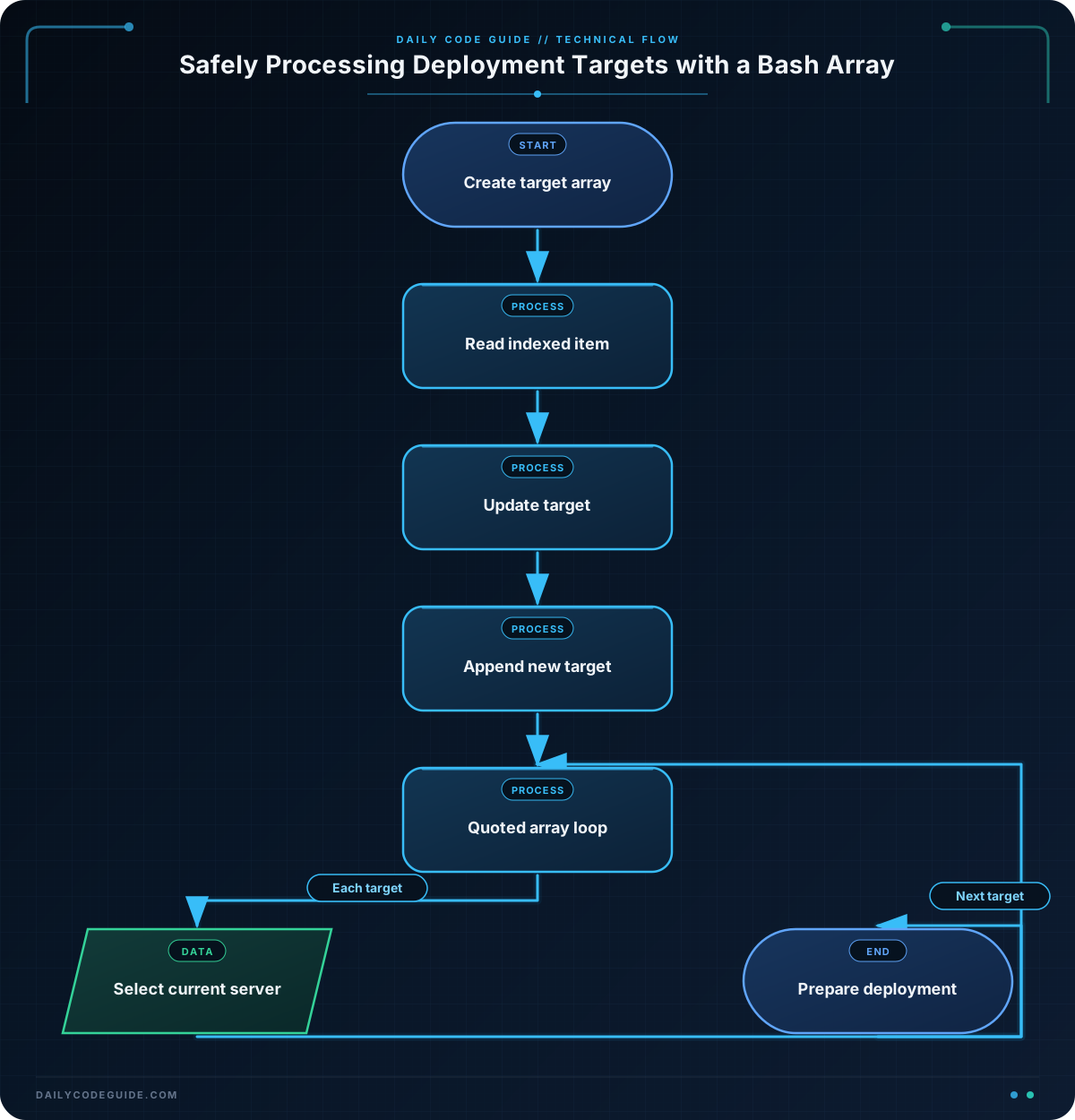
deployment_targets=("web-01" "web-02" "worker-01") creates an indexed array with three server names. Because the values are separate quoted strings, Bash stores them as three separate items.
"${deployment_targets[0]}" reads the first item. Remember that Bash starts counting at zero, so index 0 refers to web-01.
The assignment deployment_targets[1]="web-02-blue" replaces the item at index 1. It changes web-02 without changing the other array items.
The += operator appends a new item:
deployment_targets+=("worker-02")The loop uses "${deployment_targets[@]}" to expand the array into its individual items. The surrounding double quotes ensure that each item is treated as one value. This is the safe pattern to use when iterating over an array.
Inside the loop, target temporarily contains the current server name. The example prints a preparation message rather than performing a real deployment command, so you can test it safely on any Bash system.
Another Example
Arrays are also useful when a script needs to check several deployment-related files. This example stores configuration file paths and reports which files exist. The paths are quoted so that each path remains one array item.
#!/usr/bin/env bash

configuration_files=(
    "/etc/app/production.conf"
    "/etc/app/database.conf"
    "/etc/app/logging.conf"
)

configuration_files[2]="/etc/app/monitoring.conf"
configuration_files+=("/etc/app/security.conf")

for config_file in "${configuration_files[@]}"; do
    if [[ -f "$config_file" ]]; then
        printf 'Found configuration file: %s\n' "$config_file"
    else
        printf 'Missing configuration file: %s\n' "$config_file"
    fi
done
This example uses the same array operations in a different task: it replaces one path, appends another path, and then checks each item. The -f test checks whether the path refers to a regular file.
Common Mistakes
- Forgetting that indexes start at zero: The first item is
${deployment_targets[0]}, not${deployment_targets[1]}. - Leaving array expansion unquoted: Prefer
for target in "${deployment_targets[@]}". Without quotes, Bash can split an item containing spaces into multiple loop values. - Using parentheses for a single assignment: Create an array with parentheses, but update one item with an indexed assignment such as
deployment_targets[1]="new-name". - Using
$arraywhen you mean all items: An expression such as$deployment_targetsdoes not clearly request every array element. Use"${deployment_targets[@]}"for safe iteration.
Try It Yourself
Create an array named deployment_targets containing api-01, api-02, and jobs-01. Then:
- Print the second target.
- Change
jobs-01tojobs-02. - Append
cache-01. - Use a quoted
forloop to print every target.
Challenge
Write a Bash script that prepares a rolling deployment for these servers:
- Start with
app-01,app-02, andapp-03. - Replace the second server with
app-02-canary. - Append
app-04to the array. - Safely loop through the final list and print
Deploying to SERVERfor each server.
The final output should list four deployment messages in array order.
Solution
#!/usr/bin/env bash

deployment_targets=("app-01" "app-02" "app-03")

deployment_targets[1]="app-02-canary"
deployment_targets+=("app-04")

for target in "${deployment_targets[@]}"; do
    printf 'Deploying to %s\n' "$target"
done
The script creates the initial array, updates index 1, appends a fourth server, and safely processes each final value with "${deployment_targets[@]}".
Key Takeaways
- Bash arrays store multiple related values in one variable.
- Indexed arrays begin at position
0. - Use
array[index]="value"to modify an item. - Use
array+=("value")to append an item. - Use
for item in "${array[@]}"to safely iterate through all items.

