


What You’ll Learn
SQL window functions let you calculate values across related rows without reducing the result to one row per group. In this lesson, you will use them to analyze customer orders while keeping every order record visible.
- Understand how window functions differ from regular aggregate functions.
- Use ROW_NUMBER() to sequence orders for each customer.
- Use RANK() to rank orders by value, including ties.
- Use SUM() OVER to calculate a running sales total.
The Concept
A regular aggregate query with GROUP BY combines multiple rows into summary rows. For example, grouping orders by customer can return one total per customer, but it cannot show the original order details in the same result without additional work.
A window function performs a calculation across a set of related rows while retaining each individual row in the result. The general structure is:
function_name(...) OVER (
    PARTITION BY grouping_column
    ORDER BY ordering_column
)
PARTITION BY divides the result into independent groups. It is similar to grouping, but it does not collapse those groups into one row.
ORDER BY inside the window determines the order used for the calculation. This ordering can be different from the final ordering of the query.
For order analysis, window functions are useful when you need to answer questions such as:
- Which order was each customer’s first, second, or third order?
- How does each order rank against the customer’s other orders?
- How much has each customer sold up to the current order?
Basic Example
The following query numbers each customer’s orders chronologically, ranks those orders by value, and calculates a running sales total for each customer. Every order remains in the result.
WITH orders (order_id, customer_name, order_date, order_total) AS (
    VALUES
        (101, 'Alice', DATE '2025-01-03', 120.00),
        (102, 'Bob', DATE '2025-01-04', 75.00),
        (103, 'Alice', DATE '2025-01-06', 210.00),
        (104, 'Bob', DATE '2025-01-08', 125.00),
        (105, 'Alice', DATE '2025-01-10', 95.00),
        (106, 'Bob', DATE '2025-01-11', 125.00)
)
SELECT
    order_id,
    customer_name,
    order_date,
    order_total,
    ROW_NUMBER() OVER (
        PARTITION BY customer_name
        ORDER BY order_date, order_id
    ) AS customer_order_number,
    RANK() OVER (
        PARTITION BY customer_name
        ORDER BY order_total DESC
    ) AS customer_value_rank,
    SUM(order_total) OVER (
        PARTITION BY customer_name
        ORDER BY order_date, order_id
        ROWS BETWEEN UNBOUNDED PRECEDING AND CURRENT ROW
    ) AS running_customer_sales
FROM orders
ORDER BY customer_name, order_date, order_id;
Expected Output
 order_id | customer_name | order_date | order_total | customer_order_number | customer_value_rank | running_customer_sales
----------+---------------+------------+-------------+-----------------------+---------------------+------------------------
      101 | Alice         | 2025-01-03 |      120.00 |                     1 |                   2 |                 120.00
      103 | Alice         | 2025-01-06 |      210.00 |                     2 |                   1 |                 330.00
      105 | Alice         | 2025-01-10 |       95.00 |                     3 |                   3 |                 425.00
      102 | Bob           | 2025-01-04 |       75.00 |                     1 |                   3 |                  75.00
      104 | Bob           | 2025-01-08 |      125.00 |                     2 |                   1 |                 200.00
      106 | Bob           | 2025-01-11 |      125.00 |                     3 |                   1 |                 325.00
How the Code Works
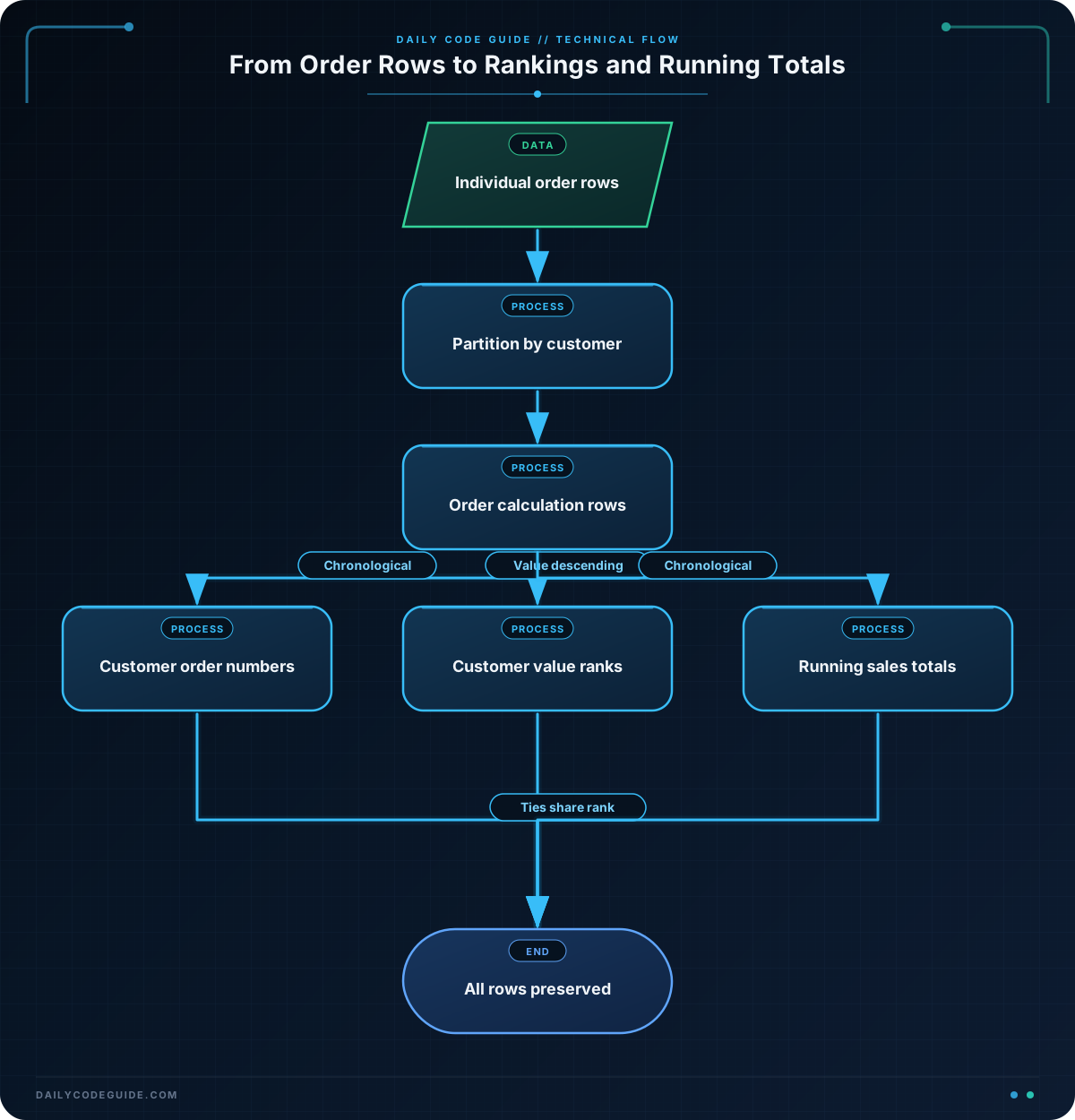
The common table expression creates a small orders dataset so the query can run without relying on an existing table. In a real application, the name in the FROM clause would usually be an orders table or a filtered query.
The first window expression uses ROW_NUMBER():
- PARTITION BY customer_name starts numbering again for each customer.
- ORDER BY order_date, order_id defines chronological order.
- The order ID is included as a tie-breaker in case two orders have the same date.
The second expression uses RANK() and orders by order_total DESC. Alice’s order for 210.00 receives rank 1. For Bob, both orders for 125.00 receive rank 1 because they tie. The next rank would be 3, not 2, because RANK() leaves a gap after a tie.
The running total uses SUM(order_total) OVER. Its window is ordered by date and order ID, so each row includes that customer’s sales from the beginning through the current order. The explicit ROWS BETWEEN UNBOUNDED PRECEDING AND CURRENT ROW frame makes the intended running-total behavior clear.
Notice that the query has no GROUP BY. That is why the six input orders produce six output rows. A window function adds calculated information beside rows instead of replacing them with grouped summaries.
Another Example
Window functions can use different partitions in the same query. This example keeps every order, ranks it against all orders in the company, and calculates a company-wide running sales total rather than a separate total for each customer.
WITH orders (order_id, customer_name, order_date, order_total) AS (
    VALUES
        (201, 'Mina', DATE '2025-02-01', 180.00),
        (202, 'Jon', DATE '2025-02-02', 240.00),
        (203, 'Mina', DATE '2025-02-04', 95.00),
        (204, 'Priya', DATE '2025-02-05', 240.00),
        (205, 'Jon', DATE '2025-02-07', 110.00),
        (206, 'Priya', DATE '2025-02-09', 160.00)
)
SELECT
    order_id,
    customer_name,
    order_date,
    order_total,
    RANK() OVER (
        ORDER BY order_total DESC
    ) AS company_value_rank,
    SUM(order_total) OVER (
        ORDER BY order_date, order_id
        ROWS BETWEEN UNBOUNDED PRECEDING AND CURRENT ROW
    ) AS running_company_sales
FROM orders
ORDER BY order_date, order_id;
Here, there is no PARTITION BY in either window. Therefore, every order participates in one company-wide ranking and one company-wide running total. The two 240.00 orders share rank 1, while the running total follows the chronological order.
Common Mistakes
- Using GROUP BY when individual rows are needed: GROUP BY collapses rows. Use a window aggregate when you need both detail columns and a total.
- Confusing the two ORDER BY clauses: The ORDER BY inside OVER controls the calculation. The final ORDER BY controls how rows are displayed.
- Forgetting a tie-breaker: If two orders can have the same date, add a stable column such as order_id to make sequencing and running totals deterministic.
- Expecting RANK() to produce consecutive numbers: Ties create gaps. Use DENSE_RANK() when tied values should not create gaps, or ROW_NUMBER() when every row must receive a unique position.
- Filtering too early: A WHERE clause is evaluated before the window calculation. If you filter out older orders first, a running total may begin with the filtered dataset rather than the full order history.
Try It Yourself
Modify the basic query so it also returns the largest order value seen so far for each customer. Use a windowed MAX() ordered by date and order ID. Keep all original order rows in the result.
For Alice, the running maximum should be 120.00 on the first row, then 210.00 on later rows.
Challenge
Write a query using the following order data that returns every order along with:
- The order’s sequence number for its customer, ordered chronologically.
- The order’s rank by value within that customer.
- A running sales total for the entire company, ordered chronologically.
Use order ID as a tie-breaker wherever dates are used for ordering. Sort the final result chronologically across all customers.
Solution
WITH orders (order_id, customer_name, order_date, order_total) AS (
    VALUES
        (301, 'Nora', DATE '2025-03-01', 140.00),
        (302, 'Omar', DATE '2025-03-01', 85.00),
        (303, 'Nora', DATE '2025-03-03', 220.00),
        (304, 'Omar', DATE '2025-03-04', 85.00),
        (305, 'Nora', DATE '2025-03-06', 60.00),
        (306, 'Omar', DATE '2025-03-07', 190.00)
)
SELECT
    order_id,
    customer_name,
    order_date,
    order_total,
    ROW_NUMBER() OVER (
        PARTITION BY customer_name
        ORDER BY order_date, order_id
    ) AS customer_order_number,
    RANK() OVER (
        PARTITION BY customer_name
        ORDER BY order_total DESC
    ) AS customer_value_rank,
    SUM(order_total) OVER (
        ORDER BY order_date, order_id
        ROWS BETWEEN UNBOUNDED PRECEDING AND CURRENT ROW
    ) AS running_company_sales
FROM orders
ORDER BY order_date, order_id;
The first window is partitioned by customer, so each customer receives an independent sequence and value ranking. The running total has no partition, so it includes every order in chronological company-wide order. Because the query uses window functions instead of GROUP BY, all six order records remain visible.
Key Takeaways
- Window functions calculate across related rows without collapsing the result.
- PARTITION BY creates independent calculation groups while preserving individual rows.
- ROW_NUMBER() gives each row a sequence, while RANK() gives tied rows the same rank.
- A running total requires an ordered window, and a stable tie-breaker makes the result predictable.
- The window’s ORDER BY controls calculation order; the query’s final ORDER BY controls display order.

