What You’ll Learn
Before a deployment script performs any work, it should confirm that the tools it needs are installed and available through the shell’s PATH. In this lesson, you will learn how to use Bash command -v to perform that check.
- Understand what
command -vchecks. - Use its exit status in an
ifstatement. - Stop a deployment when a required tool is missing.
- Adapt a script when an optional tool is unavailable.
The Concept
command -v asks Bash whether a command is available. If Bash can find the command, it returns a successful exit status. It usually also prints the command’s path.
command -v curlOn a system where curl is installed, the command might print:
/usr/bin/curlIf Bash cannot find the command, command -v returns a nonzero exit status. An exit status is a number that a command gives back to the shell. A status of 0 means success; a nonzero status means failure or that the requested condition was not met.
When checking availability, redirect the command’s output because you usually only need its exit status:
if command -v curl >/dev/null 2>&1; then
    echo "curl is available."
else
    echo "curl is missing."
fi
The >/dev/null part discards normal output, and 2>&1 discards error output as well. The if statement then uses the command’s exit status to choose a branch.
This check is useful for deployment scripts, build scripts, backup scripts, and other automation that depends on programs such as git, curl, tar, or a cloud provider’s command-line tool.
Basic Example
This script checks for three required deployment tools before the deployment can begin.
#!/usr/bin/env bash

required_tools=("git" "curl" "tar")
missing_tool=0

for tool in "${required_tools[@]}"; do
    if command -v "$tool" >/dev/null 2>&1; then
        printf 'Found required tool: %s\n' "$tool"
    else
        printf 'Missing required tool: %s\n' "$tool"
        missing_tool=1
    fi
done

if [[ "$missing_tool" -ne 0 ]]; then
    printf '\nDeployment stopped because a required tool is missing.\n'
    exit 1
fi

printf '\nAll required tools are available. Deployment can start.\n'
Expected Output
The exact paths are not printed because the script suppresses command -v‘s output. If all three tools are installed, the output is:
Found required tool: git
Found required tool: curl
Found required tool: tar

All required tools are available. Deployment can start.
If tar is unavailable, the script reports it and exits before the deployment work starts:
Found required tool: git
Found required tool: curl
Missing required tool: tar

Deployment stopped because a required tool is missing.
How the Code Works
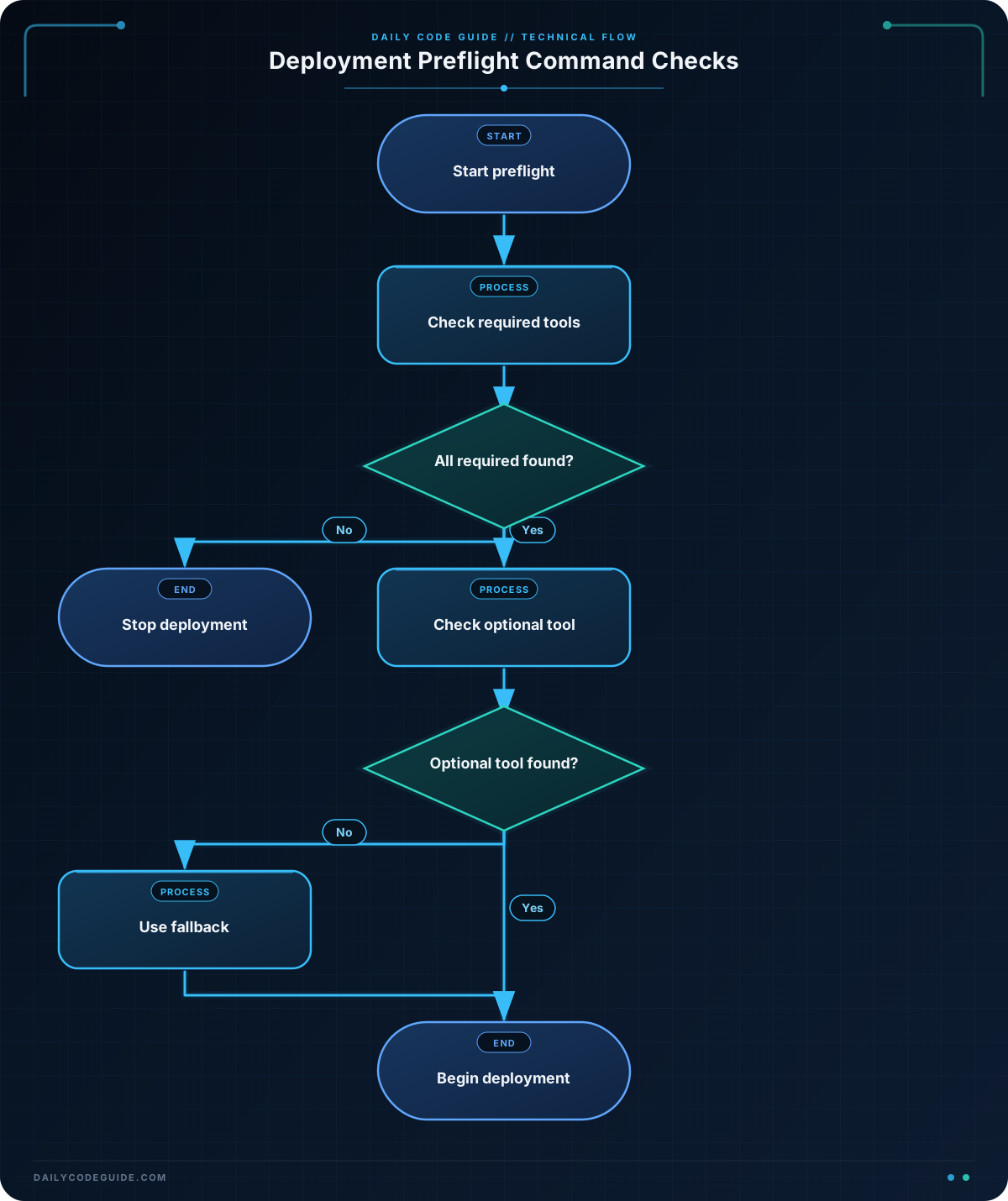
The array stores the names of the tools that the deployment needs:
required_tools=("git" "curl" "tar")The for loop checks each name. Quoting "$tool" keeps the command name as one value when it is passed to command -v.
The important condition is:
if command -v "$tool" >/dev/null 2>&1; thenIf the command exists somewhere on PATH, the condition succeeds and the script prints a success message. If it does not, the else branch runs.
missing_tool starts at 0. When a tool is missing, the script changes it to 1. This allows the loop to check every required tool and report all missing tools instead of stopping at the first one.
After the loop, this condition checks whether any tool was missing:
if [[ "$missing_tool" -ne 0 ]]; then
    exit 1
fi
exit 1 stops the script with a failure status. A deployment system can use that status to recognize that the preflight check failed. The script reaches the final message only when every required command was found.
For additional deployment safety, you can combine command checks with input checks. For example, you can validate deployment input in Bash before starting the deployment itself.
Another Example
Not every tool must be required in every situation. This example always requires curl for a health check, but only uses the AWS CLI when the script is configured to retrieve secrets from AWS.
#!/usr/bin/env bash

use_aws_secrets=true

if ! command -v curl >/dev/null 2>&1; then
    echo "curl is required for the deployment health check."
    exit 1
fi

if [[ "$use_aws_secrets" == true ]]; then
    if command -v aws >/dev/null 2>&1; then
        echo "AWS CLI is available. Secret retrieval can be enabled."
    else
        echo "AWS CLI is missing. Continuing without AWS secrets."
        use_aws_secrets=false
    fi
fi

if [[ "$use_aws_secrets" == true ]]; then
    echo "The deployment will use AWS-backed configuration."
else
    echo "The deployment will use local configuration."
fi

echo "Required checks finished."
The script stops if curl is missing because the health check cannot work without it. If the AWS CLI is missing, the script changes its behavior instead of stopping. A real script could then use a local configuration file rather than retrieving secrets from AWS.
When your deployment needs cloud tooling, you can also review examples of AWS CLI commands in deployment workflows. If your deployment performs an HTTP health check, use curl in a Bash deployment script after confirming that it is available.
Common Mistakes
- Checking the command’s printed path instead of its status:
command -vis most useful in anifstatement. You usually do not need to compare its output to a hard-coded path such as/usr/bin/curl. - Forgetting that availability depends on
PATH: A program may be installed but unavailable to a script if its directory is not included inPATH. - Continuing after a required check fails: If a missing tool makes deployment unsafe, use
exit 1after reporting the problem. - Using a required check for an optional feature: Decide whether the script should stop or choose a fallback. Optional tools can be checked and handled with a different branch.
- Leaving unwanted path output in logs: Redirect the output to
/dev/nullwhen you only need the success or failure status.
Try It Yourself
Write a Bash script that checks whether git and curl are available.
- Print
git is ready.orgit is missing.. - Print
curl is ready.orcurl is missing.. - Exit with status
1if either tool is missing. - Print
Preflight checks passed.only when both tools are available.
Challenge
Create a preflight script for a deployment that has these requirements:
gitandcurlare required.- The script must check both required tools.
- If either required tool is missing, print a clear message and exit with status
1. awsis optional. If it is missing, print a warning but do not stop the script.- If all required tools are available, print that deployment can begin.
Solution
#!/usr/bin/env bash

required_tools=("git" "curl")
required_tool_missing=0

for tool in "${required_tools[@]}"; do
    if command -v "$tool" >/dev/null 2>&1; then
        printf '%s is available.\n' "$tool"
    else
        printf '%s is missing.\n' "$tool"
        required_tool_missing=1
    fi
done

if [[ "$required_tool_missing" -ne 0 ]]; then
    printf '\nDeployment cannot begin. Install the missing required tools.\n'
    exit 1
fi

if command -v aws >/dev/null 2>&1; then
    echo "AWS CLI is available."
else
    echo "Warning: AWS CLI is unavailable; AWS-specific steps will be skipped."
fi

printf '\nAll required checks passed. Deployment can begin.\n'
The loop checks both required commands and records whether any are missing. The script exits before deployment when that flag is nonzero. The separate AWS check treats aws as optional, so its absence produces a warning rather than a failure.
Key Takeaways
command -v namechecks whether Bash can find a command throughPATH.- Use the command in an
ifstatement when you only need to test availability. - Redirect its output to
/dev/nullwhen the command path is not needed. - Use
exit 1to stop a deployment when a required tool is missing. - Optional tools can be checked separately so the script can choose a fallback.