


What You’ll Learn
In this lesson, you will learn how to use Bash’s mktemp command to create temporary files and directories safely. You will use these resources for intermediate backup and deployment data, then remove them automatically when the script finishes.
- Create a unique temporary file with
mktemp. - Create a temporary directory with
mktemp -d. - Understand why predictable temporary filenames can be unsafe.
- Clean up temporary resources with an exit trap.
The Concept
A temporary file is a file that a script uses for a short time. For example, a backup script might create a manifest listing files before packaging them. A deployment script might prepare configuration files in a staging directory before copying them into place.
A tempting approach is to choose a fixed filename such as /tmp/backup-list.txt. This is unsafe because another process may create or replace that file before your script uses it. This problem is called a race condition: the result depends on the timing of multiple processes.
The mktemp command creates a new temporary file with a unique, unpredictable name. It also creates the file before returning its path, which helps prevent another process from claiming the same name first. Use mktemp -d when you need a temporary directory instead.
Always save the path returned by mktemp. Then arrange for the temporary resource to be removed when the script exits, including when the script stops because of an error.
Basic Example
This backup preparation script creates a temporary manifest, writes a list of files into it, and displays the manifest as a stand-in for a later backup step.
#!/usr/bin/env bash
set -e

manifest_file=$(mktemp "${TMPDIR:-/tmp}/backup-manifest.XXXXXX")

cleanup() {
    rm -f "$manifest_file"
}
trap cleanup EXIT

printf 'Creating backup manifest at: %s\n' "$manifest_file"

printf '%s\n' \
    "/srv/website/index.html" \
    "/srv/website/assets/app.css" \
    "/srv/website/assets/app.js" \
    > "$manifest_file"

printf '\nFiles selected for backup:\n'
cat "$manifest_file"

printf '\nThe manifest will be removed when the script exits.\n'
Expected Output
The random part of the filename will be different each time. The temporary file is removed after the script exits, so it will not remain at the displayed path.
Creating backup manifest at: /tmp/backup-manifest.K8v2Qx

Files selected for backup:
/srv/website/index.html
/srv/website/assets/app.css
/srv/website/assets/app.js

The manifest will be removed when the script exits.
How the Code Works
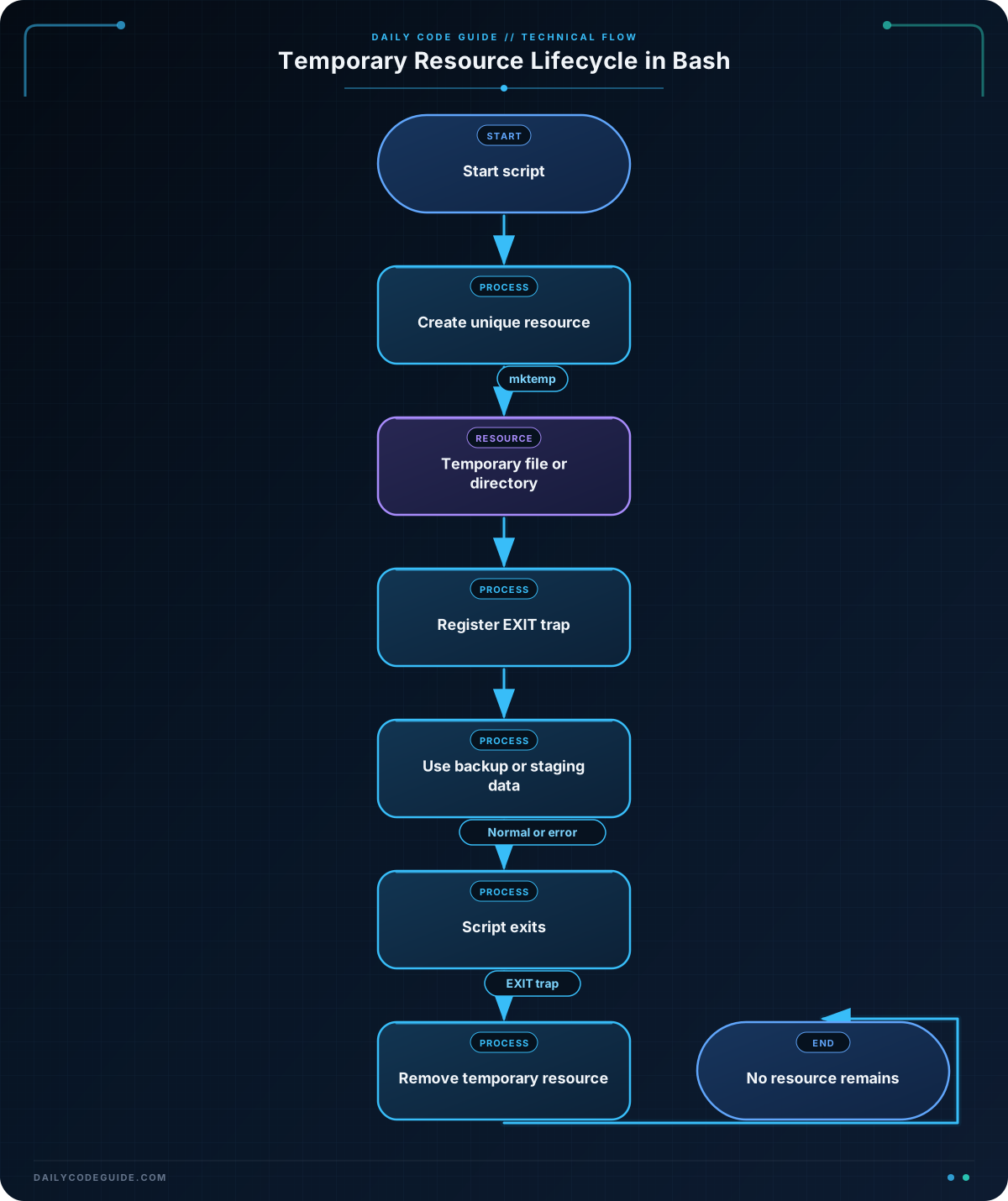
set -emakes the script stop when a command fails. This helps prevent later commands from using incomplete backup data.manifest_file=$(mktemp "${TMPDIR:-/tmp}/backup-manifest.XXXXXX")runsmktempand stores its returned path in themanifest_filevariable.XXXXXXis a template suffix thatmktempreplaces with random characters. The resulting filename is unique for this creation attempt.${TMPDIR:-/tmp}uses the directory in theTMPDIRvariable when it is set. Otherwise, it uses/tmp.- The redirection operator writes the selected paths into the temporary file. The file already exists because
mktempcreated it. - The cleanup function removes the file with
rm -f. The-foption avoids an error if the file is already gone. trap cleanup EXITtells Bash to run the cleanup function whenever the script exits normally or because of an error.
Notice that every use of the temporary path is quoted. Quoting variables protects paths that may contain spaces or other special characters.
Another Example
Deployment scripts often need a temporary staging directory instead of one temporary file. This example creates a private staging directory, prepares a configuration file inside it, and checks that the staged file exists.
#!/usr/bin/env bash
set -e

staging_dir=$(mktemp -d "${TMPDIR:-/tmp}/release-staging.XXXXXX")

cleanup() {
    rm -rf -- "$staging_dir"
}
trap cleanup EXIT

mkdir "$staging_dir/config"

cat > "$staging_dir/config/app.conf" <<'EOF'
APP_ENV=production
LOG_LEVEL=info
EOF

printf 'Prepared deployment files in: %s\n' "$staging_dir"

if [[ -f "$staging_dir/config/app.conf" ]]; then
    echo "Configuration is ready for deployment."
fi

printf 'Staging directory will be removed when the script exits.\n'
The -d option makes mktemp create a directory. The directory name is still unique, and the directory is created before the script uses it. The cleanup command uses rm -rf -- because the temporary directory contains files and subdirectories.
Common Mistakes
- Using a predictable filename: Avoid building a temporary path from a fixed name and assuming it is available. Let
mktempcreate the resource. - Forgetting cleanup: Temporary files can accumulate and may contain sensitive backup or deployment information. Install an exit trap soon after creating the resource.
- Using the wrong option: Use
mktempfor a file andmktemp -dfor a directory. A directory is needed before placing several temporary files inside it. - Failing to quote the variable: Use quoted paths such as
"$manifest_file"and"$staging_dir"when passing them to commands. - Deleting the wrong path: Only remove the path returned by
mktemp. Do not replace it with a broad path such as/tmp/*.
Try It Yourself
Write a Bash script that creates a temporary file for a backup status report. The script should:
- Create the file with a name beginning with
backup-status.. - Register cleanup before writing the report.
- Write two status lines into the file.
- Display the report with
cat. - Remove the file automatically when the script exits.
Use the examples above as a guide, but choose your own status messages.
Challenge
Create a small backup preparation script that safely creates a temporary directory and uses it to hold two intermediate files:
- A manifest containing two backup paths.
- A status file containing the message
Backup preparation complete..
The script must use mktemp -d, register an exit cleanup trap, display both files, and leave no staging directory behind after it exits.
Solution
#!/usr/bin/env bash
set -e

backup_dir=$(mktemp -d "${TMPDIR:-/tmp}/backup-work.XXXXXX")

cleanup() {
    rm -rf -- "$backup_dir"
}
trap cleanup EXIT

printf '%s\n' \
    "/srv/website/index.html" \
    "/srv/website/assets/app.js" \
    > "$backup_dir/manifest.txt"

printf '%s\n' \
    "Backup preparation complete." \
    > "$backup_dir/status.txt"

printf 'Manifest:\n'
cat "$backup_dir/manifest.txt"

printf '\nStatus:\n'
cat "$backup_dir/status.txt"

printf '\nTemporary backup directory will be removed on exit.\n'
The directory is created safely with a unique name, and both intermediate files are placed inside it. The exit trap removes the directory and everything inside it after the final message is printed, including if a command fails after the trap is installed.
Key Takeaways
- Use
mktempto create a unique temporary file instead of choosing a predictable filename. - Use
mktemp -dwhen a script needs a temporary directory. - Save the generated path in a variable and quote that variable whenever you use it.
- Register an
EXITtrap to remove temporary resources automatically. - Temporary backup manifests and deployment staging files should not be left behind after a script finishes.

