


What You’ll Learn
In this lesson, you’ll learn how to use grep in Bash to search application logs for lines containing specific text. You will practice finding error messages, reading line numbers, and locating request identifiers.
- Understand what
grepdoes. - Search a log file for matching text.
- Use
-nto display matching line numbers. - Use
-ifor case-insensitive searches. - Use
-Fwhen searching for an exact text string such as a request ID.
The Concept
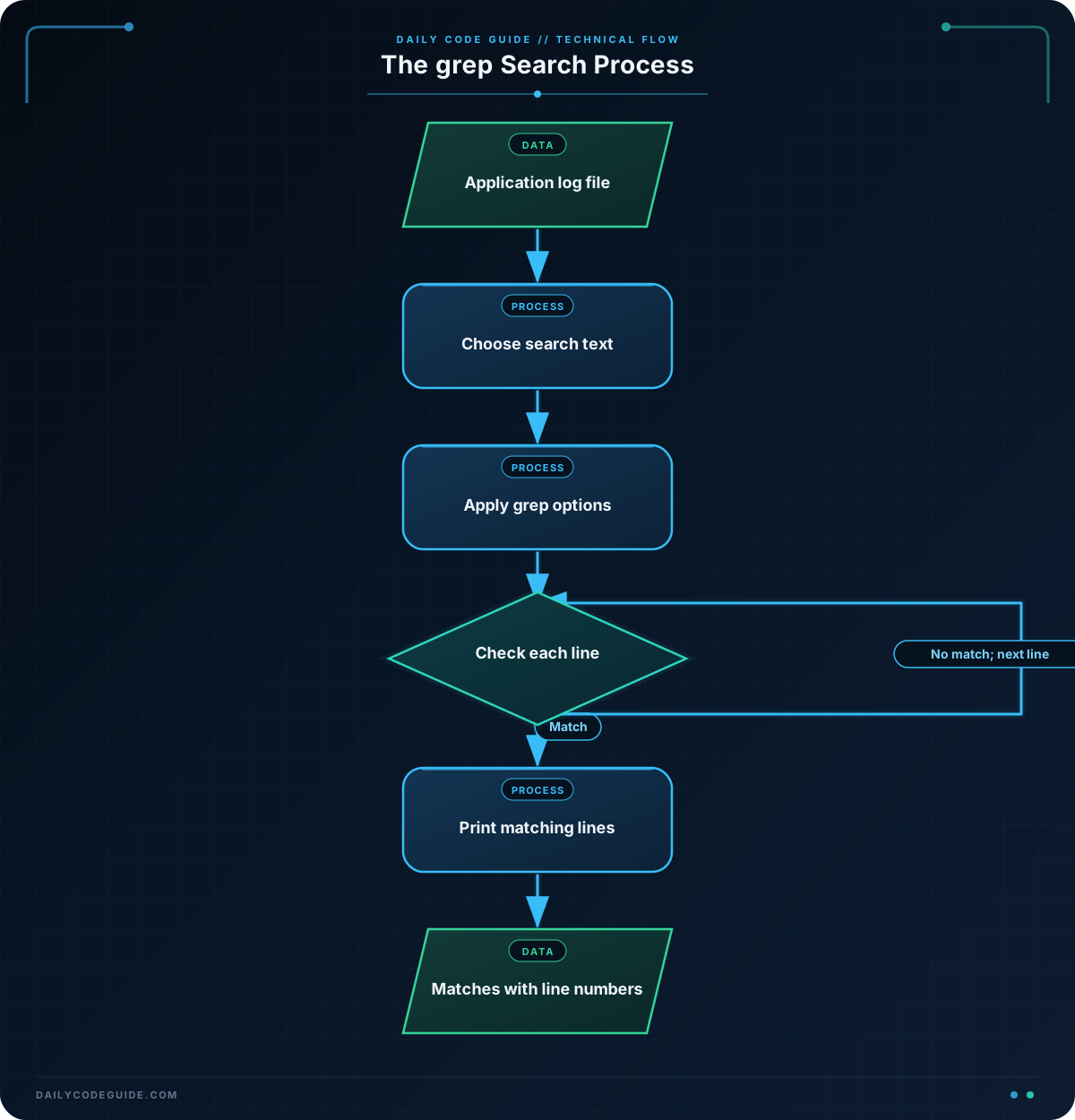
The Bash grep command searches text and prints the lines that match a pattern. A pattern is the text you want to find, such as ERROR, timeout, or a request identifier.
This is especially useful when application logs contain hundreds or thousands of lines. Instead of reading the entire file, you can search for the lines that need attention.
The basic form is:
grep "pattern" filenameFor example, grep "ERROR" app.log searches app.log and prints every line containing the text ERROR.
Useful beginner options include:
-nadds the matching line number.-iignores uppercase and lowercase differences.-Fsearches for a fixed text string instead of treating special characters as a pattern.
Basic Example
The following example creates a small application log and searches it for error messages. The cat command writes the sample log to app.log. The final command searches the file.
cat > app.log <<'EOF'
2026-08-18 10:14:20 INFO  Request received: GET /dashboard
2026-08-18 10:14:21 ERROR Database connection failed
2026-08-18 10:14:22 WARN  Retrying database connection
2026-08-18 10:14:23 ERROR Request returned status 500
EOF

grep -n "ERROR" app.log
Expected Output
2:2026-08-18 10:14:21 ERROR Database connection failed
4:2026-08-18 10:14:23 ERROR Request returned status 500
How the Code Works
The first part creates a sample file:
cat > app.logredirects text into a file namedapp.log.<<'EOF'starts a here-document, allowing several lines to be entered as file content.- The closing
EOFmarks the end of the content.
The search command is:
grep -n "ERROR" app.logHere is what each part means:
grepruns the text-search command.-ntells Bash to show the line number before each match."ERROR"is the text to search for.app.logis the file to search.
The command prints lines 2 and 4 because those are the only lines containing ERROR. The number before each line is its position in the file.
Searches are case-sensitive by default. For example, grep "error" app.log would not match ERROR. Add -i when the capitalization may vary:
grep -ni "error" app.logAnother Example
Request identifiers are useful when tracing one request through an application. This example searches an access log for the exact identifier req-7f3a.
cat > access.log <<'EOF'
2026-08-18 10:20:01 INFO request_id=req-91ab method=GET path=/health status=200
2026-08-18 10:20:02 INFO request_id=req-7f3a method=POST path=/orders status=201
2026-08-18 10:20:03 INFO request_id=req-44c2 method=GET path=/orders status=200
2026-08-18 10:20:04 ERROR request_id=req-7f3a method=POST path=/orders status=500
EOF

grep -nF "request_id=req-7f3a" access.log
The -F option tells grep to treat the search text as a fixed string. This is helpful for identifiers because you want to find that exact text rather than use pattern-matching behavior.
Common Mistakes
- Searching the wrong file: Check the filename carefully. A command such as
grep "ERROR" app.logcannot find matches in a different file. - Forgetting case sensitivity: Use
-iwhen logs might containError,ERROR, orerror. - Leaving out quotation marks: Quotation marks keep the search text together, especially when it contains spaces.
- Expecting context lines:
grepprints matching lines, not automatically the lines before and after them. Begin with matching lines only while learning the command. - Confusing line numbers with log timestamps: With
-n, the number at the beginning is the file line number, not the time of the event.
Try It Yourself
Using access.log from the previous example, search for all lines containing the word ERROR. Make the search case-insensitive and include line numbers.
Then search for the exact request identifier req-7f3a and include line numbers. Compare the results: the first search finds one type of event, while the second follows one request across multiple events.
Challenge
Assume that app.log contains application messages. Write a Bash command that:
- Searches for the word
timeout. - Matches any capitalization, such as
TimeoutorTIMEOUT. - Displays the line number for every matching line.
Solution
grep -ni "timeout" app.logThe -n option displays line numbers, and -i makes the search case-insensitive. The command searches app.log for any line containing timeout in any capitalization.
Key Takeaways
grepsearches a file and prints lines that match text.- Use
grep -nto include line numbers with matching lines. - Use
grep -iwhen capitalization should not matter. - Use
grep -Ffor an exact fixed-text search, such as a request ID. - Searching logs with
grephelps you quickly find errors and trace application requests.

