What You’ll Learn
In this lesson, you will learn how to use Python’s built-in configparser module to work with INI configuration files. You will load different application settings for different environments, such as development and production.
- Understand the structure of an INI file.
- Read sections and settings with
configparser. - Convert configuration values to types such as integers and booleans.
- Create an INI file from Python code.
The Concept
A configuration file stores settings separately from your program’s source code. For example, an application might use one database during development and another database in production.
INI files organize settings into named sections. Each section contains key-value pairs:
[database]
host = localhost
port = 5432
Python’s configparser module is part of the standard library, so you do not need to install anything. It reads INI files and provides dictionary-like access to their sections and settings. If you are new to dictionary-style data, reviewing Python dictionaries can help you understand this access pattern.
Configuration files are useful when settings may change between environments. Instead of editing Python code, you can select a different INI file.
Basic Example
Imagine an application that can run in either development or production. First, create a file named settings_development.ini:
[app]
name = Daily Code Guide
debug = true

[database]
host = localhost
port = 5432

[logging]
level = DEBUG
Now create app.py in the same folder:
import configparser

environment = "development"
config_file = f"settings_{environment}.ini"

config = configparser.ConfigParser()
loaded_files = config.read(config_file)

if not loaded_files:
    print(f"Could not find {config_file}")
else:
    app_name = config["app"]["name"]
    debug_enabled = config.getboolean("app", "debug")
    database_host = config["database"]["host"]
    database_port = config.getint("database", "port")
    log_level = config["logging"]["level"]

    print(f"Application: {app_name}")
    print(f"Environment: {environment}")
    print(f"Debug mode: {debug_enabled}")
    print(f"Database: {database_host}:{database_port}")
    print(f"Log level: {log_level}")
Expected Output
When both files are in the same folder, running the program produces:
Application: Daily Code Guide
Environment: development
Debug mode: True
Database: localhost:5432
Log level: DEBUG
How the Code Works
import configparser imports the standard-library module. Because it is built into Python, no package installation is required.
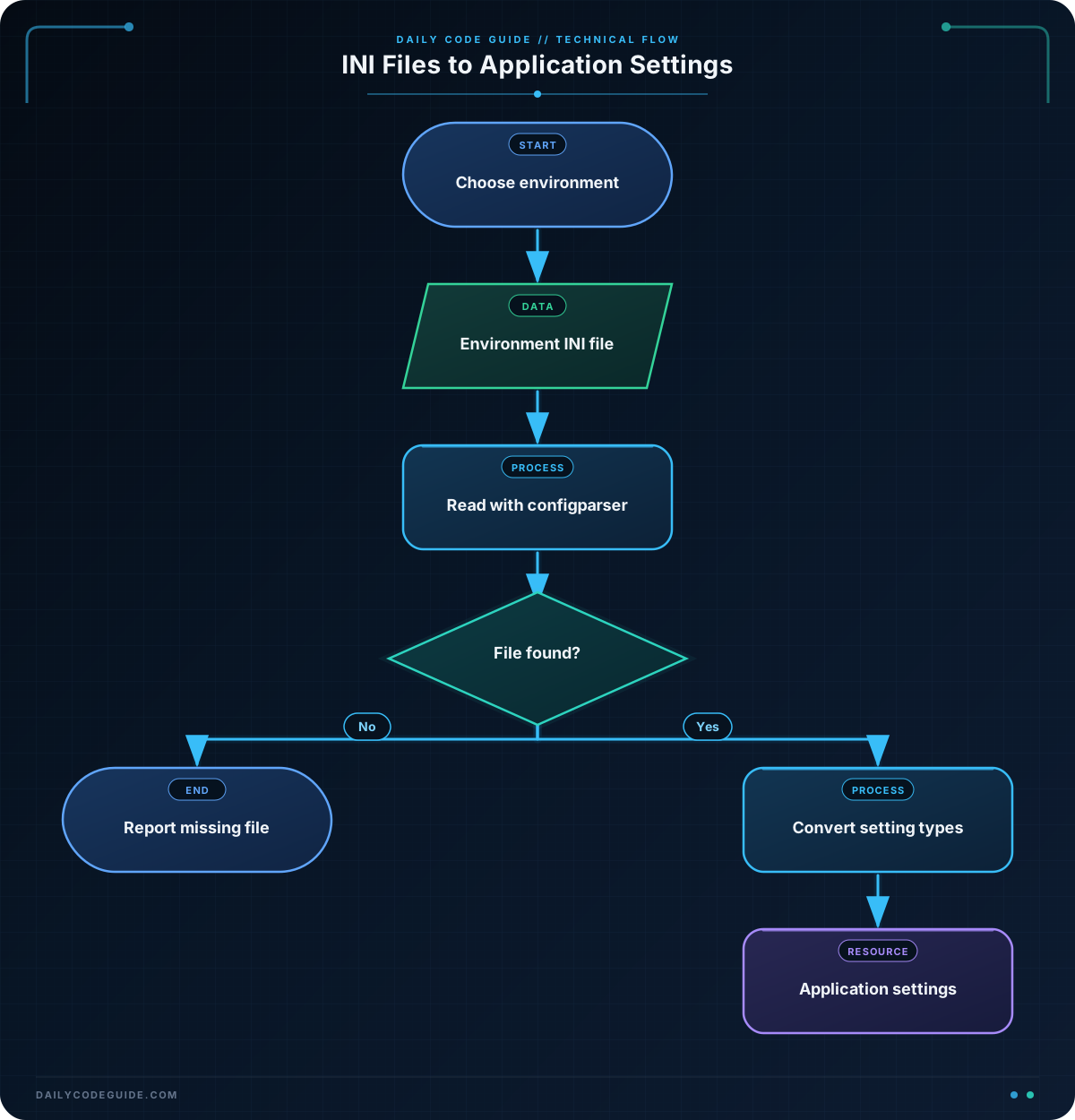
The environment variable identifies which environment the program should use. The f-string builds the filename settings_development.ini from that value. A production version could use settings_production.ini instead.
configparser.ConfigParser() creates an object that will hold the settings read from the INI file.
The read() method loads the file. It returns a list of files that were successfully read. The if not loaded_files check displays a helpful message if the file does not exist.
Sections can be accessed like dictionary keys. For example, config["app"]["name"] gets the name setting from the app section.
Values read from INI files are strings by default. That is why the example uses:
getboolean()to turn"true"intoTrue.getint()to turn"5432"into the integer5432.
You can also use config.get("section", "setting") when you want to read a value as a string.
Another Example
You can also create an INI file from Python. This can be useful when a setup script prepares environment-specific settings for another program.
The following script creates a staging configuration file and then reads one of its settings:
import configparser

staging_config = configparser.ConfigParser()

staging_config["application"] = {
    "name": "Daily Code Guide",
    "debug": "true"
}

staging_config["database"] = {
    "host": "staging-db.example.com",
    "port": "5432"
}

with open("settings_staging.ini", "w") as config_file:
    staging_config.write(config_file)

saved_config = configparser.ConfigParser()
saved_config.read("settings_staging.ini")

database_host = saved_config["database"]["host"]
debug_enabled = saved_config.getboolean("application", "debug")

print(f"Staging database: {database_host}")
print(f"Debug mode: {debug_enabled}")
Assigning a dictionary to staging_config["application"] creates a section and its settings. The write() method saves all sections to the open file.
The second ConfigParser object reads the file back, demonstrating that the generated file can be used by a separate part of an application.
Common Mistakes
- Using the wrong filename:
config.read()does not raise an error when a file is missing. Check its returned list if the file must exist. - Forgetting that values are strings: Use
getint()orgetboolean()when your program needs a number or boolean value. - Using the wrong section name:
config["database"]only works when the INI file contains a section named[database]. - Adding spaces to section brackets: Write
[database], not[ database ], to keep the section name clear and consistent. - Storing secrets carelessly: INI files can contain passwords or tokens. Limit access to sensitive files using appropriate file permissions, and avoid committing secrets to a shared source-code repository.
Try It Yourself
Create a file named settings_production.ini with these sections:
[app]with anamesetting anddebug = false.[database]with a production host and port.[logging]withlevel = WARNING.
Then change the basic example’s environment variable to "production". Run the program and verify that it reads the production values instead of the development values.
Challenge
Create a Python program that prepares a test environment configuration.
Your program should:
- Create a file named
settings_test.ini. - Add an
[application]section withname = Checkout Serviceanddebug = true. - Add a
[server]section withhost = 127.0.0.1andport = 8080. - Read the file after creating it.
- Print the application name, server address, and debug status.
Solution
This solution creates the sections with dictionaries, writes the INI file, reads it again, and converts the port and debug values to the appropriate types.
import configparser

config = configparser.ConfigParser()

config["application"] = {
    "name": "Checkout Service",
    "debug": "true"
}

config["server"] = {
    "host": "127.0.0.1",
    "port": "8080"
}

with open("settings_test.ini", "w") as config_file:
    config.write(config_file)

loaded_config = configparser.ConfigParser()
loaded_config.read("settings_test.ini")

application_name = loaded_config["application"]["name"]
debug_enabled = loaded_config.getboolean("application", "debug")
server_host = loaded_config["server"]["host"]
server_port = loaded_config.getint("server", "port")

print(f"Application: {application_name}")
print(f"Server: {server_host}:{server_port}")
print(f"Debug mode: {debug_enabled}")
The first configuration object creates and saves the file. The second object loads the saved file, just as an application would load an existing environment-specific configuration.
Key Takeaways
configparserreads and writes INI configuration files using sections and key-value pairs.- Configuration files let you change environment settings without editing application logic.
- INI values are strings unless you use conversion methods such as
getint()andgetboolean(). ConfigParsercan create sections from dictionaries and save them withwrite().- Protect configuration files when they contain passwords, tokens, or other sensitive settings.