


What You’ll Learn
Python’s datetime module gives you tools for working with calendar dates, clock times, and time differences. In this lesson, you will learn how to:
- Create dates and date-time values.
- Calculate a due date with
timedelta. - Format dates and times so they are easy to read.
- Build a simple appointment schedule.
The Concept
Dates and times are more than ordinary strings. For example, "March 10" is text, but a Python date can be compared with another date or used in a calculation.
Python’s standard library includes the datetime module for this purpose. You can import the classes you need from it:
daterepresents a calendar date.datetimerepresents a date and a time.timedeltarepresents a duration, such as 14 days or 2 hours.
For example, adding a timedelta of 14 days to an appointment date gives you a due date. The strftime() method then turns a date or time into readable text.
A format code beginning with % tells Python what to display. For example, %A means the full weekday name, %B means the full month name, and %I:%M %p displays a 12-hour time such as 09:30 AM.
Basic Example
This example creates an appointment date, calculates a due date 14 days later, and formats both values for display.
from datetime import date, datetime, timedelta

appointment_date = date(2025, 3, 10)
due_date = appointment_date + timedelta(days=14)

appointment_time = datetime(2025, 3, 10, 9, 30)

formatted_appointment = appointment_time.strftime("%A, %B %d at %I:%M %p")
formatted_due_date = due_date.strftime("%A, %B %d, %Y")

print("Appointment:", formatted_appointment)
print("Due date:", formatted_due_date)
Expected Output
Appointment: Monday, March 10 at 09:30 AM
Due date: Monday, March 24, 2025
How the Code Works
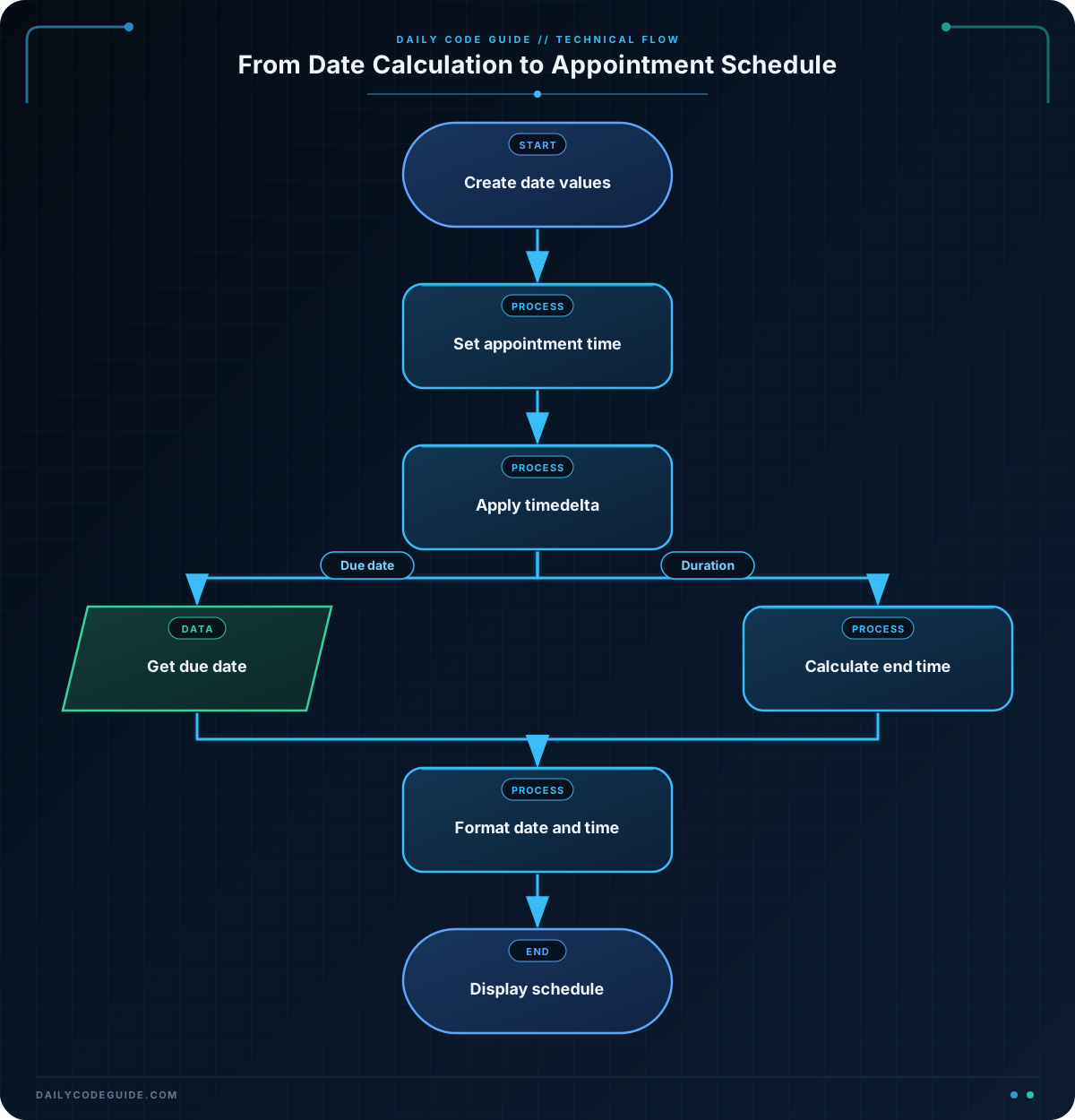
The first line imports three useful classes from the datetime module:
from datetime import date, datetime, timedeltadatecreates a value containing a year, month, and day.datetimecreates a value containing a date and a time.timedeltalets you represent an amount of time to add or subtract.
This line creates the appointment date. The arguments are provided in the order year, month, and day:
appointment_date = date(2025, 3, 10)Next, the code adds 14 days. Python handles crossing into a new month or year automatically:
due_date = appointment_date + timedelta(days=14)The appointment needs a time as well as a date, so the example uses datetime. Its arguments are year, month, day, hour, and minute. The hour 9 means 9:30 in the morning.
appointment_time = datetime(2025, 3, 10, 9, 30)Finally, strftime() formats the values as strings. The original date remains a date; only the displayed version is converted to text.
%A: full weekday name, such asMonday%B: full month name, such asMarch%d: two-digit day%Y: four-digit year%I:%M %p: 12-hour time with minutes and AM or PM
Another Example
An appointment schedule often needs both a starting time and an ending time. This example reads appointment times from strings, converts them into datetime values with strptime(), and calculates each ending time from its duration.
from datetime import datetime, timedelta

appointments = [
    ("Patient intake", "2025-03-12 09:00", 30),
    ("Follow-up visit", "2025-03-12 11:15", 45),
    ("Planning meeting", "2025-03-12 14:00", 60),
]

for title, start_text, duration_minutes in appointments:
    start_time = datetime.strptime(start_text, "%Y-%m-%d %H:%M")
    end_time = start_time + timedelta(minutes=duration_minutes)

    start_display = start_time.strftime("%I:%M %p")
    end_display = end_time.strftime("%I:%M %p")

    print(f"{start_display} - {end_display}: {title}")
strptime() does the opposite of strftime(): it converts text into a date or time value. The format string must match the input text. Here, %H:%M matches a 24-hour hour and minute such as 14:00.
Common Mistakes
- Using the wrong argument order:
date(2025, 3, 10)means year, month, day. It does not mean day, month, year. - Adding numbers directly to dates: Use
timedelta(days=7)instead of trying to add the number7to a date. - Using the wrong formatting code:
%mmeans a numeric month, while%Mmeans minutes. They are different. - Giving
strptime()a mismatched format: If the text uses2025-03-12, the format needs%Y-%m-%d. - Confusing a
datewith adatetime: Adatehas no clock time. Usedatetimewhen the hour and minute matter.
The examples use simple date-times without time zones. That is suitable for a basic local schedule. Applications serving people in different regions need additional time-zone handling.
Try It Yourself
Create a Python program for a consultation appointment. Set the appointment to April 7, 2025, at 2:00 PM. Then calculate a follow-up date seven days later and print both values in a readable format.
Try to produce output similar to:
Consultation: Monday, April 07 at 02:00 PM
Follow-up date: Monday, April 14, 2025
Challenge
Create a program for a project consultation that:
- Stores the consultation as a
datetimefor April 7, 2025, at 2:00 PM. - Calculates a project due date 10 days after the consultation.
- Prints the consultation in the format
Monday, April 07 at 02:00 PM. - Prints the due date in the format
Thursday, April 17, 2025.
Use timedelta for the calculation rather than manually changing the day number.
Solution
from datetime import datetime, timedelta

consultation = datetime(2025, 4, 7, 14, 0)
due_date = consultation.date() + timedelta(days=10)

consultation_text = consultation.strftime("%A, %B %d at %I:%M %p")
due_date_text = due_date.strftime("%A, %B %d, %Y")

print("Consultation:", consultation_text)
print("Due date:", due_date_text)
The consultation uses a 24-hour value of 14, which represents 2:00 PM. Calling consultation.date() keeps only its calendar date before the program adds 10 days. The two strftime() calls use different formats because the consultation includes a time while the due date only needs a calendar date.
Key Takeaways
- Use Python’s
datetimemodule to work with dates and times. - Use
datefor a calendar date anddatetimewhen a clock time is needed. - Use
timedeltato add or subtract days, minutes, or other durations. - Use
strftime()to format date-time values for display. - Use
strptime()to convert correctly formatted text into a date-time value.

