


What You’ll Learn
In this lesson, you’ll learn how indexes help a database find matching rows in a growing customer orders table without scanning every order.
- Choose columns that are useful to index.
- Create an index for a frequently used
WHEREcondition. - Use
EXPLAINandEXPLAIN ANALYZEto inspect a query plan. - Understand the tradeoff between faster reads and additional write and storage costs.
The examples use PostgreSQL syntax. Other database systems provide similar features, but their index and query-plan commands may differ.
The Concept
Suppose an orders table starts with a few hundred rows. A query such as WHERE customer_id = 2048 may finish quickly even if the database checks every row.
As the table grows to millions of orders, checking every row becomes expensive. This operation is commonly called a sequential scan or table scan. An index gives the database an additional data structure that helps it locate rows matching a column value more directly.
An index is similar to an index in a book: instead of reading every page to find a topic, you use the index to jump closer to the relevant pages. The database still has to fetch the matching rows, but it can often avoid examining unrelated rows.
A basic index on the customer_id column looks like this:
CREATE INDEX idx_orders_customer_id
ON orders (customer_id);
This can improve queries that frequently filter or join on customer_id. However, indexes are not automatically beneficial for every query. If a query returns a large portion of the table, a sequential scan may still be faster than using an index and then fetching many rows.
Indexes also require storage and must be updated when rows are inserted, updated, or deleted. For that reason, index columns based on real query patterns rather than indexing every column.
Basic Example
This PostgreSQL example creates a small orders table, adds sample data, queries orders for one customer, creates an index, and asks PostgreSQL to show the query plan.
DROP TABLE IF EXISTS orders;

CREATE TABLE orders (
    order_id INTEGER PRIMARY KEY,
    customer_id INTEGER NOT NULL,
    order_status VARCHAR(20) NOT NULL,
    total_amount NUMERIC(10, 2) NOT NULL,
    ordered_at TIMESTAMP NOT NULL
);

INSERT INTO orders (
    order_id,
    customer_id,
    order_status,
    total_amount,
    ordered_at
) VALUES
    (1001, 2048, 'shipped', 89.99, '2025-02-01 09:15:00'),
    (1002, 3051, 'processing', 42.50, '2025-02-01 10:30:00'),
    (1003, 2048, 'cancelled', 15.00, '2025-02-02 14:05:00'),
    (1004, 2048, 'shipped', 120.75, '2025-02-03 16:45:00'),
    (1005, 4110, 'processing', 64.25, '2025-02-04 08:20:00');

SELECT order_id, total_amount, ordered_at
FROM orders
WHERE customer_id = 2048
  AND order_status = 'shipped'
ORDER BY ordered_at DESC;

CREATE INDEX idx_orders_customer_id
ON orders (customer_id);

EXPLAIN (ANALYZE, BUFFERS)
SELECT order_id, total_amount, ordered_at
FROM orders
WHERE customer_id = 2048
  AND order_status = 'shipped'
ORDER BY ordered_at DESC;
Expected Output
The first query returns the two shipped orders for customer 2048, newest first:
order_id | total_amount | ordered_at
---------+--------------+---------------------
1004     | 120.75       | 2025-02-03 16:45:00
1001     | 89.99        | 2025-02-01 09:15:00
The EXPLAIN (ANALYZE, BUFFERS) command displays a plan chosen by PostgreSQL, along with actual timing and buffer information. Because this table is very small, PostgreSQL may still choose a sequential scan. That is normal: an index has overhead, and scanning five rows can be cheaper. On a much larger table, the same index is more likely to produce an index-based plan.
How the Code Works
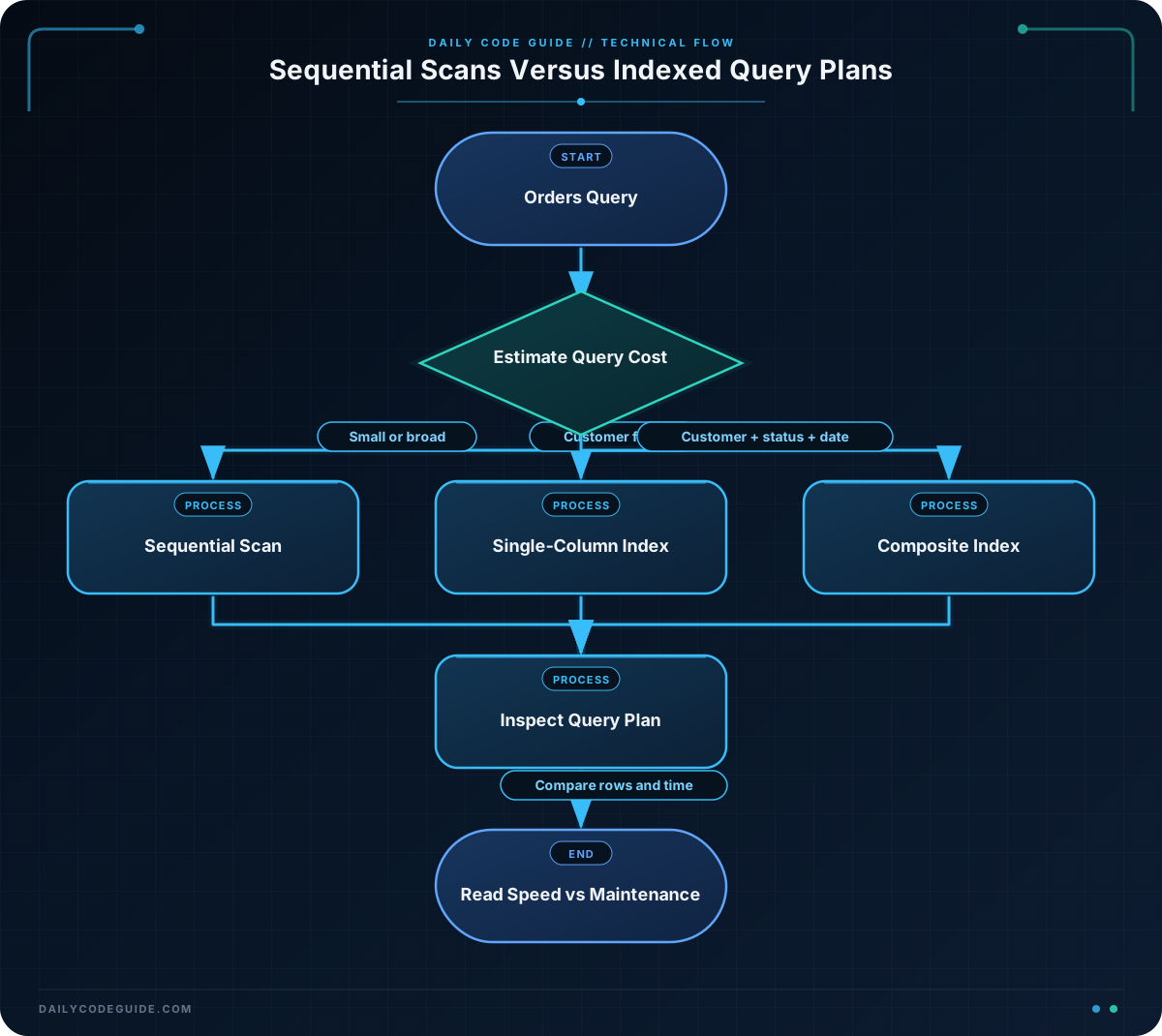
The customer_id column is a reasonable index candidate because customer-facing applications often retrieve order history for one customer. The query also filters by order_status, but the first index only helps PostgreSQL locate rows for the customer. It may still check the status of those matching rows afterward.
EXPLAIN shows the plan PostgreSQL intends to use without running the query. EXPLAIN ANALYZE actually runs the query and adds measurements such as actual row counts and execution time. Use EXPLAIN ANALYZE carefully with statements that modify data, because it executes them.
Important plan terms include:
- Seq Scan: PostgreSQL reads the table sequentially.
- Index Scan: PostgreSQL uses an index to find row locations, then reads the table rows.
- Bitmap Index Scan: PostgreSQL collects matching row locations from an index before fetching them efficiently in groups.
- actual time: Measured execution time for a plan node when using
ANALYZE. - rows: The estimated or actual number of rows produced by a plan node.
After adding an index in a real application, test representative queries with realistic data volumes. Do not judge an index solely from a tiny development table.
Another Example
A single-column index is not always the best fit. Consider a support dashboard that retrieves a customer’s pending orders, newest first:
CREATE INDEX idx_orders_customer_status_date
ON orders (customer_id, order_status, ordered_at DESC);

SELECT order_id, total_amount, ordered_at
FROM orders
WHERE customer_id = 2048
  AND order_status = 'processing'
ORDER BY ordered_at DESC
LIMIT 20;

EXPLAIN (ANALYZE, BUFFERS)
SELECT order_id, total_amount, ordered_at
FROM orders
WHERE customer_id = 2048
  AND order_status = 'processing'
ORDER BY ordered_at DESC
LIMIT 20;
This is a composite index, meaning it contains multiple columns. Its column order is intentional:
customer_idcomes first because the query identifies one customer.order_statuscomes next because the query also restricts the status.ordered_at DESCsupports the requested newest-first ordering.
Composite indexes generally work best when a query uses the leading columns. An index beginning with (customer_id, order_status) is useful for filtering by both columns, and often for filtering by customer_id alone. It is usually not an efficient replacement for an index that begins with order_status when the query filters only by status.
The LIMIT 20 also matters. Once PostgreSQL can find the matching rows in the desired order, it may stop after finding the first 20 instead of sorting and returning every match.
Common Mistakes
- Indexing every column: Extra indexes consume disk space and make inserts and updates more expensive. Index columns used by important filters, joins, and ordering patterns.
- Assuming an index is always used: The query planner considers table size, estimated row counts, selectivity, and available resources. A sequential scan can be the correct choice.
- Ignoring column order in a composite index: An index on
(customer_id, order_status)is not equivalent to one on(order_status, customer_id)for every query. - Testing only with a small table: A five-row table may be faster with a sequential scan. Test with representative data before deciding whether an index helps.
- Forgetting statistics: PostgreSQL uses statistics to estimate how many rows a condition will match. After major data changes,
ANALYZE orders;can refresh those statistics.
Also remember that an index on customer_id does not automatically make a query fast if the query applies a function or expression that prevents ordinary index matching. Check the actual plan rather than guessing.
Try It Yourself
Using the orders table from the basic example:
- Write a query that returns processing orders for customer
3051. - Sort the results from newest to oldest.
- Use
EXPLAINto inspect the plan. - Check the available indexes on the table with the PostgreSQL catalog view below.
SELECT indexname, indexdef
FROM pg_indexes
WHERE tablename = 'orders';
Challenge
The customer service application frequently runs this query against a large orders table:
SELECT order_id, total_amount, ordered_at
FROM orders
WHERE customer_id = 2048
  AND order_status = 'processing'
ORDER BY ordered_at DESC
LIMIT 20;
Create an index designed for this query. Then write an EXPLAIN (ANALYZE, BUFFERS) statement for the same query so the team can verify the plan on realistic data.
Solution
CREATE INDEX idx_orders_customer_status_date
ON orders (customer_id, order_status, ordered_at DESC);

EXPLAIN (ANALYZE, BUFFERS)
SELECT order_id, total_amount, ordered_at
FROM orders
WHERE customer_id = 2048
  AND order_status = 'processing'
ORDER BY ordered_at DESC
LIMIT 20;
The index matches both equality filters first and stores the timestamp in the requested descending order. PostgreSQL can use the matching customer and status values, return rows in newest-first order, and stop after the first 20 rows. The actual plan still depends on table size, data distribution, statistics, and the PostgreSQL version, so verify it with EXPLAIN ANALYZE rather than expecting a particular scan type.
Key Takeaways
- Indexes can prevent expensive full-table scans when queries filter on well-chosen columns.
- Use
EXPLAINandEXPLAIN ANALYZEto see and measure the database’s chosen plan. - Composite index column order should reflect the query’s filtering and ordering pattern.
- Small tables may use sequential scans even when an index exists.
- Indexes improve some reads but add storage and write-maintenance costs, so create them based on real workload needs.

