


What You’ll Learn
In this lesson, you will learn how to use Python’s functools.lru_cache decorator to memoize function calls. Memoization stores a function’s results so repeated calls with the same arguments can return immediately instead of repeating the work.
- Apply
lru_cacheto a recursive function. - Understand how cached arguments and return values affect the cache.
- Inspect cache hits and misses with
cache_info(). - Recognize when a cache should be cleared or avoided.
The Concept
A recursive function can revisit the same input many times. In a recursive data-processing script, this often happens when multiple records depend on the same shared record.
Without caching, each visit recalculates the result. With functools.lru_cache, Python remembers the result associated with each set of arguments. A later call with the same arguments can reuse that result.
The decorator is imported from the standard library:
from functools import lru_cacheYou apply it directly above a function:
@lru_cache(maxsize=None)
def calculate_value(item_id):
    ...
The maxsize argument controls how many results the cache can retain. With maxsize=None, the cache can grow without a limit. That is useful when the set of possible arguments is small and bounded, but it can consume too much memory when inputs are unbounded. If you omit the argument, the cache keeps up to 128 recent results by default.
For caching to work, the function arguments must be hashable. Strings, integers, and tuples are common choices. Lists and dictionaries are not hashable, so they cannot be used directly as cached arguments.
Basic Example
Imagine a build script that calculates the total effort required to release a project. A release depends on packaging and documentation. Both of those tasks depend on the test suite, so the recursive function encounters "tests" more than once.
from functools import lru_cache


TASKS = {
    "release": (2, ("package", "docs")),
    "package": (3, ("compile", "tests")),
    "docs": (2, ("tests",)),
    "compile": (5, ()),
    "tests": (4, ()),
}


@lru_cache(maxsize=None)
def total_effort(task_name):
    effort, dependencies = TASKS[task_name]
    dependency_effort = sum(total_effort(dependency) for dependency in dependencies)
    return effort + dependency_effort


first_total = total_effort("release")
second_total = total_effort("release")

print(f"First calculation: {first_total} hours")
print(f"Second calculation: {second_total} hours")
print(f"Cache information: {total_effort.cache_info()}")
Expected Output
First calculation: 20 hours
Second calculation: 20 hours
Cache information: CacheInfo(hits=2, misses=5, maxsize=None, currsize=5)
How the Code Works
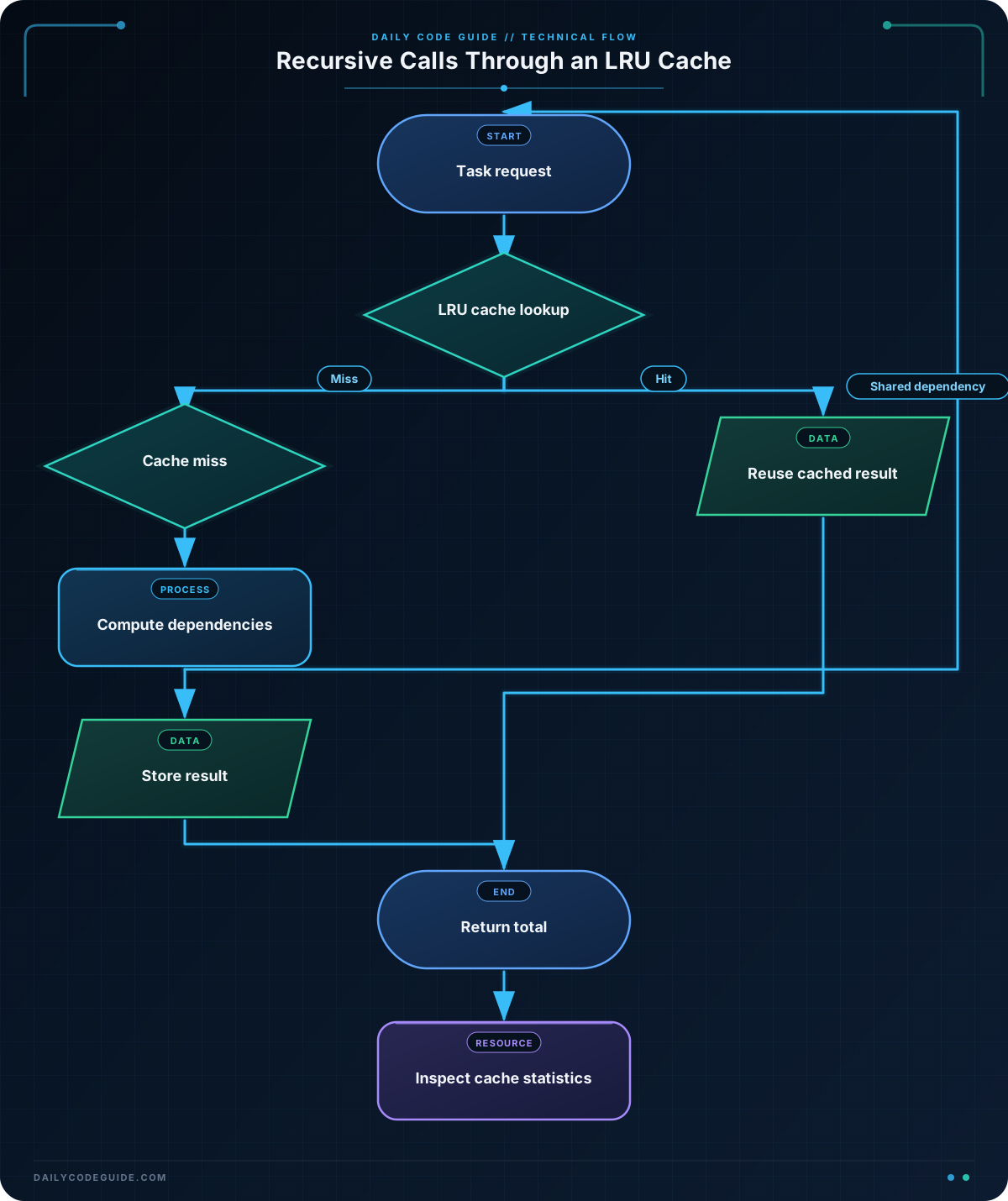
TASKS stores each task’s direct effort and its dependencies. For example, the release requires both packaging and documentation, while both dependency paths eventually involve the test suite.
When total_effort("release") runs for the first time, the function recursively processes five distinct task names: release, package, compile, tests, and docs. These produce five cache misses.
The test task is encountered while calculating both package and docs. The second request for total_effort("tests") is a cache hit, so its value of 4 is reused.
The second top-level call for "release" is also a cache hit. The complete result is already available, so Python does not traverse the task graph again. This is especially valuable when the graph contains expensive calculations or many shared dependencies.
The decorated function also exposes useful methods:
total_effort.cache_info()reports hits, misses, the configured size, and the current number of entries.total_effort.cache_clear()removes all stored results.total_effort.cache_parameters()reports settings such asmaxsizeand whether argument types are distinguished.
When evaluating an optimization, measure the actual effect rather than assuming caching helps. These Python profiling tools can help identify bottlenecks and verify whether repeated calculations are a meaningful part of the runtime.
Another Example
Caching is also useful when resolving inherited configuration. In this example, each service inherits a retry limit from its parent environment unless it defines its own value. Multiple services may ask for the same environment’s effective setting.
from functools import lru_cache


PARENT_ENVIRONMENT = {
    "payments-canary": "payments-production",
    "payments-production": "production",
    "search-canary": "search-production",
    "search-production": "production",
    "production": None,
}

LOCAL_RETRY_LIMIT = {
    "production": 5,
    "payments-production": 8,
    "search-production": 6,
}


@lru_cache(maxsize=32)
def effective_retry_limit(environment):
    if environment in LOCAL_RETRY_LIMIT:
        return LOCAL_RETRY_LIMIT[environment]

    parent = PARENT_ENVIRONMENT[environment]
    if parent is None:
        raise ValueError(f"No retry limit configured for {environment}")

    return effective_retry_limit(parent)


environments = (
    "payments-canary",
    "payments-production",
    "search-canary",
    "search-production",
)

for environment in environments:
    limit = effective_retry_limit(environment)
    print(f"{environment}: {limit} retries")

print(f"Cache information: {effective_retry_limit.cache_info()}")
The two canary environments both eventually consult the shared "production" environment. Once that inherited value is cached, later lookups reuse it. The bounded maxsize=32 is appropriate here because the script chooses to retain only a limited number of recent environment results.
Common Mistakes
- Caching mutable or changing data: The cache does not know when external data changes. If
TASKSor a configuration dictionary is modified, previously cached results may be stale. Callfunction_name.cache_clear()after a relevant update, or design the function so its changing data is passed as an argument. - Passing unhashable arguments: A cached function cannot use a list or dictionary as an argument because those objects are mutable and unhashable. Convert stable list-like data to a tuple, or use a hashable identifier and look up the full record inside the function.
- Using an unlimited cache for unlimited input:
maxsize=Nonecan retain every distinct call for the lifetime of the process. Use a finite limit when inputs may grow continuously. - Caching functions with side effects: A cached function may not run on every call. Avoid decorating functions that send notifications, write files, update databases, or otherwise depend on executing each time.
- Ignoring argument types when they matter: By default, some calls with equivalent values may share a result. Use
@lru_cache(typed=True)when values of different types must be cached separately.
Try It Yourself
Add a new "security_scan" task to the build graph. Make "package" depend on it, assign it an effort of 3 hours, and run the script again. Inspect the cache statistics. Then call total_effort.cache_clear() before calculating the result again and compare the misses.
Challenge
Create a cached recursive function named total_records(source_name) for a data-processing pipeline.
- Each source has a direct record count and zero or more input sources.
- The total for a source is its direct count plus the totals of its inputs.
- At least two sources must share the same input source.
- Use
@lru_cache(maxsize=None). - Print the total for the final report and the cache statistics.
Solution
from functools import lru_cache


SOURCES = {
    "final_report": (10, ("regional_summary", "fraud_summary")),
    "regional_summary": (6, ("transactions",)),
    "fraud_summary": (4, ("transactions",)),
    "transactions": (1000, ()),
}


@lru_cache(maxsize=None)
def total_records(source_name):
    direct_count, inputs = SOURCES[source_name]
    input_count = sum(total_records(input_name) for input_name in inputs)
    return direct_count + input_count


report_total = total_records("final_report")

print(f"Total records: {report_total}")
print(f"Cache information: {total_records.cache_info()}")
The final report contains 2,026 records: 10 direct records, 6 plus the transactions, and 4 plus the same transactions source. The shared "transactions" result is calculated once and reused. The four distinct source names produce four misses, while the second request for "transactions" produces one cache hit.
Key Takeaways
functools.lru_cachestores results for previously used argument combinations.- Memoization is particularly effective for recursive functions with overlapping subproblems.
- Cached arguments must be hashable, and cached results can become stale when external data changes.
- Use
cache_info()to determine whether calls are actually benefiting from the cache. - Choose a finite
maxsizewhen the number of possible inputs could grow substantially.

