


What You’ll Learn
In this lesson, you will learn how to use Python if statements to make decisions in a shipping-cost program. You will see how a condition controls which code runs and how to use else when the condition is false.
- Understand what an if statement does.
- Write conditions using comparison operators.
- Use indentation to group related code.
- Choose a shipping cost based on an order’s details.
The Concept
An if statement lets a program make a decision. Python checks a condition, which is an expression that is either True or False. If the condition is true, Python runs the indented code underneath it.
For example, a shipping program might ask whether an order weighs five kilograms or less. If it does, the program can use one shipping price. Otherwise, it can use a different price.
A basic if statement has this structure:
if condition:
    # Code that runs when condition is True
else:
    # Code that runs when condition is False
The colon after the condition is required. The lines inside each branch must be indented, normally by four spaces in Python.
Common comparison operators include:
==means equal to.!=means not equal to.<means less than.<=means less than or equal to.>means greater than.>=means greater than or equal to.
Basic Example
This program chooses a shipping cost based on the weight of a package. Packages weighing five kilograms or less cost $5.00 to ship. Heavier packages cost $10.00.
package_weight = 3.5

if package_weight <= 5:
    shipping_cost = 5.00
else:
    shipping_cost = 10.00

print(f"Shipping cost: ${shipping_cost:.2f}")
Expected Output
Shipping cost: $5.00How the Code Works
package_weight = 3.5 stores the package’s weight in a variable.
Next, Python checks this condition:
if package_weight <= 5:The condition asks whether package_weight is less than or equal to 5. Because 3.5 is less than 5, the condition is true.
Python therefore runs the indented line and assigns 5.00 to shipping_cost:
shipping_cost = 5.00The else branch contains the alternative. Python runs it only when the condition is false, such as when package_weight is 7.
Finally, the print() statement displays the selected cost. The format specifier :.2f shows the number with exactly two digits after the decimal point, which is useful for displaying money.
Another Example
Shipping prices can also depend on the delivery destination. This example uses an if statement to give local deliveries a lower price than national deliveries.
delivery_area = "local"

if delivery_area == "local":
    shipping_cost = 4.50
else:
    shipping_cost = 8.00

print(f"Delivery area: {delivery_area}")
print(f"Shipping cost: ${shipping_cost:.2f}")
The condition uses == because the program is comparing delivery_area with the text "local". Do not use a single = for this comparison. A single = assigns a value to a variable.
Common Mistakes
- Forgetting the colon: Write
if package_weight <= 5:, including the colon at the end. - Incorrect indentation: The code controlled by an if statement must be indented consistently. Use four spaces.
- Using
=instead of==: Use=to assign a value and==to compare two values. - Putting the wrong code in a branch: Check that each shipping-cost assignment is indented under the condition or
elsebranch where it belongs.
Try It Yourself
Create a Python program that stores an order’s weight in package_weight. If the weight is less than or equal to 2 kilograms, set the shipping cost to 3.50. Otherwise, set it to 7.50. Print the cost using two decimal places.
Test your program with a weight of 1.5, then change the weight to 4 and observe how the output changes.
Challenge
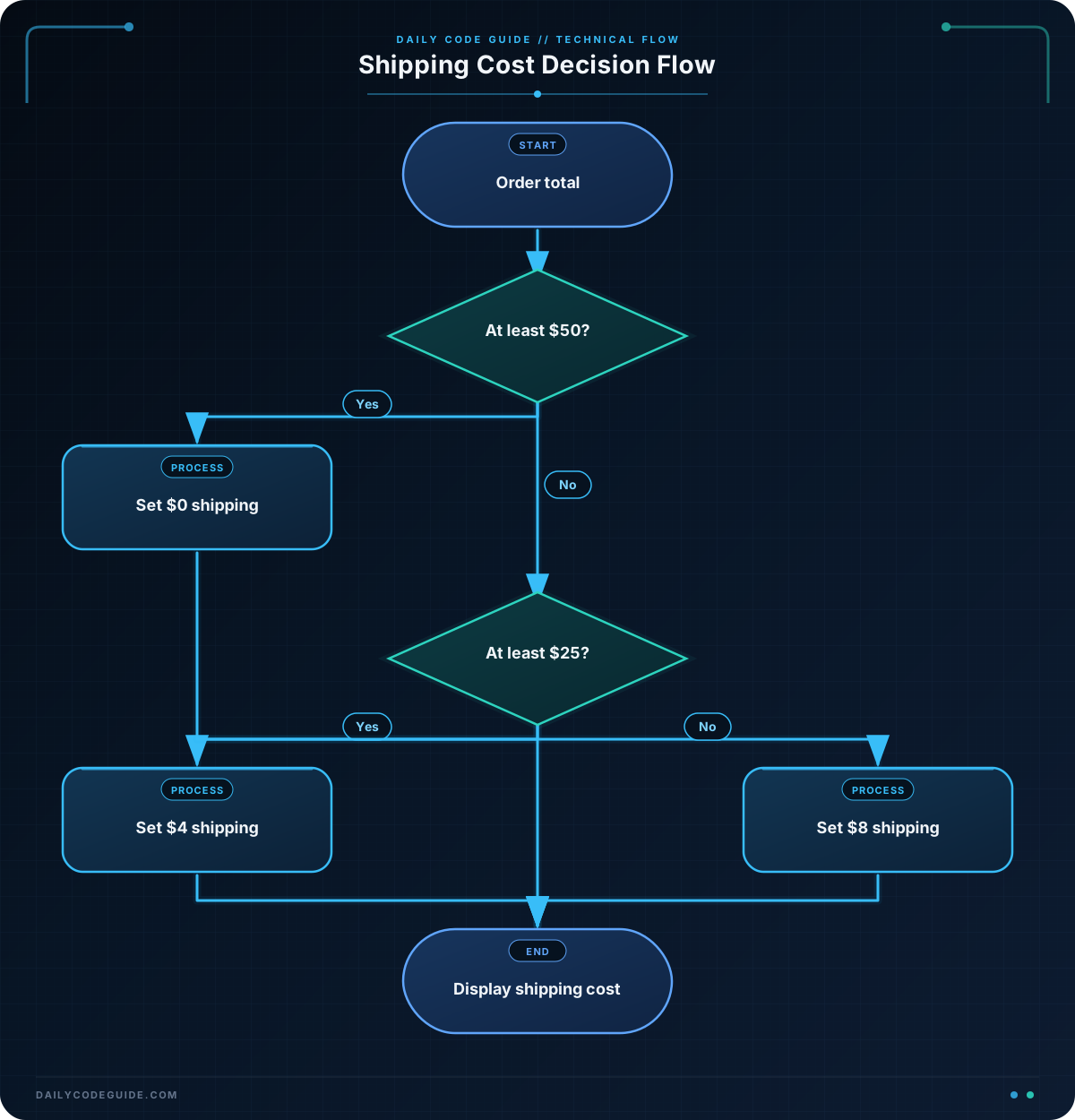
Create a shipping-cost calculator based on the total value of an order:
- Orders of $50 or more receive free shipping.
- Orders from $25 up to, but not including, $50 cost $4.00 to ship.
- Orders below $25 cost $8.00 to ship.
Store the order total in a variable, choose the correct cost with if, elif, and else, and print the order total and shipping cost with two decimal places.
Solution
order_total = 42.50

if order_total >= 50:
    shipping_cost = 0.00
elif order_total >= 25:
    shipping_cost = 4.00
else:
    shipping_cost = 8.00

print(f"Order total: ${order_total:.2f}")
print(f"Shipping cost: ${shipping_cost:.2f}")
The first condition checks whether the order qualifies for free shipping. If it is false, Python checks the elif condition for orders of at least $25. If both conditions are false, the else branch applies the $8.00 shipping cost. With an order total of $42.50, the program prints a shipping cost of $4.00.
Key Takeaways
- An if statement lets Python choose which code to run.
- A condition produces either
TrueorFalse. - Use
elsefor the alternative when an if condition is false. - Use
elifwhen you need to check another condition. - Python uses a colon and indentation to define each branch.

