


What You’ll Learn
In this lesson, you will learn how Python sets store unique values and how to use them to remove duplicate email addresses from imported data.
- Understand what a set is and how it differs from a list.
- Convert a list of email addresses into a set.
- Use
sorted()when you need predictable display order. - Combine email addresses from multiple sources with a set.
The Concept
A set is a Python collection that stores each value only once. If the same value appears multiple times, the set keeps one copy.
This makes sets useful when imported data contains duplicates. For example, a mailing list might include the same email address more than once because a person submitted a form several times or appeared in multiple data exports.
You can create a set from a list by passing the list to set():
emails = ["alex@example.com", "alex@example.com", "sam@example.com"]
unique_emails = set(emails)
After this code runs, unique_emails contains only "alex@example.com" and "sam@example.com".
Sets do not keep values in a reliable display order. If you want to show the values alphabetically or in another predictable order, pass the set to sorted(). The result of sorted() is a list.
Basic Example
Imagine that an imported customer file contains duplicate email addresses. The following program removes those duplicates and displays the remaining addresses alphabetically.
imported_emails = [
    "maria@example.com",
    "devon@example.com",
    "maria@example.com",
    "li@example.com",
    "devon@example.com",
]

unique_emails = set(imported_emails)
sorted_emails = sorted(unique_emails)

print("Unique email addresses:")
for email in sorted_emails:
    print(email)
Expected Output
Unique email addresses:
devon@example.com
li@example.com
maria@example.com
How the Code Works
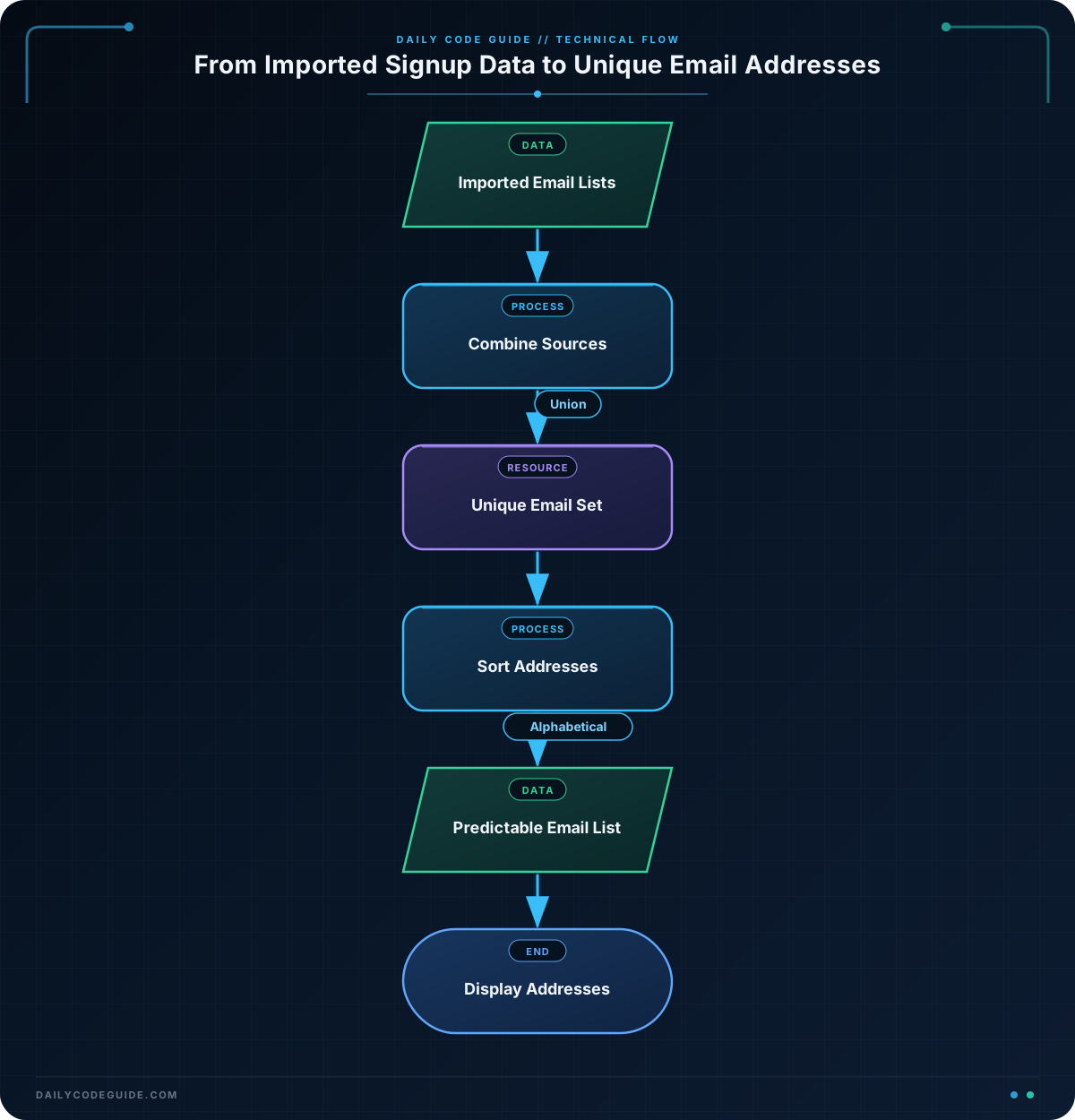
The imported_emails variable is a list. Lists preserve every item, including repeated values.
This line creates a set:
unique_emails = set(imported_emails)Python checks the values in imported_emails and keeps only one copy of each email address. The result is assigned to unique_emails.
Next, the program sorts the unique values:
sorted_emails = sorted(unique_emails)The set itself does not guarantee a useful order, but sorted() creates a new list in alphabetical order. Sorting is not required to remove duplicates; it only makes the output easier to read and predict.
Finally, the for loop visits each email address in the sorted list and prints it. Because the list came from a set, each address appears only once.
Another Example
Sometimes email addresses come from more than one imported source. A set can combine the addresses from both sources and remove duplicates at the same time.
The | operator creates the union of two sets. A union contains every unique value found in either set.
website_signups = {
    "nora@example.com",
    "owen@example.com",
    "pat@example.com",
}

event_signups = {
    "owen@example.com",
    "quinn@example.com",
    "nora@example.com",
}

all_signups = website_signups | event_signups

print("Customers from either source:")
for email in sorted(all_signups):
    print(email)
Here, nora@example.com and owen@example.com appear in both sources, but they appear only once in all_signups.
Common Mistakes
- Expecting a set to preserve list order: Sets are designed for unique membership, not reliable ordering. Use
sorted()when you need predictable output. - Trying to access a set by position: Expressions such as
emails[0]work with lists, but sets do not support indexing. Use a loop to visit set values, or convert the set to a list first. - Assuming similar-looking email addresses are duplicates: Python compares strings exactly. For example,
"Maya@example.com"and"maya@example.com"are different strings. If your data requires case-insensitive matching, normalize the addresses before creating the set. - Replacing the original list when you still need its order: Converting a list to a set removes duplicates but also loses the list’s ordering behavior. Keep the original list if that order is important elsewhere in your program.
Try It Yourself
Create a program that removes duplicate addresses from this imported list. Print the unique addresses in alphabetical order.
imported_emails = [
    "riley@example.com",
    "casey@example.com",
    "riley@example.com",
    "taylor@example.com",
    "casey@example.com",
]

# Create a set and print the addresses in sorted order.
Challenge
A company imported email addresses from three separate files. Create one set containing every unique address, then print the total number of unique addresses and each address in alphabetical order.
Your program should use:
- One set for each source.
- The set union operator
|to combine the sources. len()to count the unique addresses.sorted()for predictable output.
newsletter_file = {
    "ava@example.com",
    "ben@example.com",
    "chris@example.com",
}

support_file = {
    "ben@example.com",
    "dana@example.com",
    "eli@example.com",
}

event_file = {
    "ava@example.com",
    "eli@example.com",
    "finn@example.com",
}

# Combine the three sets and display the result.
Solution
newsletter_file = {
    "ava@example.com",
    "ben@example.com",
    "chris@example.com",
}

support_file = {
    "ben@example.com",
    "dana@example.com",
    "eli@example.com",
}

event_file = {
    "ava@example.com",
    "eli@example.com",
    "finn@example.com",
}

all_emails = newsletter_file | support_file | event_file
sorted_emails = sorted(all_emails)

print(f"Unique email addresses: {len(all_emails)}")
for email in sorted_emails:
    print(email)
The union operation combines all three sets while keeping only one copy of each address. There are six unique addresses, and sorted() makes their printed order alphabetical.
Key Takeaways
- A Python set stores unique values and automatically removes duplicates.
- Use
set(your_list)to convert a list into a set. - Sets do not guarantee a useful order, so use
sorted()for predictable display. - Use the
|operator to combine sets and remove duplicates across multiple sources. - Use
len()to count the unique values in a set.

