


What You’ll Learn
Python includes the sqlite3 module, which lets you work with a SQLite database without installing or running a separate database server. In this lesson, you will create a task table, insert task records, search for tasks, and close the database connection safely.
- Connect to a local SQLite database.
- Create a table for application tasks.
- Insert Python dictionary data with SQL parameters.
- Search records with a
SELECTquery. - Commit changes and close the connection safely.
The Concept
SQLite is a small database system that stores its data in a local file. Unlike database systems that require a separate server, SQLite runs inside your Python program. This makes it useful for small applications, prototypes, desktop tools, scripts, and local task managers.
Python’s built-in sqlite3 module provides the functions needed to connect to SQLite. A database contains tables, and a table contains rows and columns. For example, a tasks table might have columns for an ID, title, and status.
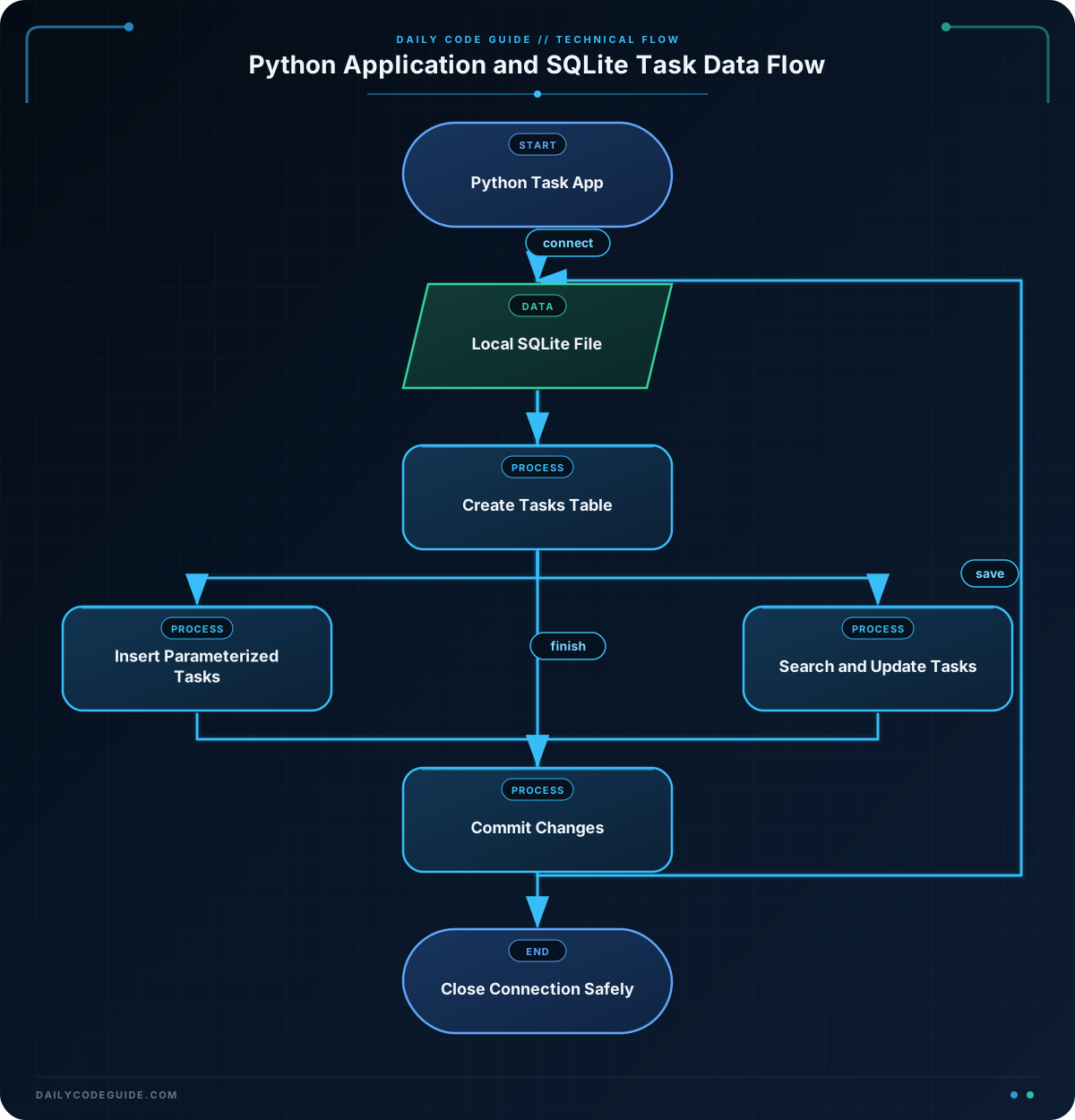
A typical Python SQLite workflow is:
- Call
sqlite3.connect()to open a database file. - Use a cursor to execute SQL statements.
- Call
commit()after inserting or changing data. - Fetch query results with
fetchall()orfetchone(). - Close the connection when the program is finished.
The values inserted into a database often begin as ordinary Python variables or dictionaries. If you need a refresher on storing and using values, review Python variables before continuing.
Use question marks as placeholders for values in SQL statements. Passing the values separately helps prevent SQL injection and avoids problems with quotes inside task titles.
Basic Example
The following program creates a local file named tasks.db, creates a tasks table, inserts three tasks, and displays the tasks that are still open.
import sqlite3

connection = sqlite3.connect("tasks.db")

try:
    connection.execute("""
        CREATE TABLE IF NOT EXISTS tasks (
            id INTEGER PRIMARY KEY,
            title TEXT NOT NULL UNIQUE,
            status TEXT NOT NULL
        )
    """)

    tasks = [
        {"title": "Write project outline", "status": "open"},
        {"title": "Review database notes", "status": "open"},
        {"title": "Send progress update", "status": "complete"},
    ]

    for task in tasks:
        connection.execute(
            "INSERT OR IGNORE INTO tasks (title, status) VALUES (?, ?)",
            (task["title"], task["status"])
        )

    connection.commit()

    rows = connection.execute(
        "SELECT title, status FROM tasks WHERE status = ? ORDER BY id",
        ("open",)
    ).fetchall()

    print("Open tasks:")
    for title, status in rows:
        print(f"- {title} ({status})")
finally:
    connection.close()
Expected Output
On the first run, the program creates the database file and displays:
Open tasks:
- Write project outline (open)
- Review database notes (open)
How the Code Works
import sqlite3 loads Python’s built-in SQLite support. No external package is needed.
This line opens a connection to a local database file:
connection = sqlite3.connect("tasks.db")If tasks.db does not exist, SQLite creates it. If it already exists, Python opens the existing file.
The CREATE TABLE IF NOT EXISTS statement creates the table only when it is missing. The id column is an automatically managed primary key. The UNIQUE rule on title prevents the same task title from being inserted repeatedly.
Each task is represented by a dictionary. The loop passes the dictionary values to this parameterized query:
connection.execute(
    "INSERT OR IGNORE INTO tasks (title, status) VALUES (?, ?)",
    (task["title"], task["status"])
)
The two question marks are placeholders. The tuple that follows supplies their values in order: the title goes into the first placeholder, and the status goes into the second.
INSERT OR IGNORE skips a duplicate title instead of stopping with an error. This is useful when you run the example more than once.
SQLite usually holds changes in a transaction until you save them. Calling connection.commit() saves the inserted tasks to the database file.
The SELECT query searches for rows whose status matches "open". Calling fetchall() returns all matching rows as a list of tuples. The loop then unpacks each tuple into title and status.
The try and finally blocks ensure that connection.close() runs even if an error occurs. Closing connections is a good habit because it releases resources and makes sure your program is finished using the database.
Another Example
A task application usually needs more than an initial list. Users may search for a task and mark it complete. This example uses a separate database file, searches with LIKE, updates one matching task, and then displays the remaining open tasks.
import sqlite3

connection = sqlite3.connect("project_tasks.db")

try:
    connection.execute("""
        CREATE TABLE IF NOT EXISTS tasks (
            id INTEGER PRIMARY KEY,
            title TEXT NOT NULL UNIQUE,
            status TEXT NOT NULL
        )
    """)

    starting_tasks = [
        ("Prepare release checklist", "open"),
        ("Test task search", "open"),
        ("Publish user guide", "open"),
    ]

    connection.executemany(
        "INSERT OR IGNORE INTO tasks (title, status) VALUES (?, ?)",
        starting_tasks
    )

    search_term = "guide"
    matching_tasks = connection.execute(
        "SELECT id, title, status FROM tasks "
        "WHERE title LIKE ? ORDER BY title",
        (f"%{search_term}%",)
    ).fetchall()

    print(f"Tasks matching '{search_term}':")
    for task_id, title, status in matching_tasks:
        print(f"{task_id}: {title} ({status})")

    connection.execute(
        "UPDATE tasks SET status = ? WHERE title = ?",
        ("complete", "Publish user guide")
    )
    connection.commit()

    open_tasks = connection.execute(
        "SELECT title FROM tasks WHERE status = ? ORDER BY title",
        ("open",)
    ).fetchall()

    print("Open tasks after update:")
    for (title,) in open_tasks:
        print(f"- {title}")
finally:
    connection.close()
The search term is surrounded by percent signs to create the pattern %guide%. SQLite’s LIKE operator then finds titles containing that word. The update also uses placeholders rather than placing Python values directly inside the SQL string.
Common Mistakes
- Forgetting to commit: An
INSERT,UPDATE, orDELETEmay not be saved permanently until you callconnection.commit(). - Building SQL with string concatenation: Avoid putting user input directly into a query. Use
?placeholders and pass values as a tuple. - Passing one value incorrectly: A one-value parameter tuple needs a trailing comma, such as
(search_term,). Without the comma, Python treats it as a regular value in parentheses. - Forgetting to close the connection: Put cleanup in a
finallyblock so it also happens when an exception occurs. - Expecting a new empty database every time: A file database keeps its data between program runs. Use a new filename or remove the file during testing if you need a clean database.
Try It Yourself
Modify the basic example so it can find tasks by a word in their title. Store the search word in search_term, use a LIKE query with a parameter, and print each matching title.
For example, searching for "project" should find "Write project outline".
Challenge
Build a small task search program that:
- Creates a table named
taskswithid,title, andstatuscolumns. - Inserts the three supplied tasks.
- Searches for tasks containing a word stored in
search_term. - Marks
"Call design team"as complete. - Prints the matching tasks and then prints all complete tasks.
- Uses SQL parameters and closes the connection safely.
Solution
import sqlite3

connection = sqlite3.connect("challenge_tasks.db")

try:
    connection.execute("""
        CREATE TABLE IF NOT EXISTS tasks (
            id INTEGER PRIMARY KEY,
            title TEXT NOT NULL UNIQUE,
            status TEXT NOT NULL
        )
    """)

    tasks = [
        ("Plan next sprint", "open"),
        ("Call design team", "open"),
        ("Update task documentation", "complete"),
    ]

    connection.executemany(
        "INSERT OR IGNORE INTO tasks (title, status) VALUES (?, ?)",
        tasks
    )

    search_term = "task"
    matching_tasks = connection.execute(
        "SELECT title, status FROM tasks "
        "WHERE title LIKE ? ORDER BY title",
        (f"%{search_term}%",)
    ).fetchall()

    print(f"Tasks matching '{search_term}':")
    for title, status in matching_tasks:
        print(f"- {title} ({status})")

    connection.execute(
        "UPDATE tasks SET status = ? WHERE title = ?",
        ("complete", "Call design team")
    )
    connection.commit()

    complete_tasks = connection.execute(
        "SELECT title FROM tasks WHERE status = ? ORDER BY title",
        ("complete",)
    ).fetchall()

    print("Complete tasks:")
    for (title,) in complete_tasks:
        print(f"- {title}")
finally:
    connection.close()
The solution uses executemany() to insert several task tuples, a parameterized LIKE query to search titles, and a parameterized UPDATE statement to change one task’s status. It commits the update and closes the database connection in the finally block.
Key Takeaways
- Python’s built-in
sqlite3module works with local SQLite database files without a separate server. - Use
connect(), execute SQL through the connection, commit changes, and close the connection. - Use
?placeholders and separate parameter values instead of building SQL with string concatenation. SELECTandLIKEcan search task records, whileINSERTandUPDATEcan store and change them.- A
try/finallyblock helps ensure that database connections are closed safely.

