


What You’ll Learn
In this lesson, you will learn how to combine rows from two compatible SQL queries into one result. You will also learn the difference between UNION and UNION ALL, including how each one handles duplicate rows.
- Combine current and archived customer records.
- Understand the column requirements for combining result sets.
- Choose between UNION and UNION ALL.
- Control the order of the combined results.
The Concept
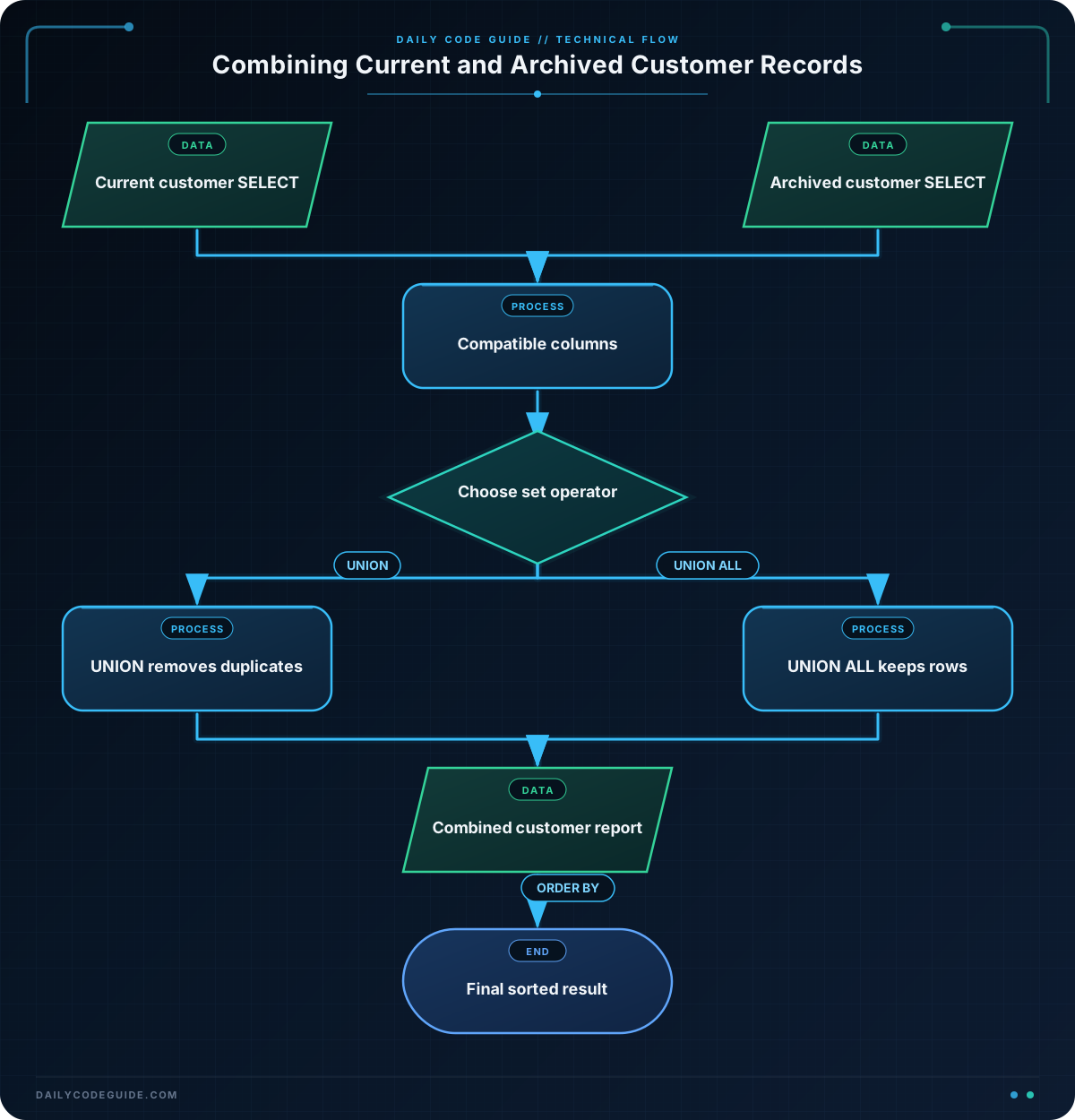
A query result is a set of rows returned by a SELECT statement. SQL lets you combine the results of two or more compatible SELECT statements by placing UNION or UNION ALL between them.
For example, a company might store recent customers in a current_customers table and older customers in an archived_customers table. A report may need to show customers from both tables together.
The two SELECT statements must have:
- The same number of selected columns.
- Columns in the same order.
- Compatible data types in corresponding positions.
UNION removes duplicate rows from the combined result. UNION ALL keeps every row, including duplicates.
Use UNION when duplicate rows should appear only once. Use UNION ALL when every row matters, such as when you are auditing records or need to preserve the number of rows from each source.
Basic Example
Suppose both customer tables contain the same three columns: customer_id, full_name, and email. The following query combines the tables into one customer report:
SELECT customer_id, full_name, email
FROM current_customers

UNION

SELECT customer_id, full_name, email
FROM archived_customers

ORDER BY customer_id;
Assume customer 102 has the exact same values in both tables. Because this query uses UNION, that identical row appears only once.
Expected Output
customer_id | full_name      | email
------------+----------------+------------------------
101         | Maya Chen      | maya@example.com
102         | Liam Patel     | liam@example.com
103         | Sofia Garcia   | sofia@example.com
104         | Noah Williams  | noah@example.com
How the Code Works
The first SELECT reads the selected columns from the current customer table:
customer_ididentifies the customer.full_namecontains the customer’s name.emailcontains the customer’s email address.
The second SELECT reads columns with the same meaning from the archived table. Since both queries select three compatible columns in the same order, their results can be combined.
The UNION operator combines the rows and removes rows that are identical across all selected columns. It does not remove rows merely because they have the same customer_id. If two rows share an ID but have different names or email addresses, SQL treats them as different rows.
The ORDER BY customer_id clause sorts the final combined result. When using UNION, place one final ORDER BY after the last SELECT. It sorts the complete result, rather than only one source table.
Another Example
Sometimes you need to keep every row and identify where each row came from. In this example, each query adds a text value as a fourth column. Because the source values are different, this query uses UNION ALL to preserve every record:
SELECT customer_id, full_name, email, 'current' AS record_source
FROM current_customers

UNION ALL

SELECT customer_id, full_name, email, 'archived' AS record_source
FROM archived_customers

ORDER BY customer_id, record_source;
The text values 'current' and 'archived' are compatible because both are text values. The added record_source column makes the report easier to understand.
With UNION ALL, an identical customer row found in both tables would still appear twice. This is useful when the report must represent every stored row, not just unique customer details.
Common Mistakes
Selecting a different number of columns
Both queries must return the same number of columns. A query selecting three columns cannot be combined directly with a query selecting four columns.
Putting columns in a different order
SQL matches columns by position, not by column name. The first column from one query corresponds to the first column from the other query, and so on. Keep related columns in the same order.
Expecting UNION to find duplicate customers by ID
UNION removes duplicate rows only when all selected values match. It does not automatically decide that two rows represent the same customer based on customer_id alone.
Using UNION ALL when duplicates should be removed
UNION ALL is not a duplicate-removal operation. If current and archived tables contain the same row, the combined result will include both copies.
Sorting only one part of the query
For a combined result, put the final ORDER BY after the last SELECT. This sorts the complete result set.
Try It Yourself
Write two versions of a customer report:
- Use
UNIONto list each identical customer row only once. - Use
UNION ALLto list every row from both tables.
In both queries, select customer_id, full_name, and email, then sort the final result by full_name.
Compare the results when the two tables contain an identical customer row.
Challenge
Create a report that combines current and archived customer records while showing the source of each record.
Your query should:
- Select
customer_id,full_name, andemailfrom both tables. - Add a fourth column named
record_source. - Use
'Current customer'for rows from the current table. - Use
'Archived customer'for rows from the archived table. - Keep every row, including duplicate customer details.
- Sort the final report by
record_sourceand thenfull_name.
Solution
SELECT customer_id, full_name, email, 'Current customer' AS record_source
FROM current_customers

UNION ALL

SELECT customer_id, full_name, email, 'Archived customer' AS record_source
FROM archived_customers

ORDER BY record_source, full_name;
UNION ALL keeps every row from both tables, which satisfies the requirement to preserve duplicates. Both SELECT statements return four compatible columns in the same order. The final ORDER BY sorts the complete report first by its source label and then by the customer’s name.
Key Takeaways
UNIONcombines compatible query results and removes identical rows.UNION ALLcombines compatible query results while keeping every row.- Combined queries need the same number of columns in the same order.
- Corresponding columns should have compatible data types.
- A final
ORDER BYsorts the complete combined result.

