


What You’ll Learn
In this lesson, you will learn how to synchronize incoming customer records without creating duplicate rows. You will compare two database-specific upsert patterns:
- PostgreSQL’s INSERT … ON CONFLICT
- SQL Server’s MERGE
- How unique constraints determine which records conflict
- How to handle practical issues such as duplicate keys in the incoming data
The Concept
An upsert combines an insert and an update. If an incoming customer does not already exist, the database inserts it. If a matching customer does exist, the database updates selected columns instead.
This is useful when importing customer data from a CRM, payment system, spreadsheet, or another application. Without an upsert, application code often has to perform a separate lookup, followed by either an insert or an update. That approach can be slower and can introduce race conditions when two processes synchronize the same customer simultaneously.
The database needs a rule for deciding whether a customer already exists. Usually, this is a primary key such as customer_id or a unique business identifier such as external_customer_id. The unique constraint is essential because it prevents duplicate records and gives the database a conflict to detect.
Upsert syntax is database-specific. PostgreSQL commonly uses INSERT … ON CONFLICT, while SQL Server supports MERGE. The examples below use the same customer synchronization theme but keep each dialect’s syntax separate.
Basic Example
This PostgreSQL example receives three customer records. Two records are already present: customer 1001 should be updated, while customer 1002 remains unchanged. Customer 1003 is new and should be inserted.
DROP TABLE IF EXISTS customers;

CREATE TABLE customers (
    customer_id INTEGER PRIMARY KEY,
    full_name TEXT NOT NULL,
    email TEXT NOT NULL,
    loyalty_tier TEXT NOT NULL,
    updated_at TIMESTAMP NOT NULL
);

INSERT INTO customers (
    customer_id,
    full_name,
    email,
    loyalty_tier,
    updated_at
)
VALUES
    (1001, 'Maya Chen', 'maya.chen@example.com', 'silver', '2025-01-10 09:00:00'),
    (1002, 'Jon Bell', 'jon.bell@example.com', 'bronze', '2025-01-10 09:00:00');

INSERT INTO customers (
    customer_id,
    full_name,
    email,
    loyalty_tier,
    updated_at
)
VALUES
    (1001, 'Maya Chen', 'maya.chen@example.com', 'gold', '2025-02-01 14:30:00'),
    (1002, 'Jon Bell', 'jon.bell@example.com', 'bronze', '2025-02-01 14:30:00'),
    (1003, 'Priya Nair', 'priya.nair@example.com', 'silver', '2025-02-01 14:30:00')
ON CONFLICT (customer_id)
DO UPDATE SET
    full_name = EXCLUDED.full_name,
    email = EXCLUDED.email,
    loyalty_tier = EXCLUDED.loyalty_tier,
    updated_at = EXCLUDED.updated_at;

SELECT customer_id, full_name, email, loyalty_tier, updated_at
FROM customers
ORDER BY customer_id;
Expected Output
The existing record for Maya is updated, Jon remains present, and Priya is inserted as a new customer.
 customer_id |  full_name  |          email           | loyalty_tier |     updated_at
-------------+-------------+--------------------------+--------------+---------------------
        1001 | Maya Chen   | maya.chen@example.com    | gold         | 2025-02-01 14:30:00
        1002 | Jon Bell    | jon.bell@example.com     | bronze       | 2025-01-10 09:00:00
        1003 | Priya Nair  | priya.nair@example.com   | silver       | 2025-02-01 14:30:00
How the Code Works
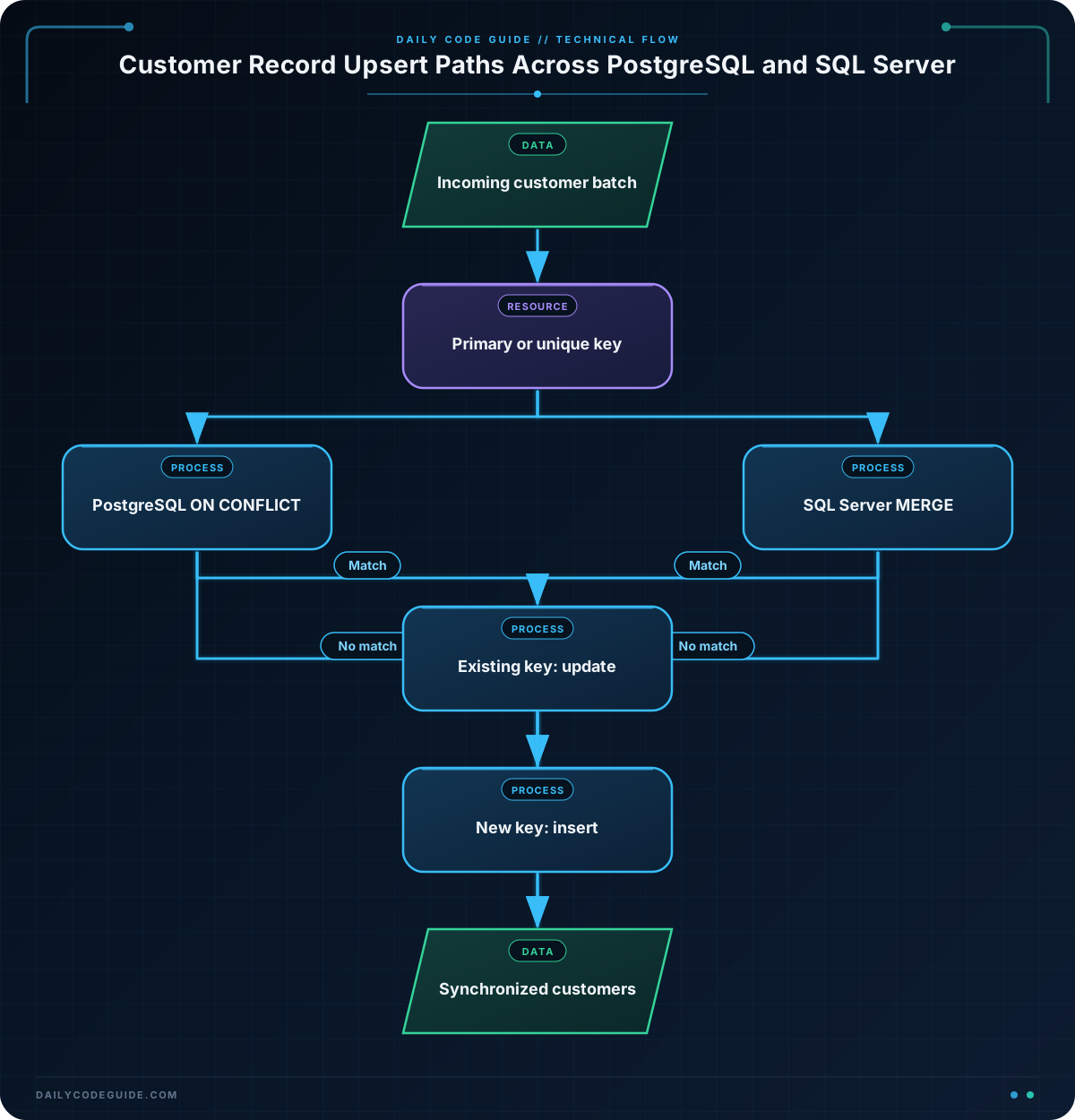
The primary key on customer_id ensures that each customer identifier can appear only once. When the second INSERT attempts to add customer 1001, PostgreSQL detects that the primary key already exists.
The clause ON CONFLICT (customer_id) tells PostgreSQL which conflict to handle. The database can also target a unique constraint or unique index, but the conflict target must represent a uniqueness rule defined on the table.
EXCLUDED represents the row that PostgreSQL attempted to insert. Therefore, EXCLUDED.loyalty_tier is the incoming loyalty tier, while customers.loyalty_tier is the value currently stored in the table.
The DO UPDATE SET section chooses which existing columns to replace. You do not have to update every column. For example, a system might preserve a locally managed marketing preference while updating only the incoming name and email.
If there is no conflicting customer_id, PostgreSQL performs the normal insert. The operation is atomic from the database user’s perspective, which is safer than manually checking for a row and then deciding which separate statement to run.
Another Example
SQL Server uses MERGE to express the same general behavior. This example synchronizes customers by customer_id from a table variable named incoming_customers. The WHEN MATCHED branch updates an existing customer, and WHEN NOT MATCHED BY TARGET inserts a new one.
DROP TABLE IF EXISTS dbo.Customers;

CREATE TABLE dbo.Customers (
    customer_id INT PRIMARY KEY,
    full_name NVARCHAR(100) NOT NULL,
    email NVARCHAR(255) NOT NULL,
    loyalty_tier NVARCHAR(20) NOT NULL,
    updated_at DATETIME2 NOT NULL
);

INSERT INTO dbo.Customers (
    customer_id,
    full_name,
    email,
    loyalty_tier,
    updated_at
)
VALUES
    (2001, 'Elena Garcia', 'elena.garcia@example.com', 'silver', '2025-01-10T09:00:00'),
    (2002, 'Marcus Reed', 'marcus.reed@example.com', 'bronze', '2025-01-10T09:00:00');

DECLARE @incoming_customers TABLE (
    customer_id INT PRIMARY KEY,
    full_name NVARCHAR(100) NOT NULL,
    email NVARCHAR(255) NOT NULL,
    loyalty_tier NVARCHAR(20) NOT NULL,
    updated_at DATETIME2 NOT NULL
);

INSERT INTO @incoming_customers (
    customer_id,
    full_name,
    email,
    loyalty_tier,
    updated_at
)
VALUES
    (2001, 'Elena Garcia', 'elena.garcia@example.com', 'gold', '2025-02-01T14:30:00'),
    (2003, 'Noah Williams', 'noah.williams@example.com', 'silver', '2025-02-01T14:30:00');

MERGE dbo.Customers AS target
USING @incoming_customers AS source
    ON target.customer_id = source.customer_id
WHEN MATCHED THEN
    UPDATE SET
        target.full_name = source.full_name,
        target.email = source.email,
        target.loyalty_tier = source.loyalty_tier,
        target.updated_at = source.updated_at
WHEN NOT MATCHED BY TARGET THEN
    INSERT (
        customer_id,
        full_name,
        email,
        loyalty_tier,
        updated_at
    )
    VALUES (
        source.customer_id,
        source.full_name,
        source.email,
        source.loyalty_tier,
        source.updated_at
    );

SELECT customer_id, full_name, email, loyalty_tier, updated_at
FROM dbo.Customers
ORDER BY customer_id;
MERGE is expressive because it can also handle source records that no longer appear in the incoming dataset with WHEN NOT MATCHED BY SOURCE. Use that branch carefully: synchronizing a partial batch should not accidentally delete or deactivate customers that were simply omitted from the batch.
Common Mistakes
- Using the wrong conflict key: If customer_id is not the identifier shared by both systems, matching on it can update the wrong row or insert duplicates. Choose a stable external identifier and enforce it with a unique constraint when appropriate.
- Assuming a primary key is automatically detected: PostgreSQL requires an explicit conflict target unless you use the supported form that names a constraint. SQL Server requires the matching condition in the MERGE ON clause.
- Updating columns that should be locally owned: An incoming feed might contain stale values. Decide which fields the source system controls before listing them in the update section.
- Sending duplicate keys in one batch: PostgreSQL can reject an INSERT … ON CONFLICT statement if multiple incoming rows try to affect the same existing row. MERGE can also fail or behave unexpectedly when multiple source rows match one target row. Deduplicate the incoming data before the upsert.
- Treating MERGE as automatically risk-free: MERGE has more branches and concurrency considerations than a simple insert. Test it under your SQL Server version and workload, and consider separate INSERT and UPDATE statements inside a transaction when that is easier to reason about.
Try It Yourself
Using PostgreSQL, create an upsert for a customer table with these requirements:
- Customer 3001 already exists with the silver loyalty tier.
- The incoming batch changes customer 3001 to gold.
- The incoming batch adds customer 3002.
- The upsert must update full_name, email, loyalty_tier, and updated_at for conflicts.
- Display the final rows ordered by customer_id.
Challenge
Write a PostgreSQL synchronization statement for a customer table named customers. The table has customer_id as its primary key and also contains full_name, email, loyalty_tier, and updated_at.
Your incoming batch must contain:
- Customer 4001, whose email and loyalty tier have changed
- Customer 4002, a new customer
- Customer 4003, whose name has changed but whose existing loyalty tier must remain untouched
Use INSERT … ON CONFLICT to update the email, full_name, and updated_at columns, but do not update loyalty_tier. Include a query that shows the final customer records.
Solution
The solution seeds customers 4001 and 4003, then upserts the incoming batch. Because loyalty_tier is omitted from the DO UPDATE SET section, the existing tier for customer 4003 is preserved.
DROP TABLE IF EXISTS customers;

CREATE TABLE customers (
    customer_id INTEGER PRIMARY KEY,
    full_name TEXT NOT NULL,
    email TEXT NOT NULL,
    loyalty_tier TEXT NOT NULL,
    updated_at TIMESTAMP NOT NULL
);

INSERT INTO customers (
    customer_id,
    full_name,
    email,
    loyalty_tier,
    updated_at
)
VALUES
    (4001, 'Aisha Morgan', 'aisha.old@example.com', 'silver', '2025-01-15 10:00:00'),
    (4003, 'Daniel Kim', 'daniel.kim@example.com', 'gold', '2025-01-15 10:00:00');

INSERT INTO customers (
    customer_id,
    full_name,
    email,
    loyalty_tier,
    updated_at
)
VALUES
    (4001, 'Aisha Morgan', 'aisha.morgan@example.com', 'gold', '2025-02-10 16:00:00'),
    (4002, 'Rafael Ortiz', 'rafael.ortiz@example.com', 'bronze', '2025-02-10 16:00:00'),
    (4003, 'Daniel J. Kim', 'daniel.kim@example.com', 'silver', '2025-02-10 16:00:00')
ON CONFLICT (customer_id)
DO UPDATE SET
    full_name = EXCLUDED.full_name,
    email = EXCLUDED.email,
    updated_at = EXCLUDED.updated_at;

SELECT customer_id, full_name, email, loyalty_tier, updated_at
FROM customers
ORDER BY customer_id;
Customer 4001 receives the new email, customer 4002 is inserted, and customer 4003 receives the new name while retaining its original gold loyalty tier. The incoming loyalty tier for conflicting rows is intentionally ignored.
Key Takeaways
- An upsert inserts missing records and updates matching records in one database operation.
- Primary keys and unique constraints provide the rule used to detect duplicates.
- PostgreSQL uses INSERT … ON CONFLICT, while SQL Server uses MERGE.
- EXCLUDED in PostgreSQL refers to the incoming row that caused a conflict.
- Deduplicate incoming batches and decide which columns the source system is allowed to update.

