What You’ll Learn
In this lesson, you will learn how to use Terraform import blocks to bring an existing AWS resource under Terraform management without starting with the older imperative import workflow.
- Declare an import target with an HCL import block.
- Review the import in a Terraform plan.
- Use -generate-config-out to generate configuration for an existing resource.
- Recognize important differences between importing state and managing configuration.
The Concept
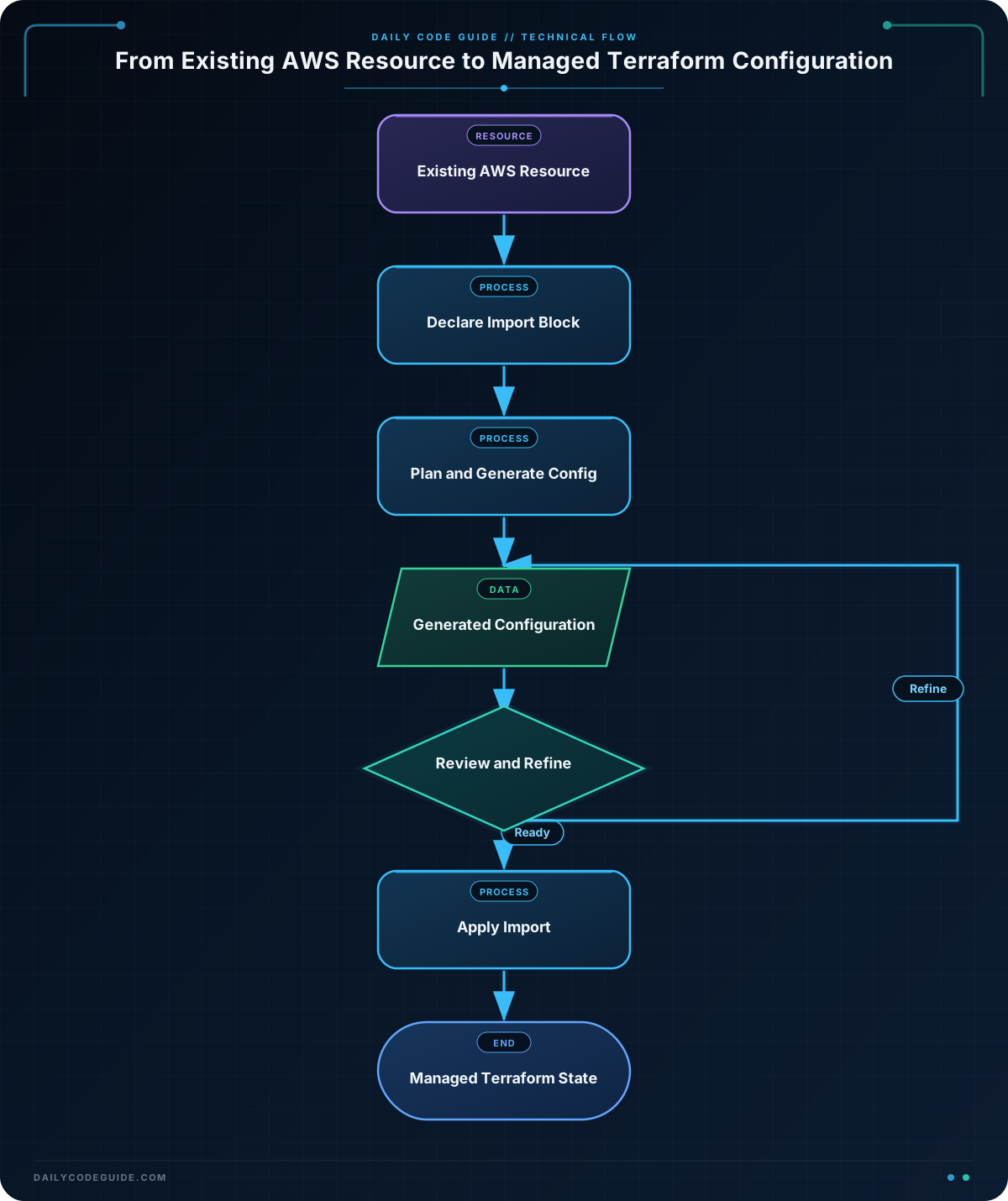
An import block tells Terraform that an existing remote object should be associated with a resource address in your configuration. For example, an existing S3 bucket can be assigned to aws_s3_bucket.audit_logs.
This is different from the traditional terraform import CLI workflow. The CLI command performs an immediate state operation, while an import block is part of your Terraform configuration. Terraform can then show the import during a plan and apply it through the normal workflow.
A basic import block has two important arguments:
- to is the Terraform resource address that will manage the object.
- id is the provider-specific identifier for the existing object.
Importing an object adds it to Terraform state, but it does not automatically create a complete resource configuration. With Terraform 1.5 or later, you can ask Terraform to generate configuration for the imported resource:
terraform plan -generate-config-out=generated.tfThe generated file is a starting point. You should inspect it, remove values that should not be managed, and review the plan before applying anything.
Basic Example
Suppose an S3 bucket named existing-company-audit-logs already exists in AWS. The following configuration declares that Terraform should manage it as aws_s3_bucket.audit_logs.
Replace the bucket name and AWS region with values from your environment. The AWS provider must also have credentials available through a supported method such as environment variables, an AWS profile, or an instance role.
terraform {
  required_version = ">= 1.5.0"

  required_providers {
    aws = {
      source  = "hashicorp/aws"
    }
  }
}

provider "aws" {
  region = "us-east-1"
}

import {
  to = aws_s3_bucket.audit_logs
  id = "existing-company-audit-logs"
}
Initialize the working directory and create a plan that generates the resource configuration:
terraform init
terraform plan -generate-config-out=generated.tf
Expected Output
The exact output depends on your Terraform and AWS provider versions. The plan should identify an import into the requested resource address and report that Terraform will generate configuration in generated.tf.
Plan: 1 to import, 0 to add, 0 to change, 0 to destroy.

Terraform has generated configuration for the imported resource
in generated.tf.
After reviewing the generated file, run a normal plan again. When the generated configuration matches the bucket that is now in state, Terraform should no longer propose an import or unexpected changes.
How the Code Works
The required_version constraint ensures that the example runs with a Terraform version that supports import blocks and configuration generation.
The provider configuration selects AWS and the us-east-1 region. The region must match the region where the existing bucket is available to the AWS provider. AWS S3 bucket names are globally unique, so the identifier in the import block must be the actual bucket name.
The resource address in the to argument does not create a resource by itself. It identifies where Terraform should place the imported object in state. Terraform can generate the missing resource block because the plan includes -generate-config-out.
The generated file may contain provider-specific arguments, including values that are computed or optional. Treat it as generated source code rather than as a finished design. Merge the useful parts into your normal configuration structure, then run:
terraform fmt
terraform plan
Once you have reviewed the plan, apply the import and configuration through the usual workflow:
terraform applyDo not run terraform apply without reviewing the plan. The generated configuration may expose differences between the remote object and the configuration you ultimately want to maintain.
Another Example
Import identifiers vary by AWS resource type. An EC2 security group is commonly imported using its group ID, such as sg-0123456789abcdef0, rather than its display name.
This configuration imports an existing security group for a web tier:
terraform {
  required_version = ">= 1.5.0"

  required_providers {
    aws = {
      source  = "hashicorp/aws"
    }
  }
}

provider "aws" {
  region = "us-west-2"
}

import {
  to = aws_security_group.web
  id = "sg-0123456789abcdef0"
}
Generate the matching resource configuration with a separate output filename:
terraform init
terraform plan -generate-config-out=generated-security-group.tf
The generated configuration should describe the existing security group, including attributes and rules that the AWS provider can read. Review ingress and egress rules carefully because changing a rule in Terraform can change network access for running workloads.
Common Mistakes
- Using the wrong identifier: Import IDs are defined by the provider resource. An S3 bucket usually uses its bucket name, while an EC2 security group uses its group ID. Check the AWS provider documentation for the exact import ID format.
- Confusing state with configuration: Importing an object records it in state, but it does not automatically produce a maintainable resource design unless you generate or write the configuration.
- Using an address that does not match the desired structure: If the final resource should be inside a module, the to address must use that module address, such as module.network.aws_security_group.web.
- Overwriting an existing generated file: -generate-config-out writes to the specified path. Use a new filename or confirm that the file can be replaced before running the command.
- Skipping the post-import plan: A successful import does not prove that the configuration is correct. Run terraform plan after reviewing the generated file and investigate unexpected changes.
Try It Yourself
Choose an existing AWS security group that you are allowed to manage. Create a Terraform configuration that:
- Uses the AWS provider in the region containing the security group.
- Declares an import into aws_security_group.application.
- Uses the security group’s actual ID as the import ID.
- Generates configuration into application-security-group.tf.
After generation, inspect the file and run a normal plan. Do not apply changes until you understand every proposed difference.
Challenge
An existing IAM role named application-runtime is used by an application, but it is not currently managed by Terraform. Write a configuration that:
- Requires Terraform 1.5 or later.
- Uses the AWS provider in eu-west-1.
- Imports the role into aws_iam_role.application_runtime.
- Generates the matching configuration into generated-iam-role.tf.
Then explain which command you would run to review the import before applying it.
Solution
The import ID for this IAM role is its role name. The configuration below declares the import and uses the plan option to generate a resource block.
terraform {
  required_version = ">= 1.5.0"

  required_providers {
    aws = {
      source  = "hashicorp/aws"
    }
  }
}

provider "aws" {
  region = "eu-west-1"
}

import {
  to = aws_iam_role.application_runtime
  id = "application-runtime"
}
Initialize the provider and review the import while asking Terraform to write the generated resource configuration:
terraform init
terraform plan -generate-config-out=generated-iam-role.tf
This works because the import address identifies the Terraform resource that should receive the existing IAM role, while the role name supplies the provider-specific import ID. The plan lets you review the operation before it changes state, and the generated file gives you configuration to refine and keep under version control.
Key Takeaways
- Import blocks declare how an existing remote object maps to a Terraform resource address.
- The import ID is resource-specific; names, IDs, and other identifiers are not interchangeable.
- terraform plan -generate-config-out=… can create an initial resource configuration for an imported object.
- Importing state and designing maintainable configuration are separate tasks.
- Always review the generated configuration and run a normal plan before applying changes.