


What You’ll Learn
In this lesson, you will learn how to use if statements in Bash to make decisions based on whether a file exists.
- Understand how an if statement works in Bash.
- Use
[[ -f ... ]]to test for a regular file. - Use
elseto handle the case where a file is missing. - Build simple file checks for scripts and automation.
The Concept
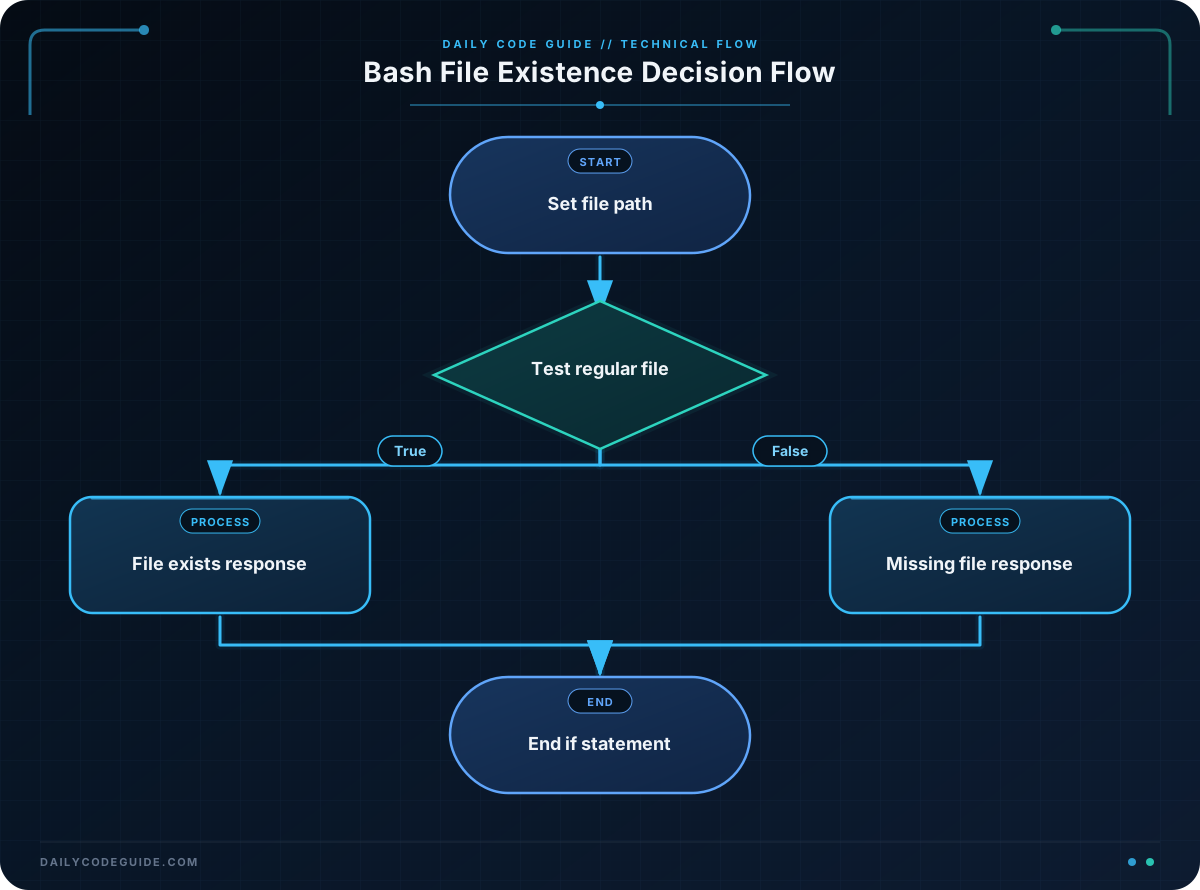
An if statement lets a Bash script choose what to do based on a condition. A condition is an expression that Bash evaluates as either true or false.
When checking files, the -f test returns true when a path exists and refers to a regular file. Regular files include documents, scripts, configuration files, and logs.
A basic Bash if statement has this structure:
if [[ condition ]]; then
    # Commands to run when the condition is true
else
    # Commands to run when the condition is false
fi
Bash uses fi to mark the end of the if statement. The word fi is if written backward.
File checks are useful when a script needs to read a configuration file, process a report, restore a backup, or avoid operating on a file that is not available.
Basic Example
The following script checks a file path. If you provide a path as the first command-line argument, the script checks that path. If you do not provide an argument, it checks /etc/hosts.
#!/usr/bin/env bash

file_path="${1:-/etc/hosts}"

if [[ -f "$file_path" ]]; then
    echo "The file exists: $file_path"
else
    echo "The file does not exist: $file_path"
fi
Expected Output
On a typical Linux or macOS system, /etc/hosts is present. Running the script without an argument produces:
The file exists: /etc/hostsIf you run the script with a path that is not present, the else branch runs instead:
The file does not exist: /definitely-not-a-real-fileHow the Code Works
#!/usr/bin/env bash: This line tells the operating system to use Bash to run the script.
file_path="${1:-/etc/hosts}": $1 contains the first argument passed to the script. The :- syntax supplies /etc/hosts when no first argument is provided.
if [[ -f "$file_path" ]]; then: This starts the conditional check. The -f test checks whether $file_path is an existing regular file.
The double quotation marks around "$file_path" protect the path if it contains spaces or other special characters.
echo: The command inside the first branch runs only when the file exists. The command inside the else branch runs only when the condition is false.
fi: This ends the if statement.
To run this example, save it as check-file.sh, make it executable with chmod +x check-file.sh, and then run it with a file path such as ./check-file.sh /etc/hosts.
Another Example
A backup script might need to know whether a weekly report is available before attempting to back it up. This example reports whether the expected source file is ready.
#!/usr/bin/env bash

backup_source="$HOME/Documents/weekly-report.txt"

if [[ -f "$backup_source" ]]; then
    printf 'Backup source is ready: %s\n' "$backup_source"
else
    printf 'Backup source is missing: %s\n' "$backup_source"
fi
This script does not copy the file yet. It performs the important safety check first, so a larger backup script could add a copy command inside the first branch later.
Common Mistakes
- Forgetting spaces inside the condition: Bash requires spaces around the test expression. Write
[[ -f "$file_path" ]], not[[-f "$file_path"]]. - Forgetting
then: Thethenkeyword must appear after the condition. You can put it on the same line or on the next line. - Forgetting
fi: Every if statement must end withfi. - Using the wrong file test:
-fchecks for a regular file. Use-dwhen you specifically need to check for a directory. - Not quoting file paths: Quoting variables such as
"$file_path"helps the script handle paths containing spaces.
Try It Yourself
Write a Bash script that checks whether a file named notes.txt exists in the current directory.
- If the file exists, print
Notes file found. - If it does not exist, print
Notes file is missing.
Test both branches by running the script once before creating the file and once after creating an empty file with touch notes.txt.
Challenge
Create a script that checks for a file named weekly-report.txt in the current directory.
- Print
Report found. Ready to process.when the file exists. - Print
Report missing. Nothing to process.when the file does not exist. - Store the filename in a variable instead of writing the filename directly inside the condition.
Solution
#!/usr/bin/env bash

report_file="weekly-report.txt"

if [[ -f "$report_file" ]]; then
    echo "Report found. Ready to process."
else
    echo "Report missing. Nothing to process."
fi
The solution stores the filename in report_file, then uses the -f test to choose between the two messages. Only one branch runs each time the script executes.
Key Takeaways
- Bash if statements choose actions based on whether a condition is true or false.
- Use
[[ -f "$file_path" ]]to check whether a regular file exists. - Use
elsefor the file-missing case. - End every Bash if statement with
fi. - Quote file path variables to make checks safer for paths containing spaces.

