


What You’ll Learn
In this lesson, you will learn how Bash pipelines connect commands so that the output from one command becomes the input for the next. You will use pipelines and text-processing commands to find failed HTTP requests in a web server log.
- Understand how the pipe character (
|) connects commands. - Use
grepto filter matching log lines. - Use
awkto select useful fields from each line. - Use
sortanduniqto organize and count results.
The Concept
A Bash pipeline sends the output of one command directly into another command. The pipe character, |, connects the commands:
first_command | second_command | third_commandEach command has a focused job. For example, one command can find lines containing failed requests, another can select only the URL and status code, and a final command can sort the results.
Pipelines are useful when working with command output that contains more information than you need. Web server logs are a good example because a single line may contain an IP address, timestamp, request method, URL, protocol, status code, and response size.
In the examples below, a log line uses a common access-log format:
192.168.1.25 - - [18/Aug/2026:10:14:22] "GET /missing.html HTTP/1.1" 404 512When Bash tools separate this line into fields, the URL is field 6 and the HTTP status code is field 8. We can use those field numbers with awk.
Basic Example
The following script creates a small sample log and then finds requests with 4xx or 5xx status codes. A 4xx code usually indicates a client error, while a 5xx code indicates a server error.
cat > access.log <<'EOF'
192.168.1.25 - - [18/Aug/2026:10:14:22] "GET /index.html HTTP/1.1" 200 2048
192.168.1.26 - - [18/Aug/2026:10:14:29] "GET /missing.html HTTP/1.1" 404 512
192.168.1.27 - - [18/Aug/2026:10:15:02] "POST /login HTTP/1.1" 500 128
192.168.1.28 - - [18/Aug/2026:10:15:11] "GET /images/logo.png HTTP/1.1" 200 4096
192.168.1.29 - - [18/Aug/2026:10:15:45] "GET /admin HTTP/1.1" 403 256
EOF

grep -E 'HTTP/[0-9.]+" [45][0-9][0-9] ' access.log | awk '{print $6, $8}' | sort
Expected Output
/admin 403
/missing.html 404
/login 500
How the Code Works
cat > access.log <<'EOF'creates a file namedaccess.logand writes the sample lines into it. The closingEOFmarks the end of the input.grep -Esearches for lines matching a regular expression. The expression looks for an HTTP protocol followed by a status code beginning with4or5.- The first pipe sends the matching log lines from
greptoawk. awk '{print $6, $8}'prints field 6, the requested URL, and field 8, the status code.- The second pipe sends the shorter results to
sort, which orders them alphabetically by URL.
Notice that each command does one small task. The complete result comes from connecting those tasks together.
Another Example
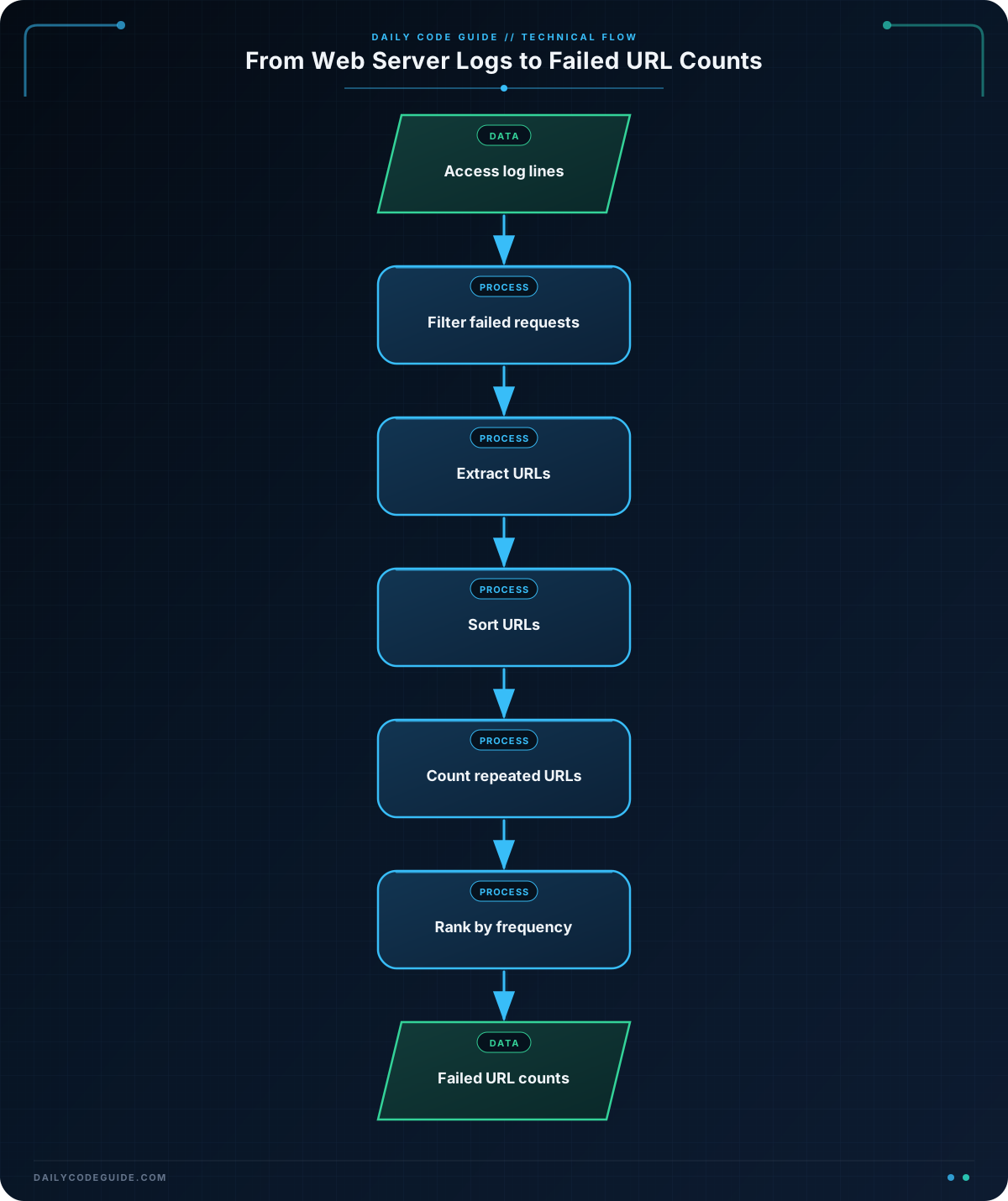
A pipeline can also help answer a different question: which failed URLs appear most often? This example counts repeated failed requests and places the most frequent URL first.
cat > requests.log <<'EOF'
10.0.0.4 - - [18/Aug/2026:11:00:01] "GET /missing.html HTTP/1.1" 404 512
10.0.0.5 - - [18/Aug/2026:11:00:05] "GET /missing.html HTTP/1.1" 404 512
10.0.0.6 - - [18/Aug/2026:11:00:08] "GET /login HTTP/1.1" 500 128
10.0.0.7 - - [18/Aug/2026:11:00:12] "GET /missing.html HTTP/1.1" 404 512
10.0.0.8 - - [18/Aug/2026:11:00:15] "GET /checkout HTTP/1.1" 503 256
10.0.0.9 - - [18/Aug/2026:11:00:20] "GET /login HTTP/1.1" 500 128
EOF

awk '$8 ~ /^[45][0-9][0-9]$/ {print $6}' requests.log | sort | uniq -c | sort -nr
Expected Output
      3 /missing.html
      2 /login
      1 /checkout
Here, awk filters the status code directly, so a separate grep command is not needed. The URL is then sorted so that uniq -c can count adjacent identical lines. Finally, sort -nr sorts the counts numerically in reverse order.
Common Mistakes
- Forgetting that
uniqcounts adjacent lines only: Sort the values before usinguniq -c. Otherwise, identical URLs separated by other URLs may not be counted together. - Using the wrong field number: Log formats can differ. In this lesson’s format, the URL is field 6 and the status code is field 8. Check a sample line before writing an
awkexpression. - Confusing the pipe with a file redirect: A pipe,
|, sends output to another command. A greater-than sign,>, writes output to a file and does not create a pipeline. - Searching for only one status code: A pattern such as
404finds only missing-page errors. The patterns4[0-9][0-9]and5[0-9][0-9]match the complete 4xx and 5xx ranges.
Try It Yourself
Use the access.log file from the basic example. Build a pipeline that prints only the URLs for failed requests, without printing their status codes. Then sort the URLs alphabetically.
One possible plan is to use grep to find 4xx and 5xx lines, awk to print field 6, and sort to organize the result.
Challenge
Using access.log from the basic example, create a pipeline that:
- Shows only server errors, meaning status codes in the 5xx range.
- Prints the status code before the URL.
- Sorts the results by status code from lowest to highest.
For the sample data, the result should contain the 500 login request and should not contain the 404 or 403 requests.
Solution
awk '$8 ~ /^5[0-9][0-9]$/ {print $8, $6}' access.log | sort -nThe awk command keeps lines whose field 8 starts with 5 and has three digits. It prints the status code first and the URL second. The pipe sends that output to sort -n, which performs a numeric sort instead of an alphabetic sort.
Expected Output
500 /loginKey Takeaways
- A Bash pipeline uses
|to send one command’s output into another command. grepfilters lines, whileawkcan select specific fields.sortorganizes text, anduniq -ccounts repeated adjacent lines.- Always confirm the field positions used by
awkbecause log formats may vary. - Small commands become powerful when combined into a clear pipeline.

