


What You’ll Learn
In this lesson, you’ll learn how Terraform modules package reusable infrastructure so the same design can be configured for development, staging, and production.
- Understand the structure of a reusable module.
- Pass variables into a module and expose outputs from it.
- Call one module with different environment-specific settings.
- Recognize common module organization and maintenance mistakes.
The Concept
A Terraform module is a directory containing Terraform configuration that can be reused as a unit. Every Terraform configuration is technically a module: the directory where you run Terraform is the root module, and directories referenced with a module block are child modules.
Modules are useful when several environments need similar infrastructure. Instead of copying an S3 bucket definition into separate development, staging, and production directories, you can define the bucket once and pass in values such as the environment name, project name, and tags.
A useful module normally has three responsibilities:
- Variables: Inputs that allow callers to configure the module.
- Resources: The infrastructure that the module creates.
- Outputs: Values that the calling configuration can use.
The caller should configure environment-specific values, while the module should contain the reusable infrastructure design. This separation makes changes easier to review and keeps environments consistent.
Basic Example
Suppose every environment needs an S3 bucket for application assets. We can package the bucket into a module and use it from a root configuration.
The project has this structure:
.
├── main.tf
├── variables.tf
├── outputs.tf
└── modules
    └── environment_bucket
        ├── main.tf
        ├── variables.tf
        └── outputs.tf
First, define the reusable resource in modules/environment_bucket/main.tf:
resource "aws_s3_bucket" "this" {
    bucket_prefix = "${var.project_name}-${var.environment}-"

    tags = merge(
        var.tags,
        {
            Environment = var.environment
            ManagedBy   = "Terraform"
        }
    )
}
Declare the module’s inputs in modules/environment_bucket/variables.tf:
variable "project_name" {
    type        = string
    description = "Name of the project that owns the bucket."
}

variable "environment" {
    type        = string
    description = "Deployment environment such as dev, staging, or prod."
}

variable "tags" {
    type        = map(string)
    description = "Additional tags for the bucket."
    default     = {}
}
Expose useful information from the module in modules/environment_bucket/outputs.tf:
output "bucket_name" {
    description = "Name of the created assets bucket."
    value       = aws_s3_bucket.this.bucket
}

output "bucket_arn" {
    description = "ARN of the created assets bucket."
    value       = aws_s3_bucket.this.arn
}
Now configure the AWS provider and call the module from the root module’s main.tf:
terraform {
    required_version = ">= 1.5.0"

    required_providers {
        aws = {
            source  = "hashicorp/aws"
            version = "~> 5.0"
        }
    }
}

provider "aws" {
    region = var.aws_region
}

module "assets_bucket" {
    source = "./modules/environment_bucket"

    project_name = var.project_name
    environment  = var.environment

    tags = {
        Team = "platform"
    }
}
Define the root module’s variables in variables.tf:
variable "aws_region" {
    type        = string
    description = "AWS region where the bucket will be created."
    default     = "us-east-1"
}

variable "project_name" {
    type        = string
    description = "Name of the application."
    default     = "catalog"
}

variable "environment" {
    type        = string
    description = "Deployment environment."
    default     = "dev"
}
Finally, expose the child module’s output from the root module in outputs.tf:
output "assets_bucket_name" {
    description = "Name of the environment assets bucket."
    value       = module.assets_bucket.bucket_name
}

output "assets_bucket_arn" {
    description = "ARN of the environment assets bucket."
    value       = module.assets_bucket.bucket_arn
}
After setting up AWS credentials, run Terraform from the root directory:
terraform init
terraform plan
terraform apply
Expected Output
The apply operation creates one S3 bucket whose generated name begins with the project and environment prefix, such as catalog-dev-. Terraform also displays the bucket name and ARN through the root module outputs.
How the Code Works
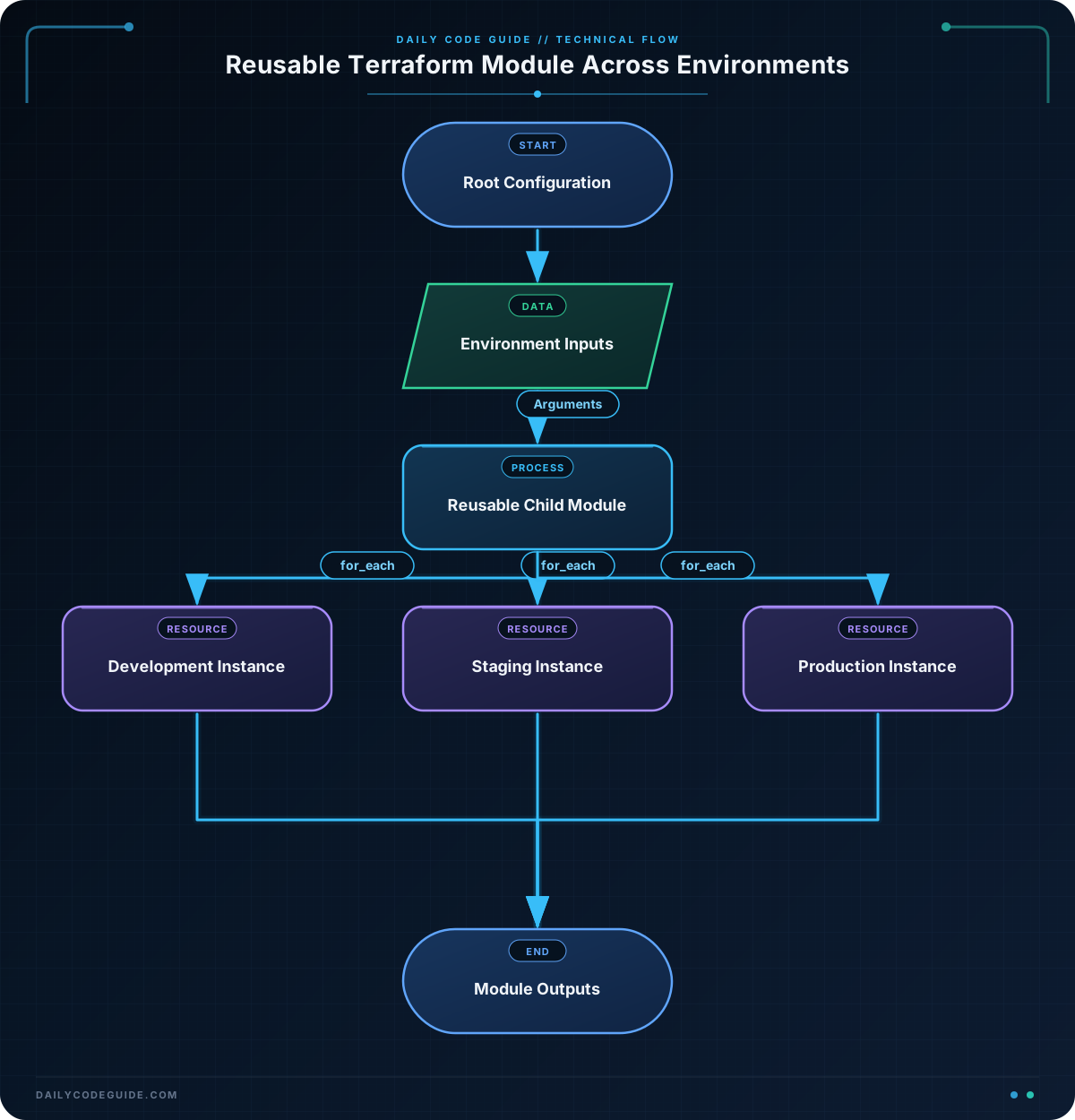
The child module does not define its own AWS provider configuration. It automatically receives the provider configured by the root module. This is generally preferable because the root module controls provider settings such as the region and account.
The source argument tells Terraform where to find the module. A relative path beginning with ./ refers to a local directory. Modules can also come from registries, Git repositories, or other supported sources.
These arguments map root-module values to child-module variables:
project_name = var.project_name
environment  = var.environment
Inside the module, var.project_name and var.environment receive those values. The module uses them to create a predictable bucket prefix and environment tag.
The merge function combines caller-provided tags with tags required by the module. If both maps contain the same key, the later map wins. In this example, the module always controls Environment and ManagedBy.
Outputs create a public interface for the module. The root module cannot directly use a child module’s internal resource as though it were declared in the root. Instead, it accesses values through expressions such as module.assets_bucket.bucket_name.
Another Example
Modules are not limited to one resource. The following module packages environment monitoring: a CloudWatch log group and an SNS topic for alerts. The root module uses for_each to create the same monitoring design for several environments while providing different retention periods.
In modules/environment_monitoring/main.tf:
resource "aws_cloudwatch_log_group" "application" {
    name              = "/applications/${var.project_name}/${var.environment}"
    retention_in_days = var.retention_days

    tags = {
        Environment = var.environment
        ManagedBy   = "Terraform"
    }
}

resource "aws_sns_topic" "alerts" {
    name = "${var.project_name}-${var.environment}-alerts"

    tags = {
        Environment = var.environment
        ManagedBy   = "Terraform"
    }
}
Its inputs are declared in modules/environment_monitoring/variables.tf:
variable "project_name" {
    type = string
}

variable "environment" {
    type = string
}

variable "retention_days" {
    type        = number
    description = "Number of days to retain application logs."
}
The module exposes both resource identifiers in modules/environment_monitoring/outputs.tf:
output "log_group_name" {
    value = aws_cloudwatch_log_group.application.name
}

output "alerts_topic_arn" {
    value = aws_sns_topic.alerts.arn
}
The root module can now configure all environments from one map:
terraform {
    required_providers {
        aws = {
            source  = "hashicorp/aws"
            version = "~> 5.0"
        }
    }
}

provider "aws" {
    region = "us-east-1"
}

variable "project_name" {
    type    = string
    default = "catalog"
}

locals {
    environments = {
        dev = {
            retention_days = 7
        }
        staging = {
            retention_days = 14
        }
        prod = {
            retention_days = 30
        }
    }
}

module "monitoring" {
    for_each = local.environments
    source   = "./modules/environment_monitoring"

    project_name   = var.project_name
    environment    = each.key
    retention_days = each.value.retention_days
}

output "monitoring_log_groups" {
    value = {
        for environment, monitoring in module.monitoring :
        environment => monitoring.log_group_name
    }
}

output "alert_topics" {
    value = {
        for environment, monitoring in module.monitoring :
        environment => monitoring.alerts_topic_arn
    }
}
Here, Terraform creates three instances of the module. The module implementation stays the same, but each.key supplies the environment name and each.value.retention_days supplies the environment-specific configuration.
Common Mistakes
- Forgetting to run
terraform init: Terraform must initialize local modules and download required providers before planning or applying. - Hard-coding environment values inside the module: A module containing
environment = "prod"cannot be reused safely for development. Pass environment-specific values from the caller instead. - Expecting internal resources to be available directly: Child resources should be exposed through outputs. Use
module.module_name.output_namefrom the caller. - Configuring providers unnecessarily inside child modules: Provider configuration in a child module can make it harder to reuse the module across accounts or regions. Keep provider configuration in the root module unless the module has a specific reason to require an aliased provider.
- Using a non-unique S3 bucket name: S3 bucket names are globally unique. The
bucket_prefixargument helps Terraform generate a unique suffix, but real projects may also include an account or organization identifier in the prefix.
Try It Yourself
Modify the assets bucket module so that the bucket receives an additional CostCenter tag from the root module. Pass the value through a new root variable, and verify that the module’s merge expression includes it when you run terraform plan.
Challenge
Create a reusable secure-assets module with the following requirements:
- Create an S3 bucket using a project name and environment name.
- Enable S3 versioning.
- Enable server-side encryption using AES256.
- Accept a
force_destroyboolean and a map of additional tags. - Call the module once for each of
dev,staging, andprodusingfor_each. - Set
force_destroytotrueonly for development. - Output a map of environment names to bucket names.
Solution
Place the following files in modules/secure_assets. The module combines the bucket with separate versioning and encryption resources:
resource "aws_s3_bucket" "this" {
    bucket_prefix = "${var.project_name}-${var.environment}-"
    force_destroy = var.force_destroy

    tags = merge(
        var.tags,
        {
            Environment = var.environment
            ManagedBy   = "Terraform"
        }
    )
}

resource "aws_s3_bucket_versioning" "this" {
    bucket = aws_s3_bucket.this.id

    versioning_configuration {
        status = "Enabled"
    }
}

resource "aws_s3_bucket_server_side_encryption_configuration" "this" {
    bucket = aws_s3_bucket.this.id

    rule {
        apply_server_side_encryption_by_default {
            sse_algorithm = "AES256"
        }
    }
}

variable "project_name" {
    type = string
}

variable "environment" {
    type = string
}

variable "force_destroy" {
    type    = bool
    default = false
}

variable "tags" {
    type    = map(string)
    default = {}
}

output "bucket_name" {
    value = aws_s3_bucket.this.bucket
}
The root configuration can use the module for all three environments:
terraform {
    required_providers {
        aws = {
            source  = "hashicorp/aws"
            version = "~> 5.0"
        }
    }
}

provider "aws" {
    region = "us-east-1"
}

variable "project_name" {
    type    = string
    default = "catalog"
}

locals {
    environments = {
        dev = {
            force_destroy = true
        }
        staging = {
            force_destroy = false
        }
        prod = {
            force_destroy = false
        }
    }
}

module "secure_assets" {
    for_each = local.environments
    source   = "./modules/secure_assets"

    project_name   = var.project_name
    environment    = each.key
    force_destroy  = each.value.force_destroy

    tags = {
        Team        = "platform"
        DataClass   = "application-assets"
    }
}

output "asset_buckets" {
    value = {
        for environment, assets in module.secure_assets :
        environment => assets.bucket_name
    }
}
The module is reusable because it defines the security behavior once, while the root module decides how each environment differs. Development can allow Terraform to delete a non-production bucket during teardown, while staging and production retain the safer default.
Key Takeaways
- A module packages reusable Terraform resources, variables, and outputs.
- The root module supplies environment-specific configuration through module arguments.
- Child module values should be exposed through outputs and read with
module.name.output. - Local modules use a relative
sourcepath, while shared modules can use registries or versioned repositories. for_eachlets one module configuration create consistent infrastructure for multiple environments.

