


What You’ll Learn
In this lesson, you will learn how to read information from a plain-text file and write new information to another file. You will use a daily application log to create a simple summary report.
- Open a text file safely with
with open(...). - Read lines from a file.
- Count different log message types.
- Create and write a summary report.
- Handle a missing input file with
FileNotFoundError.
The Concept
A text file stores characters such as letters, numbers, spaces, and line breaks. Common text files include application logs, configuration files, notes, and reports.
Python uses the built-in open() function to work with files. When opening a file, you provide its filename and a mode:
"r"reads an existing file."w"writes to a file, replacing its existing contents."a"appends new content to the end of a file.
The recommended pattern is a with statement. Python automatically closes the file when the indented block finishes, even if an error occurs.
For text files, it is also good practice to specify encoding="utf-8". This tells Python how to interpret the file’s characters.
Basic Example
Imagine that an application creates a file named daily_app.log. Each line records an event and includes a log level such as INFO, WARNING, or ERROR.
Create daily_app.log with this sample content in the same folder as your Python program:
2026-08-18 09:00 INFO Application started
2026-08-18 09:12 INFO User signed in
2026-08-18 09:30 WARNING Slow response from payment service
2026-08-18 10:05 ERROR Database connection failed
2026-08-18 10:20 INFO User signed out
2026-08-18 10:45 ERROR Email service unavailable
Now run this Python program to read the log and write a report named daily_report.txt:
log_file = "daily_app.log"
report_file = "daily_report.txt"

try:
    with open(log_file, "r", encoding="utf-8") as log:
        log_lines = log.readlines()

    info_count = 0
    warning_count = 0
    error_count = 0

    for line in log_lines:
        if " INFO " in line:
            info_count += 1
        elif " WARNING " in line:
            warning_count += 1
        elif " ERROR " in line:
            error_count += 1

    report_lines = [
        "Daily Application Report",
        "========================",
        f"Info messages: {info_count}",
        f"Warning messages: {warning_count}",
        f"Error messages: {error_count}",
    ]

    with open(report_file, "w", encoding="utf-8") as report:
        report.write("\n".join(report_lines))
        report.write("\n")

    print(f"Report written to {report_file}")

except FileNotFoundError:
    print(f"Could not find {log_file}")
Expected Output
Report written to daily_report.txtThe program creates daily_report.txt with this content:
Daily Application Report
========================
Info messages: 3
Warning messages: 1
Error messages: 2
How the Code Works
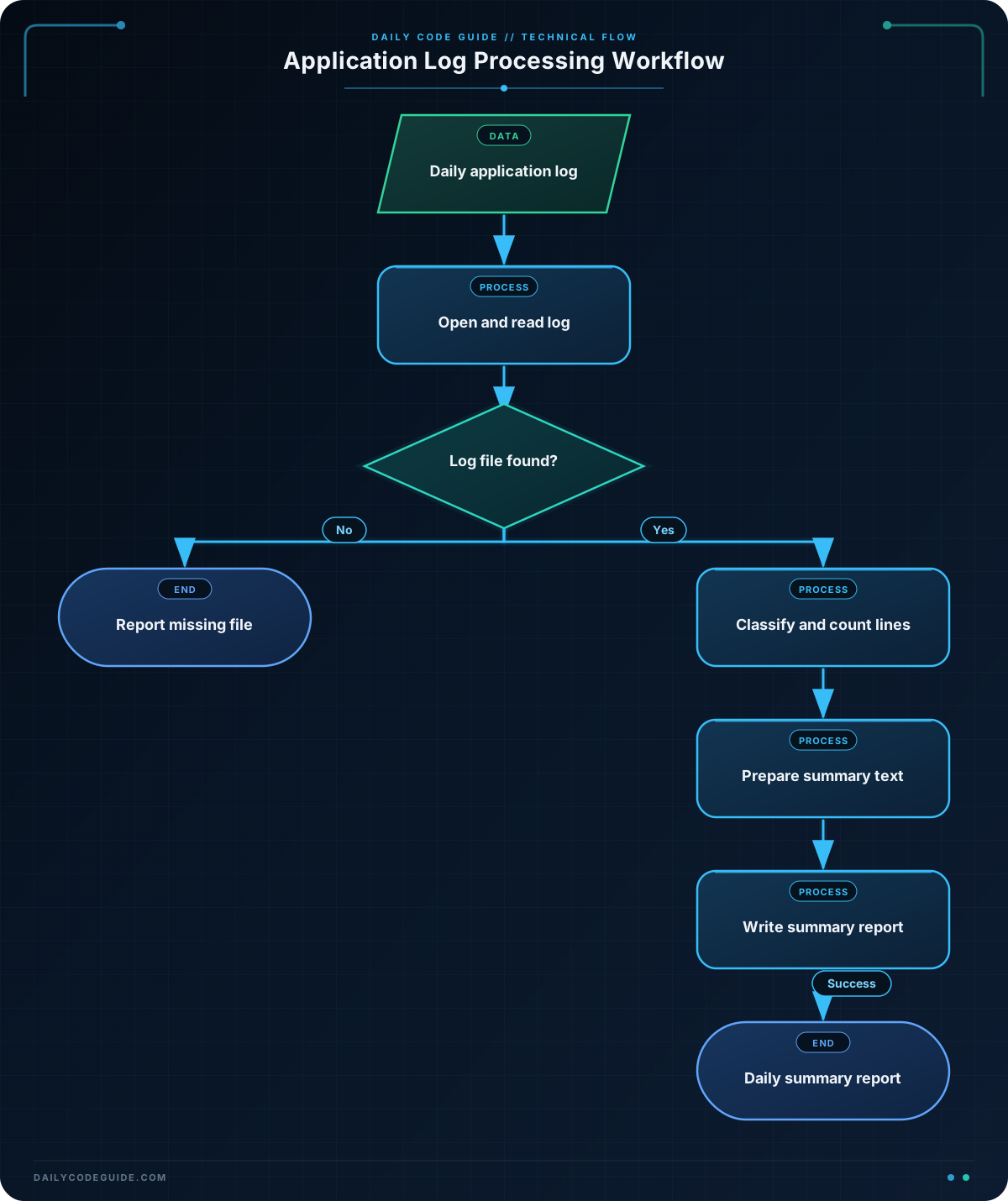
Opening and reading the log
This statement opens the log in read mode:
with open(log_file, "r", encoding="utf-8") as log:The filename comes from the log_file variable. The "r" mode means that Python will read the file without changing it. The name log represents the open file inside the with block.
The readlines() method reads all lines and returns them as a list. Each list item represents one line from the log:
log_lines = log.readlines()Counting message types
The for loop examines each line. For example, " ERROR " in line checks whether the line contains the word ERROR surrounded by spaces. If it does, the program increases error_count by one.
The elif statements ensure that each line is counted as only one message type.
Preparing the report
report_lines is a list of strings. The f-strings insert the current counts into the report text.
"\n".join(report_lines) combines the list items into one string, placing a newline between each item.
Writing the report
This statement opens the report in write mode:
with open(report_file, "w", encoding="utf-8") as report:Write mode creates the file if it does not exist. If the file already exists, it replaces the old contents. The write() method then saves the report text.
Finally, the try and except statements handle a missing log file. Instead of stopping with an error message from Python, the program prints a friendlier message.
Another Example
A useful variation is creating a separate file that contains only error entries. This lets someone quickly review serious problems without reading every normal activity message.
This program reads daily_app.log, collects lines containing ERROR, and writes them to error_entries.txt:
log_file = "daily_app.log"
error_file = "error_entries.txt"

try:
    with open(log_file, "r", encoding="utf-8") as log:
        error_lines = []

        for line in log:
            if " ERROR " in line:
                error_lines.append(line.strip())

    with open(error_file, "w", encoding="utf-8") as errors:
        if error_lines:
            errors.write("\n".join(error_lines))
            errors.write("\n")
        else:
            errors.write("No errors found.\n")

    print(f"Saved {len(error_lines)} error entries to {error_file}")

except FileNotFoundError:
    print(f"Could not find {log_file}")
This example uses the file itself as the loop source. Python reads one line at a time, which is often a convenient way to process text files. It also uses write mode for the new error file.
Common Mistakes
- Using the wrong filename: Make sure
daily_app.logis in the folder where you run the program, or provide the correct path. - Forgetting the file mode: Use
"r"to read,"w"to replace a file, and"a"to add to the end. - Accidentally replacing a file: Opening an existing report with
"w"erases its previous contents. Use"a"when you need to append instead. - Writing a list directly:
write()expects one string, not a list of strings. Use"\n".join(lines)to combine lines first. - Leaving newline characters in unexpected places: Lines read from a file usually end with
\n. Useline.strip()when you need to remove surrounding whitespace.
Try It Yourself
Modify the first program so that the report also includes the total number of log entries. Add a line such as Total entries: 6 near the top of the report.
Remember that len(log_lines) gives the number of lines read from the log.
Challenge
Write a program that reads daily_app.log and creates a file named warning_entries.txt.
- Include only lines containing
WARNING. - Write one warning entry per line.
- If there are no warnings, write
No warnings found.. - Print how many warning entries were saved.
- Handle a missing
daily_app.logfile withFileNotFoundError.
Solution
log_file = "daily_app.log"
warning_file = "warning_entries.txt"

try:
    with open(log_file, "r", encoding="utf-8") as log:
        warning_lines = []

        for line in log:
            if " WARNING " in line:
                warning_lines.append(line.strip())

    with open(warning_file, "w", encoding="utf-8") as warnings:
        if warning_lines:
            warnings.write("\n".join(warning_lines))
            warnings.write("\n")
        else:
            warnings.write("No warnings found.\n")

    print(f"Saved {len(warning_lines)} warning entries to {warning_file}")

except FileNotFoundError:
    print(f"Could not find {log_file}")
The program reads the log one line at a time, saves matching warning lines in a list, and writes that list to the output file. With the sample log, it creates a file containing one warning entry and prints:
Saved 1 warning entries to warning_entries.txtKey Takeaways
- Use
open(filename, "r", encoding="utf-8")to read a text file. - Use a
withstatement so Python closes the file automatically. - Use
"w"to create or replace a file and"a"to append to one. - Read lines with
readlines()or loop directly over the open file. - Handle
FileNotFoundErrorwhen an expected input file may be missing.

