


What You’ll Learn
In this beginner pytest tutorial, you will learn how to install pytest, write repeatable tests for a Python function, organize test files, and run those tests from the command line.
- Understand what a unit test is and why automated tests are useful.
- Create a shopping discount calculator and tests for it.
- Use Python’s
assertstatement with pytest. - Follow pytest’s file and function naming conventions.
- Run tests and interpret the result.
The Concept
A test checks whether code behaves as expected. A unit test checks one small part of a program, such as a single function.
For example, a shopping discount calculator should return the correct final price when a customer receives a 20 percent discount. Instead of checking this manually every time the function changes, you can write a test once and run it whenever you need to verify the code.
pytest is a popular Python testing tool. It finds test files automatically, runs test functions, and reports which checks passed or failed.
Install it in your project environment with pip:
python -m pip install pytestPytest looks for files whose names begin with test_ or end with _test.py. Inside those files, it looks for functions whose names begin with test_.
Basic Example
Suppose a store gives customers a percentage discount. Create a project with these two files:
discount.pycontains the code being tested.test_discount.pycontains the automated tests.
First, add the calculator to discount.py:
def calculate_discount(price, discount_percent):
    discount_amount = price * discount_percent / 100
    return price - discount_amount
Next, create test_discount.py in the same directory:
from discount import calculate_discount


def test_twenty_percent_discount():
    final_price = calculate_discount(100, 20)
    assert final_price == 80


def test_no_discount():
    final_price = calculate_discount(75, 0)
    assert final_price == 75


def test_discount_on_decimal_price():
    final_price = calculate_discount(49.99, 10)
    assert final_price == 44.991
Run the tests from the project directory:
python -m pytest -qExpected Output
The exact timing may differ, but a successful run should report that three tests passed:
...                                                                      [100%]
3 passed in 0.01s
How the Code Works
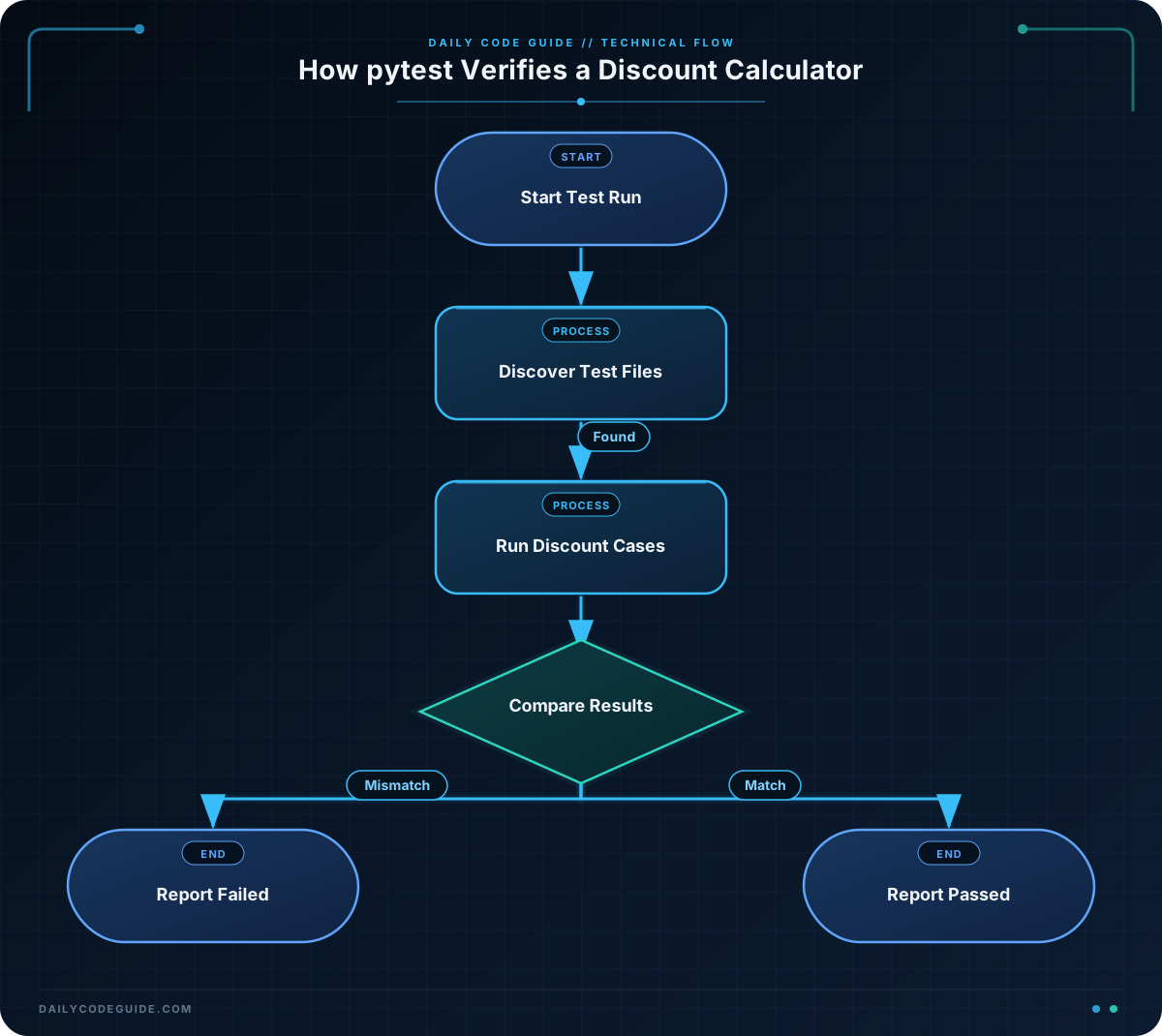
The function in discount.py receives the original price and the discount percentage. It calculates the discount amount, subtracts that amount from the original price, and returns the final price.
Each test follows a simple pattern:
- Arrange: provide an input price and discount.
- Act: call
calculate_discount(). - Assert: check that the returned value is correct.
For example, this line calls the function:
final_price = calculate_discount(100, 20)The next line checks the result:
assert final_price == 80An assert statement passes when its condition is true. If final_price is not 80, pytest marks the test as failed and shows useful details.
The import statement connects the test file to the code being tested:
from discount import calculate_discountKeeping application code and test code in separate files makes the project easier to organize. As the project grows, you can place tests in a tests directory. For this small example, keeping both files together makes Python’s import behavior easy to understand.
Another Example
A store may use different discount rates for different order totals. This example uses pytest.mark.parametrize to run the same test logic with several sets of shopping data.
Add this function to a file named tiered_discount.py:
def calculate_tiered_discount(price):
    if price >= 200:
        discount_percent = 20
    elif price >= 100:
        discount_percent = 10
    else:
        discount_percent = 0

    discount_amount = price * discount_percent / 100
    return price - discount_amount
Now create test_tiered_discount.py:
import pytest

from tiered_discount import calculate_tiered_discount


@pytest.mark.parametrize(
    "price, expected_final_price",
    [
        (50, 50),
        (100, 90),
        (250, 200),
    ],
)
def test_tiered_discount(price, expected_final_price):
    assert calculate_tiered_discount(price) == expected_final_price
parametrize tells pytest to run the test once for each row of data. This gives you several checks without writing three separate test functions.
Run this test file directly:
python -m pytest -q test_tiered_discount.pyCommon Mistakes
- Using the wrong file name: pytest may not discover a file named
discount_tests.py. Rename it totest_discount.pyor use a name ending in_test.py. - Using the wrong function name: test functions must start with
test_, such astest_no_discount. - Running pytest from the wrong directory: change to the directory containing your project files before running the command.
- Testing the wrong expected value: calculate the expected result independently. A test that repeats the same mistake as the function may pass without proving much.
- Comparing complicated decimal calculations carelessly: decimal values can sometimes contain tiny floating-point differences. For simple beginner examples, direct comparison is understandable, but larger financial applications should use a suitable money representation such as
decimal.Decimal.
Try It Yourself
Create a new test in test_discount.py for a 25 percent discount on a price of 80. The expected final price is 60.
Run the test with:
python -m pytest -qChallenge
Write and test a function named calculate_member_discount in a file named member_discount.py.
- The function accepts
priceandis_member. - Members receive a 15 percent discount.
- Non-members receive no discount.
- Create
test_member_discount.pywith one test for a member and one test for a non-member. - Run both tests with pytest.
Solution
Put the calculator in member_discount.py:
def calculate_member_discount(price, is_member):
    if is_member:
        discount_amount = price * 15 / 100
        return price - discount_amount

    return price
Then put the tests in test_member_discount.py:
from member_discount import calculate_member_discount


def test_member_receives_discount():
    final_price = calculate_member_discount(200, True)
    assert final_price == 170


def test_non_member_pays_full_price():
    final_price = calculate_member_discount(200, False)
    assert final_price == 200
Run the challenge tests from the directory containing both files:
python -m pytest -q test_member_discount.pyThe solution tests both possible membership values. If the discount logic changes accidentally, pytest will identify the failing behavior quickly.
Key Takeaways
- Pytest runs repeatable checks against your Python code.
- Test files and test functions should use names beginning with
test_so pytest can discover them. - Use
assertto compare a function’s actual result with the expected result. - Run tests with
python -m pytestfrom your project directory. - Parameterized tests let you check several input and output combinations with one test function.

