


What You’ll Learn
In this lesson, you will learn how Terraform provisioners can run commands after a resource is created. You will configure an SSH connection for a remote-exec provisioner, control its ordering, understand what happens when commands fail, and recognize when a safer alternative is a better choice.
- Use
remote-execto bootstrap a newly created cloud server. - Configure SSH connection details with Terraform expressions.
- Understand provisioner ordering and failure behavior.
- Use triggers to run a remote validation step when a deployment version changes.
- Choose between provisioners, cloud-init, image baking, and configuration management.
The Concept
A Terraform provisioner performs an action on a resource after Terraform creates it. The remote-exec provisioner connects to a remote machine over SSH or WinRM and runs commands there.
This can be useful for a controlled bootstrap, such as installing a small package set, creating a marker file, or checking that a service is running immediately after a server is available.
Terraform waits for the resource to be created before running a provisioner attached to that resource. However, creation does not necessarily mean that the operating system and every service are ready. Your connection settings and bootstrap commands must account for that delay.
Provisioners are generally considered a last resort because Terraform is primarily designed to manage infrastructure state, not to perform ongoing configuration management. When possible, prefer cloud-init or another image and configuration-management approach. A provisioner is still reasonable for a small, controlled post-creation action when those alternatives are unavailable or disproportionate.
Basic Example
The following configuration creates an AWS security group and EC2 instance, then uses the remote-exec provisioner to install and start Nginx. The example assumes an Ubuntu AMI, a public subnet, and an SSH key that allows the ubuntu user to connect.
terraform {
  required_version = ">= 1.4.0"

  required_providers {
    aws = {
      source  = "hashicorp/aws"
      version = "~> 5.0"
    }
  }
}

provider "aws" {
  region = var.aws_region
}

variable "aws_region" {
  type        = string
  description = "AWS region where the server will be created."
  default     = "us-east-1"
}

variable "vpc_id" {
  type        = string
  description = "ID of the VPC for the server."
}

variable "subnet_id" {
  type        = string
  description = "ID of a public subnet with internet access."
}

variable "ami_id" {
  type        = string
  description = "Ubuntu AMI ID for the selected AWS region."
}

variable "key_name" {
  type        = string
  description = "Name of the EC2 key pair."
}

variable "private_key_path" {
  type        = string
  description = "Local path to the private SSH key."
}

variable "admin_cidr" {
  type        = string
  description = "CIDR range allowed to connect over SSH."
}

resource "aws_security_group" "bootstrap" {
  name        = "controlled-bootstrap"
  description = "Allow SSH for the Terraform bootstrap connection"
  vpc_id      = var.vpc_id

  ingress {
    description = "SSH from the administration network"
    from_port   = 22
    to_port     = 22
    protocol    = "tcp"
    cidr_blocks = [var.admin_cidr]
  }

  egress {
    description = "Allow outbound traffic for package installation"
    from_port   = 0
    to_port     = 0
    protocol    = "-1"
    cidr_blocks = ["0.0.0.0/0"]
  }
}

resource "aws_instance" "web" {
  ami                         = var.ami_id
  instance_type               = "t3.micro"
  subnet_id                   = var.subnet_id
  associate_public_ip_address = true
  key_name                    = var.key_name

  vpc_security_group_ids = [aws_security_group.bootstrap.id]

  tags = {
    Name = "remote-exec-bootstrap"
  }

  provisioner "remote-exec" {
    inline = [
      "sudo apt-get update",
      "sudo DEBIAN_FRONTEND=noninteractive apt-get install -y nginx",
      "sudo systemctl enable nginx",
      "sudo systemctl start nginx",
      "sudo sh -c 'date -u +%Y-%m-%dT%H:%M:%SZ > /var/lib/bootstrap-complete'"
    ]

    connection {
      type        = "ssh"
      host        = self.public_ip
      user        = "ubuntu"
      private_key = file(var.private_key_path)
      timeout     = "5m"
    }
  }
}
Expected Output
The exact Terraform output depends on the AWS account and resource IDs. After a successful apply, the instance exists, Nginx is installed and running, and the server contains /var/lib/bootstrap-complete. Terraform also records the instance and its completed creation provisioner in state.
Run the configuration with values appropriate for your AWS account:
terraform init
terraform apply
How the Code Works
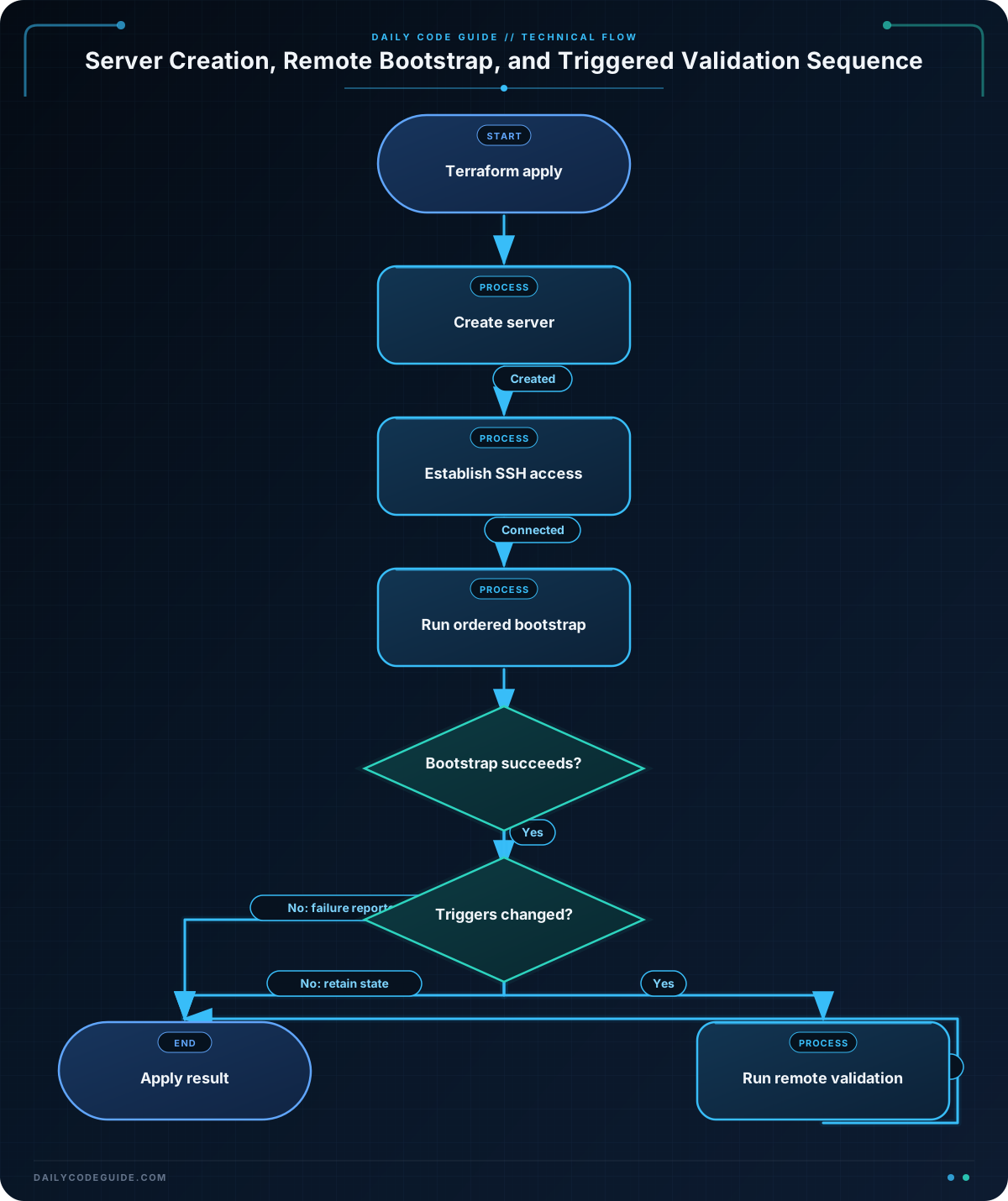
The security group permits SSH only from var.admin_cidr. Restricting this value to an administration network is safer than allowing SSH from 0.0.0.0/0. The instance also needs outbound access so that apt-get can reach the Ubuntu package repositories.
The instance’s vpc_security_group_ids references the security group, so Terraform knows the security group must exist before the instance can be created. The provisioner is attached directly to aws_instance.web, so Terraform runs it after the instance creation operation.
Inside the connection block:
host = self.public_ipuses the public IP of the instance currently being created.user = "ubuntu"selects the default SSH account for the Ubuntu image.private_key = file(var.private_key_path)loads the local private key used for authentication.timeout = "5m"gives the operating system time to boot and begin accepting SSH connections.
The inline list sends commands in order. Nginx is installed first, enabled to start during future boots, started immediately, and then marked as complete. The marker file gives later automation or troubleshooting a simple way to determine whether this bootstrap reached its final step.
If a command fails, Terraform normally reports the provisioner failure and marks the resource as tainted so that a later plan can replace it. This is often safer than silently accepting a server that was only partially configured. You can set on_failure = "continue", but doing so means Terraform may consider the resource created even though the bootstrap failed. Use that option only when partial completion is acceptable and another system will detect and repair the problem.
Another Example
A provisioner does not have to install the application itself. A useful pattern is to perform a separate post-bootstrap validation step. The terraform_data resource below runs a local script remotely whenever the instance ID or deployment version changes.
First, create the validation script at scripts/verify-bootstrap.sh:
#!/usr/bin/env bash
set -euo pipefail

test -f /var/lib/bootstrap-complete
sudo systemctl is-active --quiet nginx
sudo systemctl is-enabled --quiet nginx

printf 'Bootstrap validation passed.\n'
Then add this Terraform configuration to the same configuration that defines aws_instance.web:
variable "deployment_version" {
  type        = string
  description = "Version label used to rerun the remote validation."
  default     = "2025-01-01"
}

resource "terraform_data" "bootstrap_validation" {
  triggers_replace = [
    aws_instance.web.id,
    var.deployment_version
  ]

  provisioner "remote-exec" {
    script = "${path.module}/scripts/verify-bootstrap.sh"

    connection {
      type        = "ssh"
      host        = aws_instance.web.public_ip
      user        = "ubuntu"
      private_key = file(var.private_key_path)
      timeout     = "5m"
    }
  }
}
The instance ID forces validation after a replacement server is created. Changing deployment_version also replaces the terraform_data resource, causing its provisioner to run again. This gives the validation an explicit rerun control instead of relying on an arbitrary configuration change.
Common Mistakes
- Using the wrong SSH user: Ubuntu images commonly use
ubuntu, while other distributions may useec2-user,admin, or another account. The user must match the selected image. - Connecting before the server is reachable: A created instance may still be booting. Use a reasonable connection timeout, and make sure the image eventually starts SSH. A timeout does not fix a blocked security group or an incorrect route.
- Opening SSH to the entire internet: Avoid
0.0.0.0/0for administrative access. Use a trusted CIDR range, a private network path, or a bastion architecture. - Assuming provisioners are continuously convergent: Terraform does not automatically rerun a creation provisioner every time a command changes. Provisioners run according to resource lifecycle events. Use explicit triggers, such as the
terraform_datapattern above, when a rerun is intentional. - Ignoring partial failure: A package installation can succeed while a later service command fails. Keep bootstrap commands small and observable, and decide deliberately whether a failed provisioner should prevent the deployment from being accepted.
- Storing sensitive connection material carelessly: Protect private key files and Terraform state. Do not commit private keys or place them directly in source-controlled Terraform files.
Try It Yourself
Starting with the first example, change the remote commands so that the server also creates a file at /etc/motd.d/bootstrap containing the text Managed by Terraform. Keep the command sequence safe for a shell running with sudo, and ensure the command runs after Nginx has started.
Challenge
Extend the server bootstrap with a versioned deployment marker.
- Add a
bootstrap_versionstring variable with a default value. - Write that value to
/var/lib/bootstrap-versionduring the instance’sremote-execbootstrap. - Create a
terraform_dataresource that runs a remote validation script. - Make the validation rerun when either the instance ID or
bootstrap_versionchanges. - Have the validation fail unless both the version file exists and Nginx is active.
Solution
Add the variable and update the instance provisioner with the following configuration. The terraform_data resource and script are shown together so the rerun behavior and validation requirements are explicit.
variable "bootstrap_version" {
  type        = string
  description = "Version recorded by the server bootstrap."
  default     = "1.0.0"
}

resource "aws_instance" "web" {
  ami                         = var.ami_id
  instance_type               = "t3.micro"
  subnet_id                   = var.subnet_id
  associate_public_ip_address = true
  key_name                    = var.key_name

  vpc_security_group_ids = [aws_security_group.bootstrap.id]

  tags = {
    Name = "versioned-bootstrap"
  }

  provisioner "remote-exec" {
    inline = [
      "sudo apt-get update",
      "sudo DEBIAN_FRONTEND=noninteractive apt-get install -y nginx",
      "sudo systemctl enable nginx",
      "sudo systemctl start nginx",
      "sudo sh -c 'printf \"%s\\n\" \"${var.bootstrap_version}\" > /var/lib/bootstrap-version'",
      "sudo sh -c 'date -u +%Y-%m-%dT%H:%M:%SZ > /var/lib/bootstrap-complete'"
    ]

    connection {
      type        = "ssh"
      host        = self.public_ip
      user        = "ubuntu"
      private_key = file(var.private_key_path)
      timeout     = "5m"
    }
  }
}

resource "terraform_data" "bootstrap_validation" {
  triggers_replace = [
    aws_instance.web.id,
    var.bootstrap_version
  ]

  provisioner "remote-exec" {
    inline = [
      "test -f /var/lib/bootstrap-complete",
      "test \"$(cat /var/lib/bootstrap-version)\" = \"${var.bootstrap_version}\"",
      "sudo systemctl is-active --quiet nginx"
    ]

    connection {
      type        = "ssh"
      host        = aws_instance.web.public_ip
      user        = "ubuntu"
      private_key = file(var.private_key_path)
      timeout     = "5m"
    }
  }
}
The instance records the requested version after Nginx starts. The validation resource depends on the instance through both its connection and triggers_replace expressions. Replacing the instance or changing bootstrap_version causes the validation resource to be replaced and its remote commands to run again.
Key Takeaways
remote-execruns commands over SSH or WinRM after Terraform creates a resource.- The connection must use the correct host, operating-system user, private key, and network access.
- A failed creation provisioner normally causes Terraform to treat the resource as tainted; ignoring failures can hide partial configuration.
- Provisioners are best reserved for small, controlled actions because cloud-init, baked images, and configuration-management tools are usually more maintainable.
- Use explicit triggers when a remote validation or bootstrap step should rerun for a known configuration change.

