


What You’ll Learn
In this lesson, you will learn how to use SQL date and time functions to work with current dates, filter subscriptions by renewal dates, and calculate how many days have passed since an order was placed.
- Use
CURRENT_DATEandCURRENT_TIMESTAMP. - Filter rows using a fixed date range or a relative date range.
- Calculate elapsed time between two dates.
- Recognize common date-format and time-zone mistakes.
The Concept
A date value stores a calendar date, such as 2025-03-15. A timestamp stores a date and a time, such as 2025-03-15 14:30:00.
Date and time functions are useful whenever a query needs to answer questions such as:
- Which subscriptions renew in the next 30 days?
- Which orders are older than seven days?
- When was the last payment made?
- How long has a customer been waiting?
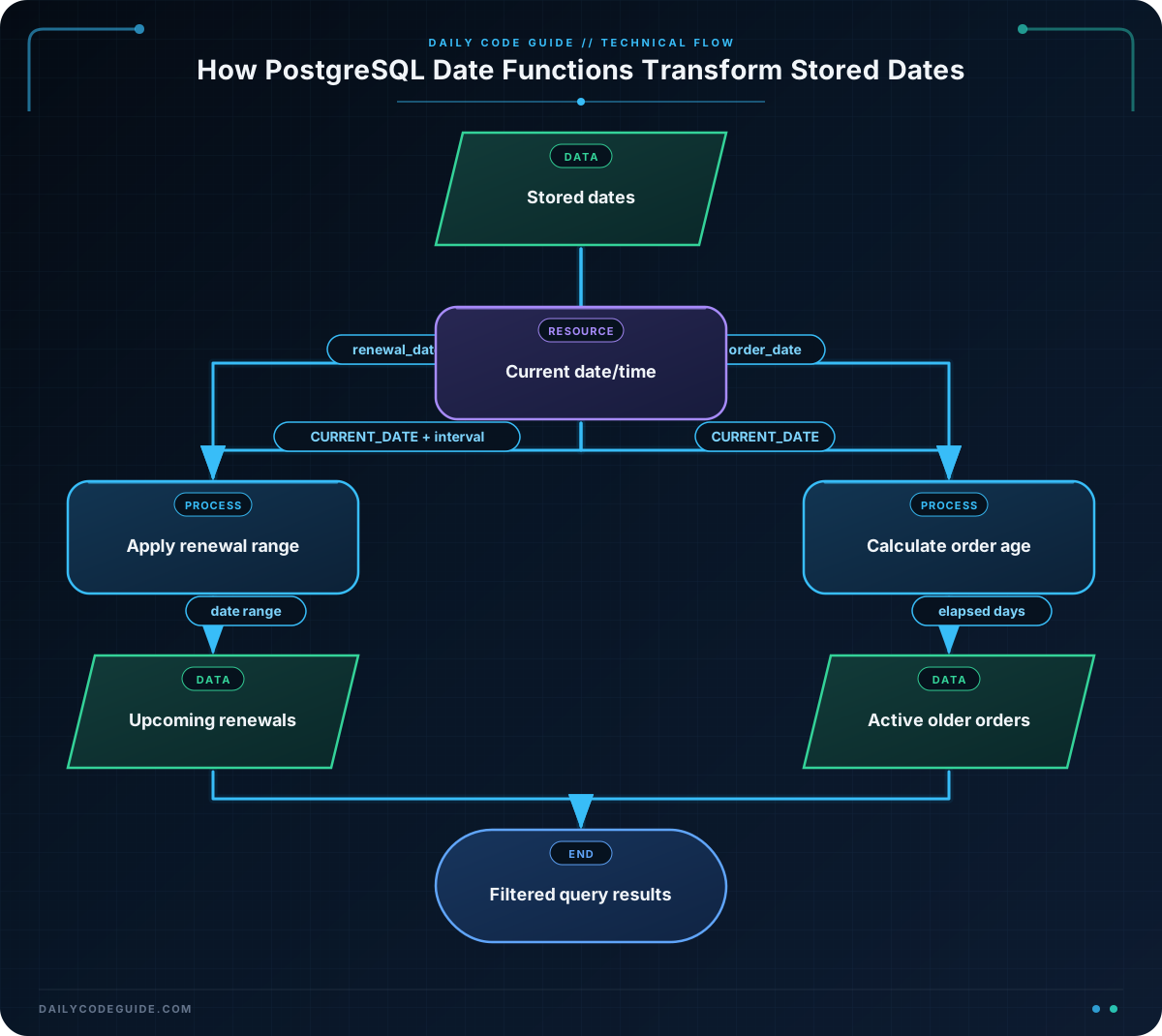
The examples use PostgreSQL syntax. PostgreSQL provides the CURRENT_DATE function for today’s date and CURRENT_TIMESTAMP for the current date and time. Date operations can also use an INTERVAL, which represents a period such as 30 days or 2 months.
For example, this condition finds dates from today through the next 30 days:
renewal_date BETWEEN CURRENT_DATE AND CURRENT_DATE + INTERVAL '30 days'BETWEEN includes both boundary values. In this example, a subscription renewing today or exactly 30 days from today is included.
Basic Example
Suppose a subscription system stores each customer’s renewal date. The following query creates sample rows and finds subscriptions that renew within the next 30 days.
WITH subscriptions (customer_name, plan_name, renewal_date) AS (
    VALUES
        ('Ava Patel', 'Basic', CURRENT_DATE + INTERVAL '5 days'),
        ('Noah Williams', 'Pro', CURRENT_DATE + INTERVAL '18 days'),
        ('Mia Chen', 'Team', CURRENT_DATE + INTERVAL '45 days'),
        ('Liam Garcia', 'Basic', CURRENT_DATE - INTERVAL '2 days')
)
SELECT
    customer_name,
    plan_name,
    renewal_date::date AS renewal_date
FROM subscriptions
WHERE renewal_date >= CURRENT_DATE
  AND renewal_date < CURRENT_DATE + INTERVAL '30 days'
ORDER BY renewal_date;
Expected Output
The query returns Ava Patel and Noah Williams, because their renewal dates are between today and 30 days from today. Mia Chen is excluded because the renewal is 45 days away. Liam Garcia is excluded because the renewal date has already passed.
How the Code Works
WITH subscriptions AS (...) creates a temporary result set containing sample subscription records. In a real application, you would usually query an existing table instead.
CURRENT_DATE represents the date on which the query runs. Because the sample renewal dates are calculated from CURRENT_DATE, the example continues to work on different days.
The first comparison checks the lower boundary:
renewal_date >= CURRENT_DATEThis prevents subscriptions with past renewal dates from appearing. The second comparison checks the upper boundary:
renewal_date < CURRENT_DATE + INTERVAL '30 days'The query uses < for the upper boundary instead of <=. This creates a range that starts today and ends just before the 30-day boundary. Either choice can be correct, but you should decide whether the exact boundary date belongs in your application’s definition of “within 30 days.”
The ::date expression converts the timestamp created by adding an interval to a date into a date-only value for display.
Another Example
Date subtraction can help a store monitor order age. In PostgreSQL, subtracting one date from another returns the number of days between them. The query below finds orders that are at least seven days old and displays each order’s age.
WITH orders (order_id, customer_name, order_date, order_status) AS (
    VALUES
        (1001, 'Sofia Martin', CURRENT_DATE - 2, 'Shipped'),
        (1002, 'Ethan Brown', CURRENT_DATE - 7, 'Processing'),
        (1003, 'Olivia Davis', CURRENT_DATE - 14, 'Processing'),
        (1004, 'Lucas Wilson', CURRENT_DATE - 30, 'Cancelled')
)
SELECT
    order_id,
    customer_name,
    order_date,
    CURRENT_DATE - order_date AS order_age_days,
    order_status
FROM orders
WHERE CURRENT_DATE - order_date >= 7
  AND order_status <> 'Cancelled'
ORDER BY order_date;
This query returns Ethan Brown’s and Olivia Davis’s orders. Both are at least seven days old and are not cancelled. The expression CURRENT_DATE - order_date calculates the elapsed number of days.
If you need the current time as well as the current date, use CURRENT_TIMESTAMP:
SELECT CURRENT_DATE AS today,
       CURRENT_TIMESTAMP AS current_time;
CURRENT_DATE is appropriate for day-based business rules, such as “orders older than seven days.” CURRENT_TIMESTAMP is more useful when the time of day matters, such as tracking exactly when a payment was received.
Common Mistakes
- Comparing dates as informal text: Use a date column and a date literal such as
DATE '2025-03-15'instead of relying on formats such as'03/15/2025'. The latter can be ambiguous across systems. - Forgetting past dates: A condition that only checks the upper limit may include already expired subscriptions. Use a lower boundary such as
renewal_date >= CURRENT_DATEwhen past dates should be excluded. - Confusing dates and timestamps: A timestamp includes a time component. If you only need calendar-day comparisons, use
CURRENT_DATEor convert a timestamp to a date. - Assuming every database uses identical syntax: PostgreSQL uses expressions such as
INTERVAL '30 days'and::date. MySQL, SQL Server, and SQLite have different date functions, so check the documentation for your database system.
Try It Yourself
Create a query that lists subscriptions renewing in the next 14 days. Include the customer name, plan name, and renewal date, and sort the results from the earliest renewal to the latest.
Start with the same subscriptions data from the basic example, but change the date range in the WHERE clause. Do not include subscriptions whose renewal date has already passed.
Challenge
An operations team needs a list of active orders that are between 3 and 10 days old, inclusive.
Write a query using the sample orders data from the second example. Your query must:
- Return the order ID, customer name, order date, and order age in days.
- Include orders from 3 through 10 days old.
- Exclude cancelled orders.
- Sort the oldest matching order first.
Solution
WITH orders (order_id, customer_name, order_date, order_status) AS (
    VALUES
        (1001, 'Sofia Martin', CURRENT_DATE - 2, 'Shipped'),
        (1002, 'Ethan Brown', CURRENT_DATE - 7, 'Processing'),
        (1003, 'Olivia Davis', CURRENT_DATE - 14, 'Processing'),
        (1004, 'Lucas Wilson', CURRENT_DATE - 30, 'Cancelled')
)
SELECT
    order_id,
    customer_name,
    order_date,
    CURRENT_DATE - order_date AS order_age_days
FROM orders
WHERE CURRENT_DATE - order_date BETWEEN 3 AND 10
  AND order_status <> 'Cancelled'
ORDER BY order_age_days DESC;
CURRENT_DATE - order_date calculates each order’s age in days. BETWEEN 3 AND 10 includes both 3 and 10, while the status condition removes cancelled orders. The descending sort places the oldest matching order first.
Key Takeaways
CURRENT_DATEreturns the current calendar date, whileCURRENT_TIMESTAMPincludes the current time.- Use date ranges with comparisons or
BETWEENto find upcoming renewals. - Subtracting dates can calculate elapsed days in PostgreSQL.
- Use intervals such as
INTERVAL '30 days'for relative date calculations. - Date and time syntax varies between database systems, so identify your SQL dialect before using database-specific functions.

