


What You’ll Learn
In this lesson, you will build a small task-tracking service with Flask. You will create REST endpoints that let clients create, read, update, and delete tasks using HTTP requests.
- How Flask routes map HTTP methods to Python functions
- How to return JSON responses and appropriate HTTP status codes
- How to validate request data
- How to implement CRUD operations for task records
- Why in-memory storage is useful for learning but limited in production
The Concept
A REST API exposes resources through URLs and uses HTTP methods to describe actions on those resources. In a task-tracking service, the resource is a task.
- GET retrieves tasks.
- POST creates a new task.
- PATCH partially updates an existing task.
- DELETE removes a task.
Flask connects each URL and HTTP method to a Python function. The function reads request data, performs an operation, and returns a response, commonly as JSON.
The example uses a Python list as temporary storage. This keeps the focus on HTTP and Flask. The data will disappear whenever the application restarts. For persistent task records, you can move this storage layer to a database such as SQLite. See SQLite databases in Python for a useful next step.
Basic Example
Install Flask in your active Python environment:
python -m pip install FlaskCreate a file named app.py with the following task API:
from flask import Flask, jsonify, request

app = Flask(__name__)

tasks = [
    {
        "id": 1,
        "title": "Review pull request",
        "description": "Check the API error handling changes",
        "completed": False,
    }
]
next_task_id = 2


@app.get("/tasks")
def list_tasks():
    return jsonify(tasks)


@app.post("/tasks")
def create_task():
    global next_task_id

    data = request.get_json(silent=True) or {}
    title = data.get("title", "").strip()

    if not title:
        return jsonify({"error": "title is required"}), 400

    task = {
        "id": next_task_id,
        "title": title,
        "description": data.get("description", ""),
        "completed": False,
    }
    tasks.append(task)
    next_task_id += 1

    return jsonify(task), 201


@app.get("/tasks/<int:task_id>")
def get_task(task_id):
    task = next((item for item in tasks if item["id"] == task_id), None)

    if task is None:
        return jsonify({"error": "task not found"}), 404

    return jsonify(task)


@app.patch("/tasks/<int:task_id>")
def update_task(task_id):
    task = next((item for item in tasks if item["id"] == task_id), None)

    if task is None:
        return jsonify({"error": "task not found"}), 404

    data = request.get_json(silent=True) or {}

    if "title" in data:
        title = data["title"].strip()
        if not title:
            return jsonify({"error": "title cannot be empty"}), 400
        task["title"] = title

    if "description" in data:
        task["description"] = data["description"]

    if "completed" in data:
        if not isinstance(data["completed"], bool):
            return jsonify({"error": "completed must be a boolean"}), 400
        task["completed"] = data["completed"]

    return jsonify(task)


@app.delete("/tasks/<int:task_id>")
def delete_task(task_id):
    task = next((item for item in tasks if item["id"] == task_id), None)

    if task is None:
        return jsonify({"error": "task not found"}), 404

    tasks.remove(task)
    return "", 204


if __name__ == "__main__":
    app.run()
Start the development server with:
python app.pyA client can create a task by sending a POST request to /tasks with a JSON body such as:
{
    "title": "Write deployment notes",
    "description": "Document the steps for the staging release"
}
Expected Output
The server returns the newly created task with an HTTP status of 201 Created:
{
    "completed": false,
    "description": "Document the steps for the staging release",
    "id": 2,
    "title": "Write deployment notes"
}
How the Code Works
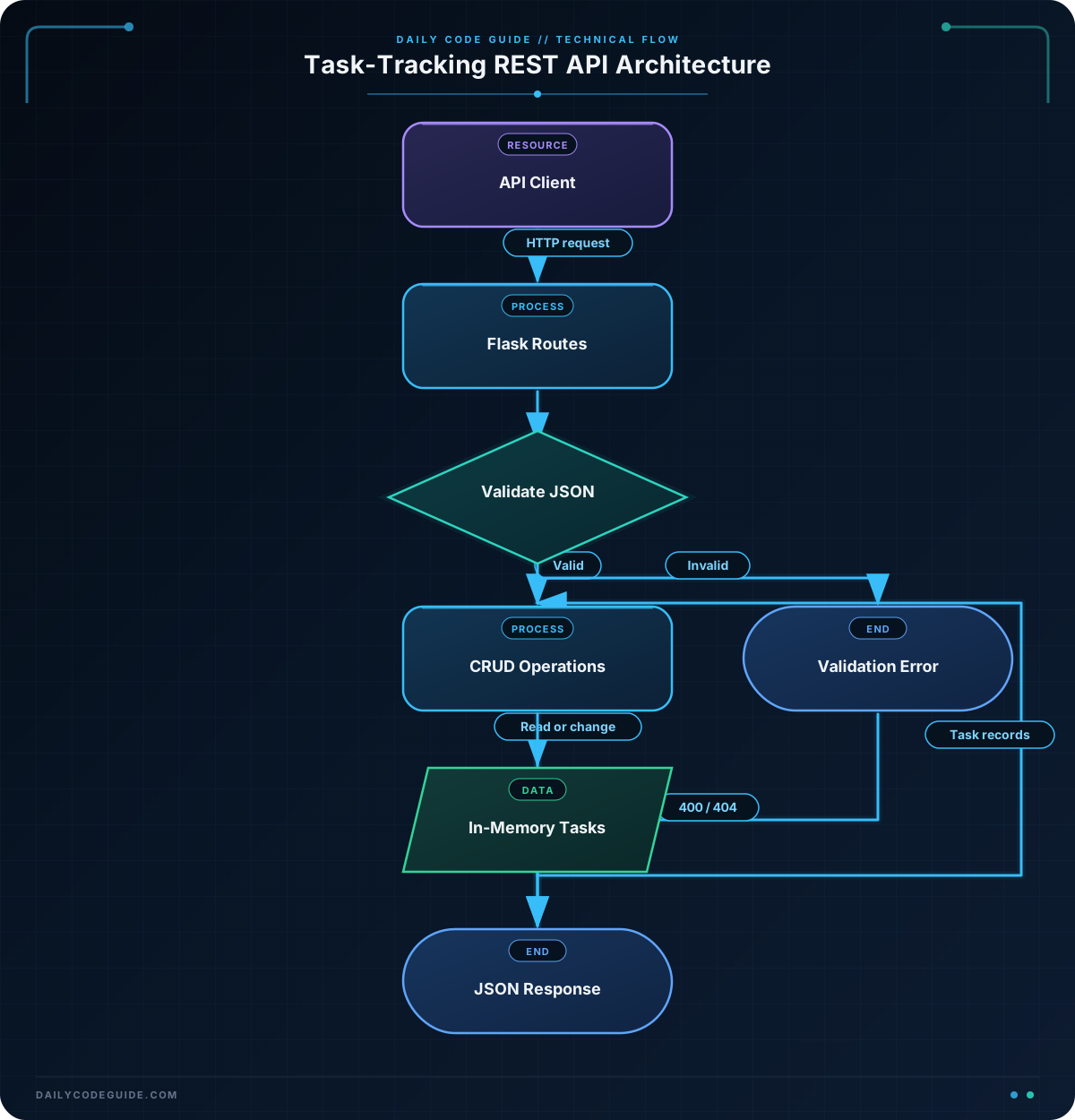
Flask(__name__) creates the application object. The route decorators register functions for specific URL paths and HTTP methods. For example, @app.post("/tasks") means that Flask calls create_task for a POST request to /tasks.
request.get_json(silent=True) attempts to read a JSON request body. The or {} fallback gives the endpoint an empty dictionary when the body is missing or invalid. The endpoint then checks that the required title is present before creating a task.
jsonify converts Python dictionaries and lists into JSON responses. Returning a tuple such as jsonify(task), 201 sets both the response body and the HTTP status code.
The PATCH endpoint updates only fields included by the client. This is different from a full replacement: a request containing only "completed": true leaves the title and description unchanged.
The next expression searches for the first task with the requested ID. If no task is found, the endpoint returns a 404 Not Found response. Returning a useful status code helps clients distinguish successful operations from validation and lookup errors.
The list-based lookup is sufficient for a small demonstration. A larger service would normally use a database query and a database-generated ID. The global counter is also not safe for multiple workers or concurrent requests.
Another Example
REST APIs often need more than basic CRUD. Clients may want to filter tasks or retrieve a summary for a dashboard. Flask exposes query-string values through request.args.
This separate example provides a read-only reporting API. It supports requests such as /tasks?status=open and returns counts through /tasks/summary.
from flask import Flask, jsonify, request

app = Flask(__name__)

tasks = [
    {"id": 1, "title": "Prepare sprint plan", "completed": True},
    {"id": 2, "title": "Test notification endpoint", "completed": False},
    {"id": 3, "title": "Update onboarding guide", "completed": False},
]


@app.get("/tasks")
def filter_tasks():
    status = request.args.get("status")

    if status not in (None, "open", "completed"):
        return jsonify({
            "error": "status must be open or completed"
        }), 400

    if status == "open":
        result = [task for task in tasks if not task["completed"]]
    elif status == "completed":
        result = [task for task in tasks if task["completed"]]
    else:
        result = tasks

    return jsonify({
        "count": len(result),
        "tasks": result,
    })


@app.get("/tasks/summary")
def task_summary():
    completed_count = sum(task["completed"] for task in tasks)

    return jsonify({
        "total": len(tasks),
        "completed": completed_count,
        "open": len(tasks) - completed_count,
    })


if __name__ == "__main__":
    app.run()
A request to /tasks?status=open returns only unfinished tasks. A request to /tasks/summary returns aggregate information without requiring the client to count records itself.
Common Mistakes
- Forgetting the status code: A successful creation should normally return
201, while a missing resource should return404. Always consider what the client needs to know about the result. - Assuming request JSON is always valid: Clients can send an empty body, malformed JSON, or the wrong data type. Validate required fields before modifying a task.
- Confusing PATCH and PUT:
PATCHchanges selected fields.PUTgenerally replaces the complete representation. Use the method that matches the behavior your API promises. - Using in-memory data in production: The list is reset when the process restarts and is not shared reliably between multiple server workers. Use persistent storage for real task data.
- Leaving debug behavior exposed: Flask’s development server is for local development. Deploy a production application with a suitable WSGI server and add authentication, authorization, and request logging as needed.
Try It Yourself
Run the first application and make requests to it using an API client. Test the following cases:
- Fetch all tasks with
GET /tasks. - Fetch task 1 with
GET /tasks/1. - Update only the completion state with
PATCH /tasks/1. - Request a task ID that does not exist and inspect the
404response. - Send a new task without a title and inspect the validation error.
Then add a GET /tasks?completed=true feature that filters tasks using a Boolean query parameter. Decide how your endpoint should respond when the parameter has an invalid value.
Challenge
Extend the task service with a full replacement endpoint:
- Add
PUT /tasks/<task_id>. - Require both
titleandcompletedin the request body. - Replace the existing task’s title, description, and completion state.
- Return
400if a required field is missing or has the wrong type. - Return
404when the task ID does not exist. - Return the updated task with status
200when the replacement succeeds.
Solution
The following complete solution includes the requested PUT endpoint and keeps the existing list and single-task retrieval behavior:
from flask import Flask, jsonify, request

app = Flask(__name__)

tasks = [
    {
        "id": 1,
        "title": "Review pull request",
        "description": "Check the API error handling changes",
        "completed": False,
    }
]


@app.get("/tasks")
def list_tasks():
    return jsonify(tasks)


@app.get("/tasks/<int:task_id>")
def get_task(task_id):
    task = next((item for item in tasks if item["id"] == task_id), None)

    if task is None:
        return jsonify({"error": "task not found"}), 404

    return jsonify(task)


@app.put("/tasks/<int:task_id>")
def replace_task(task_id):
    task = next((item for item in tasks if item["id"] == task_id), None)

    if task is None:
        return jsonify({"error": "task not found"}), 404

    data = request.get_json(silent=True) or {}

    if "title" not in data or "completed" not in data:
        return jsonify({
            "error": "title and completed are required"
        }), 400

    if not isinstance(data["title"], str) or not data["title"].strip():
        return jsonify({"error": "title must be a non-empty string"}), 400

    if not isinstance(data["completed"], bool):
        return jsonify({"error": "completed must be a boolean"}), 400

    task["title"] = data["title"].strip()
    task["description"] = data.get("description", "")
    task["completed"] = data["completed"]

    return jsonify(task), 200


if __name__ == "__main__":
    app.run()
The solution checks for the task before reading replacement data, validates both required fields, and assigns every replaceable field. Because description is optional, it falls back to an empty string when omitted.
Key Takeaways
- Flask routes connect URLs and HTTP methods to Python functions.
- REST CRUD operations commonly use GET, POST, PATCH, PUT, and DELETE.
- JSON responses and meaningful HTTP status codes make an API easier for clients to use.
- Request data should be validated before it changes application state.
- In-memory storage is useful for learning, but production APIs need persistent storage and additional security controls.

