What You’ll Learn
In this lesson, you will use AWS CLI KMS commands to inspect a customer managed key and protect application data from the command line. You will also learn how to encrypt and decrypt files, use an encryption context, and verify that decrypted data matches the original.
- Inspect key metadata with
aws kms describe-key. - Encrypt and decrypt small application files with
aws kms encryptandaws kms decrypt. - Handle KMS ciphertext and plaintext returned as base64-encoded output.
- Use an encryption context to bind ciphertext to a specific application context.
The Concept
AWS Key Management Service, or KMS, manages cryptographic keys. A customer managed key is a KMS key that your AWS account creates, controls, and configures through its key policy and IAM permissions.
The AWS CLI can inspect a key with describe-key and use it for small payloads with encrypt and decrypt. KMS encryption is useful for configuration files, short tokens, credentials, and other small values. The direct encrypt API has a 4,096-byte plaintext limit, so larger application data normally uses envelope encryption or a service such as Amazon S3 with server-side KMS encryption.
In these examples, alias/app-data identifies an existing customer managed key. The IAM identity running the commands needs permission to describe the key and to use its cryptographic operations, such as kms:DescribeKey, kms:Encrypt, and kms:Decrypt. The key policy must also allow the requested operation.
For broader data-protection workflows, you can combine KMS-based key management with AWS CLI backup and snapshot commands to protect and inspect application backups.
Basic Example
The following Bash script inspects a customer managed key, encrypts a small application configuration file, decrypts it, and compares the result with the original. It assumes the AWS CLI is already configured and that the alias exists in the selected region.
#!/usr/bin/env bash
set -euo pipefail

KEY_ID="alias/app-data"
PLAINTEXT_FILE="application-config.json"
CIPHERTEXT_FILE="application-config.json.enc"
DECRYPTED_FILE="application-config.decrypted.json"

printf '%s\n' '{"database_host":"db.internal.example","feature_flags":{"new_checkout":true}}' > "$PLAINTEXT_FILE"

echo "KMS key metadata:"
aws kms describe-key \
    --key-id "$KEY_ID" \
    --query 'KeyMetadata.[KeyId,KeyState,KeyUsage,KeyManager]' \
    --output table

aws kms encrypt \
    --key-id "$KEY_ID" \
    --plaintext "fileb://$PLAINTEXT_FILE" \
    --output text \
    --query 'CiphertextBlob' |
    base64 --decode > "$CIPHERTEXT_FILE"

aws kms decrypt \
    --ciphertext-blob "fileb://$CIPHERTEXT_FILE" \
    --output text \
    --query 'Plaintext' |
    base64 --decode > "$DECRYPTED_FILE"

if cmp --silent "$PLAINTEXT_FILE" "$DECRYPTED_FILE"; then
    echo "Decryption succeeded: the files match."
else
    echo "Decryption failed: the files differ." >&2
    exit 1
fi
Expected Output
The key identifier and account-specific values vary, but the metadata should show a usable key whose key manager is CUSTOMER. The final message confirms that the decrypted file is identical to the original.
KMS key metadata:
----------------------------------------------------
|  12345678-1234-1234-1234-123456789012            |
|  Enabled                                          |
|  ENCRYPT_DECRYPT                                  |
|  CUSTOMER                                         |
----------------------------------------------------
Decryption succeeded: the files match.
How the Code Works
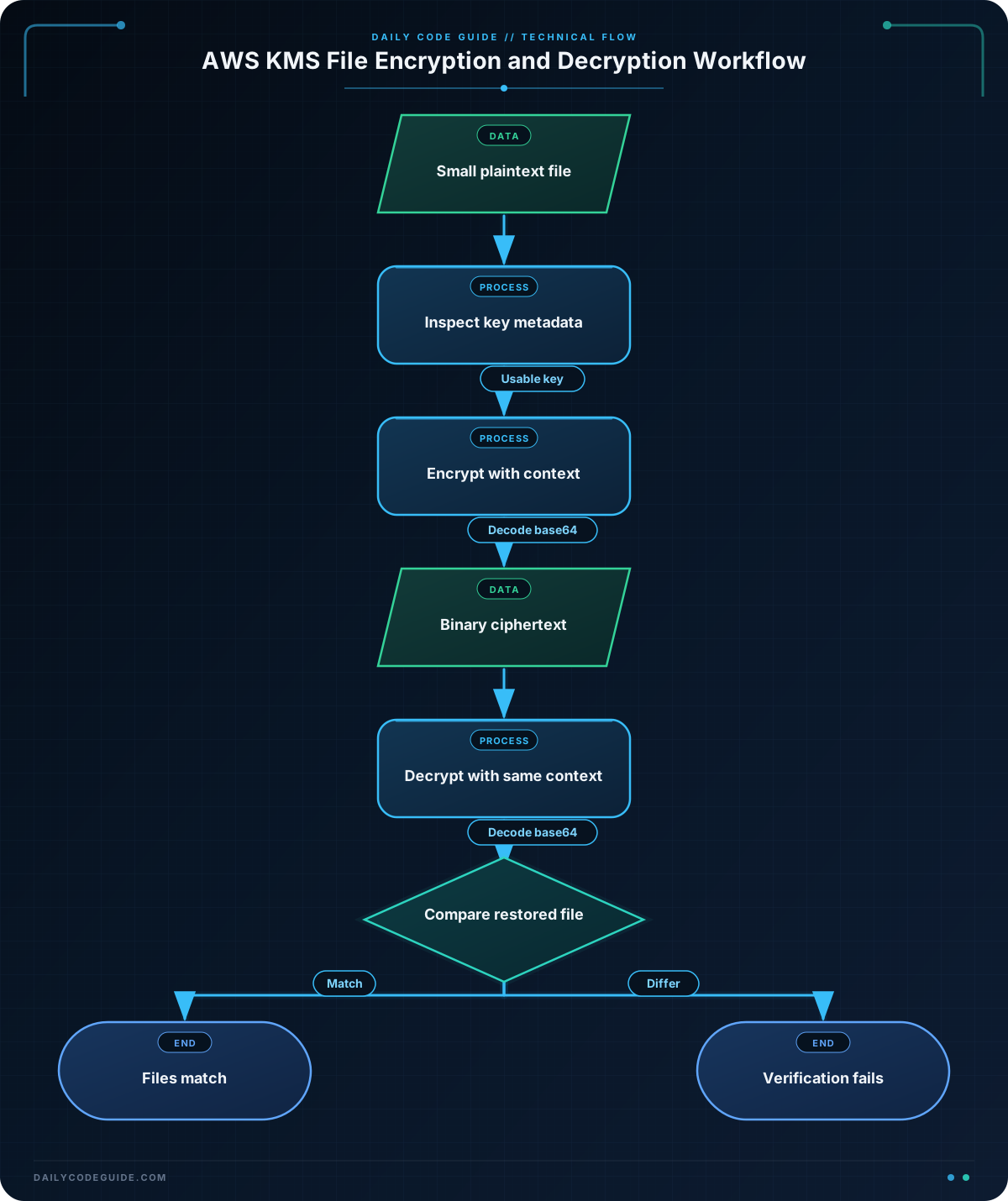
KEY_ID="alias/app-data"stores the key identifier in a variable. KMS accepts a key ID, key ARN, or alias name. An alias is convenient because it can continue pointing to the intended key while application configuration remains stable.describe-keyreturns metadata rather than plaintext or key material. The query selects the key ID, state, usage, and manager. A customer managed key should reportCUSTOMERin theKeyManagerfield.fileb://tells the AWS CLI to read the file as binary data. This is the appropriate form for file input, even when the file contains text.- The KMS response represents the ciphertext blob as base64-encoded text when requested with
--output text. Thebase64 --decodepipeline converts that value into the binary ciphertext stored in the.encfile. - The decrypt operation reverses the process. Its
Plaintextresponse is also base64-encoded in CLI text output, so it must be decoded before being written to the decrypted file. cmp --silentchecks the files byte for byte. This is stronger than simply checking whether both commands returned successfully.
Do not treat the encrypted file as human-readable text. KMS ciphertext is binary and can contain bytes that do not display safely in a terminal. Also remember that direct KMS encryption is intended for small values; it is not a general-purpose file encryption tool for large files.
Another Example
An encryption context adds authenticated metadata to a KMS operation. KMS does not encrypt the context, but it cryptographically binds the ciphertext to the supplied key-value pairs. Decryption succeeds only when the same context is supplied.
This pattern helps prevent ciphertext created for one service or environment from being accidentally reused in another. The application must preserve the exact context keys and values.
#!/usr/bin/env bash
set -euo pipefail

KEY_ID="alias/app-data"
INPUT_FILE="orders-service-settings.json"
ENCRYPTED_FILE="orders-service-settings.enc"
RESTORED_FILE="orders-service-settings.restored.json"

printf '%s\n' '{"queue_name":"orders-events","retry_limit":5}' > "$INPUT_FILE"

aws kms encrypt \
    --key-id "$KEY_ID" \
    --encryption-context Service=orders Environment=staging \
    --plaintext "fileb://$INPUT_FILE" \
    --output text \
    --query 'CiphertextBlob' |
    base64 --decode > "$ENCRYPTED_FILE"

aws kms decrypt \
    --encryption-context Service=orders Environment=staging \
    --ciphertext-blob "fileb://$ENCRYPTED_FILE" \
    --output text \
    --query 'Plaintext' |
    base64 --decode > "$RESTORED_FILE"

if cmp --silent "$INPUT_FILE" "$RESTORED_FILE"; then
    echo "The staging orders configuration was restored successfully."
fi
Common Mistakes
- Using a different encryption context during decryption: The context is authenticated, so changing
Environment=stagingtoEnvironment=production, omitting a value, or changing capitalization causes decryption to fail. - Forgetting base64 decoding: With the text output format,
CiphertextBlobandPlaintextare represented as base64 text. Store the decoded ciphertext and decode the decrypted plaintext before treating it as the original file. - Encrypting a file larger than 4,096 bytes: Direct KMS encryption rejects oversized plaintext. For larger data, use envelope encryption or a storage service that supports KMS-backed server-side encryption.
- Assuming a key alias proves the key type: An alias can refer to different kinds of KMS keys. Check
KeyManagerwithdescribe-keywhen you specifically require a customer managed key. - Confusing IAM permission errors with bad ciphertext: An
AccessDeniedExceptionusually indicates an IAM or key-policy issue. A decrypt failure caused by an incorrect encryption context or damaged ciphertext is a different problem.
Try It Yourself
Use an existing customer managed key alias in your account and adapt the basic example to protect a file named feature-settings.json. Your version should:
- Display the key state and key manager.
- Encrypt the file into a separate binary file.
- Decrypt it into a new file.
- Use
cmpto verify that the original and restored files match.
Challenge
Write a Bash script for a release process that uses the customer managed key alias alias/app-data to protect a small release note file named release-notes.txt.
The script must:
- Inspect the key and display its key ID, state, usage, and manager.
- Encrypt the release notes using the encryption context
Application=checkoutandEnvironment=production. - Decrypt the ciphertext using the same context.
- Exit with a failure status if the restored file does not exactly match the original.
Solution
#!/usr/bin/env bash
set -euo pipefail

KEY_ID="alias/app-data"
SOURCE_FILE="release-notes.txt"
ENCRYPTED_FILE="release-notes.txt.enc"
RESTORED_FILE="release-notes.txt.restored"

printf '%s\n' 'Checkout release 2025.03: payment retry handling updated.' > "$SOURCE_FILE"

printf '\n--- KMS key information ---\n'
aws kms describe-key \
    --key-id "$KEY_ID" \
    --query 'KeyMetadata.{KeyId:KeyId,State:KeyState,Usage:KeyUsage,Manager:KeyManager}' \
    --output table

aws kms encrypt \
    --key-id "$KEY_ID" \
    --encryption-context Application=checkout Environment=production \
    --plaintext "fileb://$SOURCE_FILE" \
    --query 'CiphertextBlob' \
    --output text |
    base64 --decode > "$ENCRYPTED_FILE"

aws kms decrypt \
    --encryption-context Application=checkout Environment=production \
    --ciphertext-blob "fileb://$ENCRYPTED_FILE" \
    --query 'Plaintext' \
    --output text |
    base64 --decode > "$RESTORED_FILE"

if cmp --silent "$SOURCE_FILE" "$RESTORED_FILE"; then
    echo "Release notes encrypted and restored successfully."
else
    echo "Release notes verification failed." >&2
    exit 1
fi
The solution uses the same context for both operations, converts the CLI’s base64 text responses into files, and verifies the final bytes with cmp. The script also uses set -euo pipefail, so an AWS CLI failure or a failed pipeline stops the release workflow instead of allowing a misleading success message.
Key Takeaways
aws kms describe-keylets you inspect key metadata without exposing key material.- Use
fileb://for file input and decode KMS blob responses when using text output. - Direct KMS encryption is limited to 4,096 bytes of plaintext.
- An encryption context provides authenticated application metadata and must match during decryption.
- IAM permissions and the KMS key policy both affect whether an operation succeeds.