


What You’ll Learn
After this lesson, you will understand how to use the SQL HAVING clause to filter grouped results. You will learn how to find product categories whose number of orders exceeds a target value.
- Understand why
HAVINGis used withGROUP BY. - Distinguish between
WHEREandHAVING. - Filter groups using aggregate functions such as
COUNT()andSUM().
The Concept
When you use GROUP BY, SQL combines rows that have the same value into groups. Aggregate functions, such as COUNT() and SUM(), can then calculate a value for each group.
The HAVING clause filters those groups based on their aggregate values. For example, you can use it to find product categories with more than five orders.
A query using HAVING commonly follows this pattern:
SELECT category, COUNT(*) AS order_count
FROM orders
GROUP BY category
HAVING COUNT(*) > 5;
Here is the important difference:
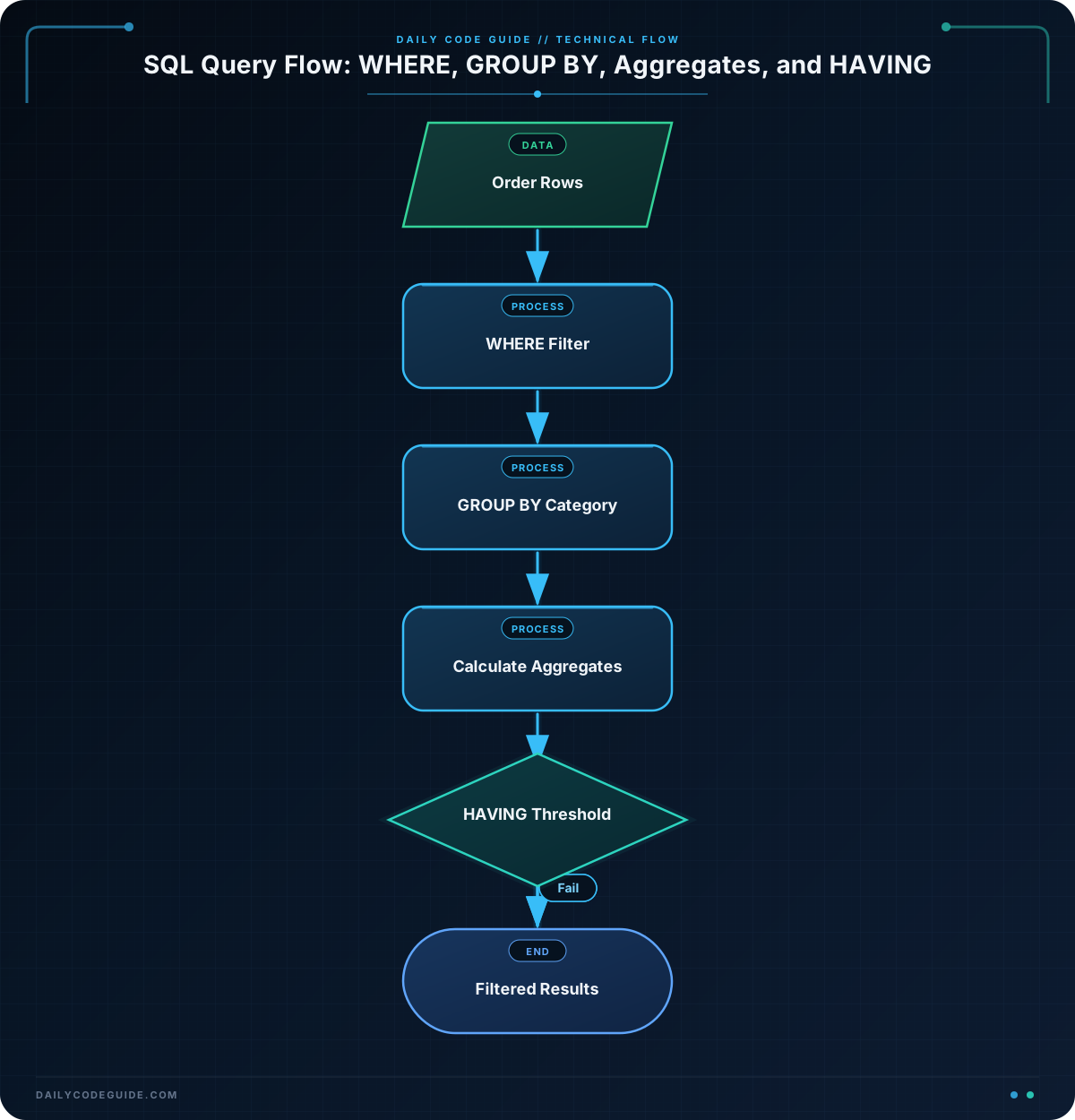
WHEREfilters individual rows before they are grouped.HAVINGfilters groups after aggregate values have been calculated.
Because the number of orders is calculated for each category, HAVING is the appropriate clause for filtering by that number.
Basic Example
The following example creates an orders table, adds sample orders, and finds categories with more than two orders.
CREATE TABLE orders (
    order_id INTEGER,
    category VARCHAR(50)
);

INSERT INTO orders (order_id, category) VALUES
    (1, 'Books'),
    (2, 'Electronics'),
    (3, 'Books'),
    (4, 'Home'),
    (5, 'Electronics'),
    (6, 'Books'),
    (7, 'Electronics'),
    (8, 'Electronics'),
    (9, 'Home');

SELECT
    category,
    COUNT(*) AS order_count
FROM orders
GROUP BY category
HAVING COUNT(*) > 2
ORDER BY category;
Expected Output
category     order_count
-----------  -----------
Books        3
Electronics  4
How the Code Works
The CREATE TABLE statement defines two columns: order_id identifies an order, and category stores the product category.
The INSERT statement adds nine orders. There are three orders in the Books category, four in Electronics, and two in Home.
Inside the query:
SELECT categorydisplays the category name.COUNT(*) AS order_countcounts the rows in each category group and gives the result the nameorder_count.FROM orderstells SQL which table to read.GROUP BY categorycreates one group for each category.HAVING COUNT(*) > 2keeps only groups containing more than two orders.ORDER BY categorysorts the remaining categories alphabetically.
The Home group is removed because it contains only two orders. The comparison operator is >, which means “greater than.” If you wanted to include categories with exactly two orders, you could use >= 2 instead.
Another Example
HAVING can filter groups using aggregate functions other than COUNT(). The next example finds product categories whose combined order value is greater than 1,000.
CREATE TABLE sales_orders (
    order_id INTEGER,
    category VARCHAR(50),
    total_amount DECIMAL(10, 2)
);

INSERT INTO sales_orders (order_id, category, total_amount) VALUES
    (101, 'Electronics', 450.00),
    (102, 'Electronics', 325.00),
    (103, 'Electronics', 500.00),
    (104, 'Books', 75.00),
    (105, 'Books', 115.00),
    (106, 'Home', 600.00),
    (107, 'Home', 250.00);

SELECT
    category,
    COUNT(*) AS order_count,
    SUM(total_amount) AS category_total
FROM sales_orders
GROUP BY category
HAVING SUM(total_amount) > 1000
ORDER BY category;
Here, SQL calculates the total value for each category with SUM(total_amount). Only Electronics remains because its orders total 1,275. The category’s order count is also shown, but the filter is based on the sum rather than the count.
Common Mistakes
Using WHERE to filter an aggregate result
A common mistake is trying to write a condition such as WHERE COUNT(*) > 2. Aggregate functions calculate values for groups, so this condition belongs in HAVING, not WHERE.
Forgetting GROUP BY
HAVING is normally used with grouped results. If you want one result per category, include GROUP BY category before the HAVING clause.
Using the wrong comparison operator
HAVING COUNT(*) > 2 means more than two orders. It does not include categories with exactly two orders. Use >= 2 when the target number should be included.
Filtering rows instead of groups
If you need to remove individual orders before counting, use WHERE before GROUP BY. For example, WHERE status = 'shipped' would count only shipped orders, while HAVING COUNT(*) > 2 would then filter the resulting category groups.
Try It Yourself
Assume an orders table contains order_id, category, and order_status columns. Write a query that displays each category and its order count, but includes only categories with at least three orders.
Remember to use COUNT(*), GROUP BY category, and a HAVING condition. Sort the results by category name.
Challenge
Write a query for a table named monthly_orders with these columns:
order_idcategoryorder_month
Find product categories that received more than three orders during '2025-01'. Display the category and its order count, and sort the results alphabetically.
Solution
SELECT
    category,
    COUNT(*) AS order_count
FROM monthly_orders
WHERE order_month = '2025-01'
GROUP BY category
HAVING COUNT(*) > 3
ORDER BY category;
The WHERE clause first limits the rows to orders from January 2025. SQL then groups those remaining orders by category and counts each group. Finally, HAVING COUNT(*) > 3 keeps only categories with more than three January orders.
Key Takeaways
HAVINGfilters grouped results.- Use
WHEREto filter individual rows before grouping. - Use
HAVINGwith aggregate functions such asCOUNT()andSUM(). - The usual order is
WHERE,GROUP BY,HAVING, and thenORDER BY. - Use comparison operators carefully:
>excludes the target value, while>=includes it.

