


What You’ll Learn
In this lesson, you’ll learn how to use Python’s re module to search log text for email addresses and validate email-like strings. You will also practice choosing between partial matching, extraction, and complete-string validation.
- Build and compile regular expression patterns with
re.compile(). - Extract multiple email addresses from application logs.
- Use
fullmatch()to validate an entire string. - Recognize common regular expression limitations and boundary mistakes.
The Concept
A regular expression, often called a regex, is a pattern that describes text you want to find. Python’s built-in re module provides functions for searching, extracting, and validating text with these patterns.
For example, an email-like pattern might describe:
- A local part containing letters, numbers, and common symbols.
- An
@character. - A domain name with at least one dot.
Regex operations have different purposes. Use search() when you need to find the first match, findall() when you need matching text from multiple locations, and finditer() when you need match details such as positions or named groups. For validation, fullmatch() is usually safer than search() because it requires the entire string to match.
Regex patterns can become difficult to read when they are written as ordinary Python strings. Raw strings, such as r"\bword\b", prevent Python from interpreting backslashes before the regular expression engine sees them.
Basic Example
The following program extracts email-like addresses from several application log lines. The pattern requires a domain containing at least one dot and uses boundaries to avoid matching part of a larger word.
import re

log_text = """\
2025-03-18 09:14:22 INFO Login succeeded for alice.smith@example.com
2025-03-18 09:15:07 WARN Password reset requested by support@example.org
2025-03-18 09:16:41 INFO No email address was supplied
2025-03-18 09:18:03 DEBUG Notification sent to bob+alerts@example.net
"""

email_pattern = re.compile(
    r"(?<![\w.-])[\w.+-]+@[\w-]+(?:\.[\w-]+)+(?![\w.-])"
)

for email in email_pattern.findall(log_text):
    print(email)
Expected Output
alice.smith@example.com
support@example.org
bob+alerts@example.net
How the Code Works
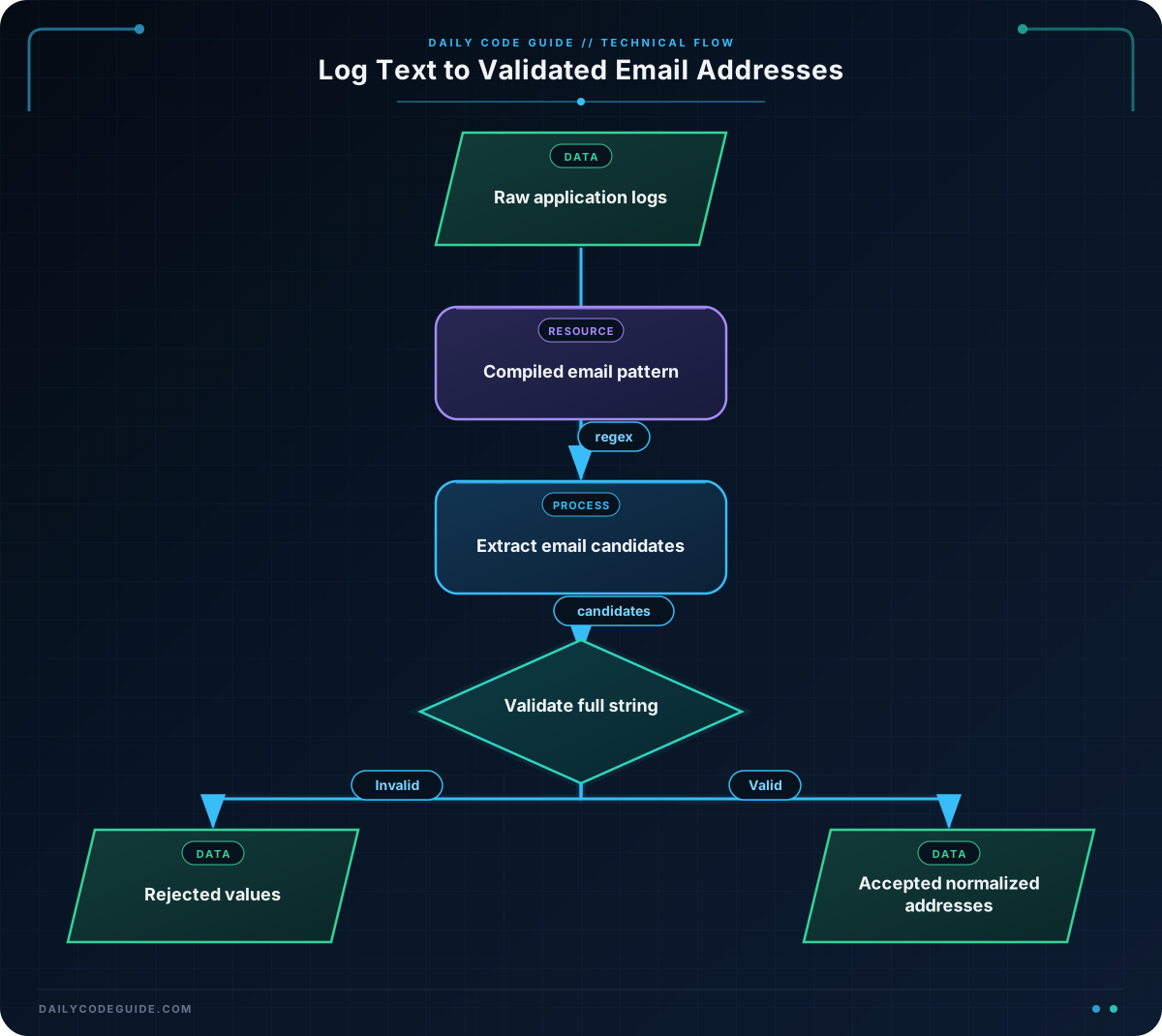
import re loads Python’s regular expression module. The call to re.compile() converts the pattern into a reusable compiled pattern. Compilation is especially useful when the same pattern will be applied to many log lines or files.
The pattern can be read in parts:
[\w.+-]+matches one or more characters commonly found before the@.@matches the literal at sign.[\w-]+matches a domain label such asexample.(?:\.[\w-]+)+requires one or more dotted domain parts, such as.comor.co.uk.(?<![\w.-])and(?![\w.-])are negative lookarounds. They prevent the match from starting or ending inside a larger email-like string.
findall() returns the matching text in the order it appears. Since the pattern has no capturing groups, the result is a list of complete email addresses. If a pattern contains capturing groups, findall() can instead return group contents, which is a common source of surprise. Use non-capturing groups such as (?:...) when you need grouping but do not need the group’s text separately.
This pattern is intentionally practical rather than a complete implementation of every rule in the email standards. It is suitable for many log-processing tasks, but it should not be treated as proof that an address can receive mail.
Another Example
Extraction and validation are related but different tasks. This example validates complete email-like values supplied by an application. It normalizes valid addresses to lowercase and reports invalid values with an exception.
import re

email_validator = re.compile(
    r"[A-Za-z0-9.!#$%&'*+/=?^_`{|}~-]+"
    r"@"
    r"[A-Za-z0-9-]+(?:\.[A-Za-z0-9-]+)+"
)

def normalize_email(value):
    cleaned_value = value.strip()

    if email_validator.fullmatch(cleaned_value) is None:
        raise ValueError(f"Invalid email-like value: {value!r}")

    return cleaned_value.lower()


submitted_addresses = [
    "Operations@Example.com",
    " analyst@example.co.uk ",
    "missing-at-symbol.example.com",
    "alerts@example",
]

for submitted_address in submitted_addresses:
    try:
        print(normalize_email(submitted_address))
    except ValueError as error:
        print(error)
Here, fullmatch() ensures that extra text before or after the address causes validation to fail. The function strips surrounding whitespace before matching, but it does not silently accept arbitrary text embedded around an address.
Common Mistakes
- Using
search()for validation:search()can accept a valid-looking substring inside invalid input. Usefullmatch()when the entire value must be valid. - Forgetting raw strings: Backslashes such as
\band\ware easier to use correctly in raw strings liker"\w+". - Assuming a regex is a complete email standard: Email syntax includes unusual but valid cases, internationalization rules, and domain requirements that a short pattern may not cover.
- Leaving punctuation in extracted values: A simple pattern may include a trailing period or comma from prose. Boundaries and a carefully designed character class help, but test against the actual log format.
- Compiling inside a tight loop: If the pattern is reused, compile it once outside the loop. This makes the intent clearer and avoids repeated setup.
Try It Yourself
Write a function named extract_unique_emails() that accepts log text and returns a sorted list of unique email-like addresses. Use the extraction pattern from the first example, but make sure duplicate addresses appear only once in the result.
Test it with a log containing at least one repeated address and one line without an address. Do not count an address twice just because it appears in two different log entries.
Challenge
Application logs often need more targeted analysis. Write a program that examines the supplied log text and reports the unique valid email-like addresses found only on lines containing "authentication failed".
Your program must:
- Inspect each log line separately.
- Ignore successful authentication lines.
- Extract email-like text from failed lines.
- Validate each extracted value with
fullmatch(). - Count how many failed-login entries belong to each email domain.
- Print the addresses in sorted order, followed by sorted domain counts.
Solution
import re

log_text = """\
2025-03-18 10:02:11 authentication failed for alice@example.com
2025-03-18 10:03:44 authentication succeeded for alice@example.com
2025-03-18 10:04:09 authentication failed for bob@example.net
2025-03-18 10:05:26 authentication failed for alice@example.com
2025-03-18 10:06:18 authentication failed for invalid-address
2025-03-18 10:07:52 authentication failed for carol@example.net
"""

email_pattern = re.compile(
    r"(?<![\w.-])[\w.+-]+@[\w-]+(?:\.[\w-]+)+(?![\w.-])"
)
email_validator = re.compile(
    r"[A-Za-z0-9.!#$%&'*+/=?^_`{|}~-]+"
    r"@"
    r"[A-Za-z0-9-]+(?:\.[A-Za-z0-9-]+)+"
)

failed_addresses = set()
domain_counts = {}

for line in log_text.splitlines():
    if "authentication failed" not in line:
        continue

    for match in email_pattern.finditer(line):
        address = match.group(0)

        if email_validator.fullmatch(address) is None:
            continue

        normalized_address = address.lower()
        failed_addresses.add(normalized_address)

        domain = normalized_address.rsplit("@", 1)[1]
        domain_counts[domain] = domain_counts.get(domain, 0) + 1

print("Failed-login addresses:")
for address in sorted(failed_addresses):
    print(address)

print("Failed-login counts by domain:")
for domain in sorted(domain_counts):
    print(f"{domain}: {domain_counts[domain]}")
The line filter ensures that successful authentication events never enter the extraction loop. finditer() provides each match object, while group(0) retrieves the complete matched address. A set removes duplicate addresses, and the dictionary counts every valid failed-login occurrence by the portion after the last @.
Key Takeaways
- Use Python’s
remodule to describe and search for text patterns. - Compile reusable patterns with
re.compile(). - Use
findall()orfinditer()to extract multiple matches from logs. - Use
fullmatch()when validating the entire input value. - A practical email regex is useful for log processing, but it is not a complete guarantee of email validity.

