What You’ll Learn
In this lesson, you will learn how to protect a Terraform plan from incorrect infrastructure assumptions. You will use:
- Preconditions to stop an operation before a resource is created or updated.
- Postconditions to verify that a resource or data source produced the expected result.
- Check blocks to report broader configuration problems without necessarily stopping the operation.
The examples focus on a common AWS scenario: selecting an AMI, region, subnet, and availability zone before launching an instance.
The Concept
Terraform variables and variable validation are useful for checking individual input values. For example, a variable can require that a region name is not empty. However, variable validation cannot always verify relationships between inputs and real infrastructure.
For example, a variable may contain a valid subnet ID, but that subnet might belong to a different availability zone than the deployment expects. Similarly, an AMI lookup may return a valid image owned by the wrong account or with an unsupported architecture.
Terraform provides three related mechanisms for these situations:
- Preconditions are placed inside a resource or data source lifecycle. Terraform evaluates them before creating or updating the object. A failed precondition produces an error and stops the plan or apply.
- Postconditions are also placed inside a lifecycle. Terraform evaluates them after reading or creating the object. A failed postcondition produces an error because the resulting object is not safe to use.
- Check blocks contain one or more assertions about the overall configuration. A failed check normally produces a warning rather than stopping the plan. Use a precondition or postcondition when a failure must block deployment.
This distinction is important: a check block is useful for visibility, while a precondition or postcondition is appropriate for a hard safety boundary. This is the same general principle as using explicit validation and clear failure messages in deployment automation: detect a problem before later actions depend on it.
Basic Example
The following configuration looks up an AMI and subnet, then launches an EC2 instance. The resource has preconditions for the AMI owner, AMI architecture, and subnet availability zone. It also has a postcondition confirming that AWS placed the instance in the expected zone.
The check block validates that the requested availability zone exists in the selected region. Because it is a check block, a failed assertion is reported as a warning instead of a hard error.
terraform {
  required_version = ">= 1.5.0"

  required_providers {
    aws = {
      source  = "hashicorp/aws"
      version = "~> 5.0"
    }
  }
}

variable "aws_region" {
  type        = string
  description = "AWS region where the instance will be created."
  default     = "us-east-1"
}

variable "availability_zone" {
  type        = string
  description = "Availability zone expected for the selected subnet."
  default     = "us-east-1a"
}

variable "subnet_id" {
  type        = string
  description = "Existing subnet for the instance."
}

variable "ami_owner_id" {
  type        = string
  description = "AWS account ID that owns the expected AMI."
}

provider "aws" {
  region = var.aws_region
}

data "aws_ami" "selected" {
  most_recent = true
  owners      = [var.ami_owner_id]

  filter {
    name   = "name"
    values = ["al2023-ami-*-x86_64"]
  }

  filter {
    name   = "state"
    values = ["available"]
  }
}

data "aws_subnet" "selected" {
  id = var.subnet_id
}

data "aws_availability_zones" "available" {
  state = "available"
}

check "availability_zone_exists" {
  assert {
    condition     = contains(data.aws_availability_zones.available.names, var.availability_zone)
    error_message = "The requested availability zone is not available in the selected AWS region."
  }
}

resource "aws_instance" "web" {
  ami           = data.aws_ami.selected.id
  instance_type = "t3.micro"
  subnet_id     = data.aws_subnet.selected.id

  tags = {
    Name = "validated-web-server"
  }

  lifecycle {
    precondition {
      condition     = data.aws_ami.selected.owner_id == var.ami_owner_id
      error_message = "The selected AMI is not owned by the expected AWS account."
    }

    precondition {
      condition     = data.aws_ami.selected.architecture == "x86_64"
      error_message = "The selected AMI must use the x86_64 architecture."
    }

    precondition {
      condition     = data.aws_subnet.selected.availability_zone == var.availability_zone
      error_message = "The selected subnet is not in the expected availability zone."
    }

    postcondition {
      condition     = self.availability_zone == var.availability_zone
      error_message = "AWS placed the instance in an unexpected availability zone."
    }
  }
}
Expected Output
With matching inputs, the plan can proceed. If the subnet is in the wrong availability zone, Terraform stops with an error similar to this:
Error: Resource precondition failed

The selected subnet is not in the expected availability zone.
If the requested zone does not exist but no hard precondition fails, Terraform reports the check failure as a warning. The exact formatting depends on the Terraform version and plan context.
How the Code Works
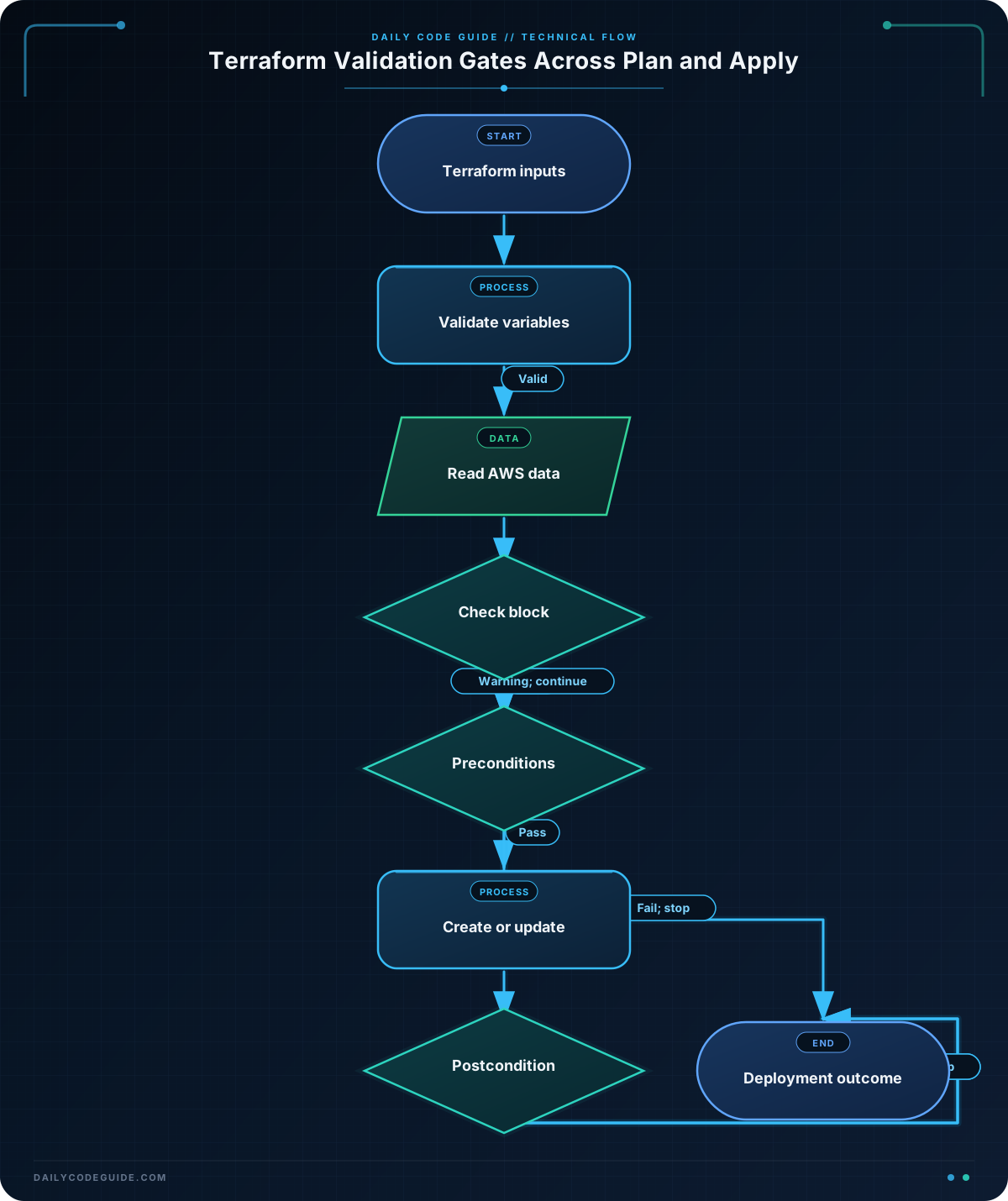
The aws_ami data source selects the newest available Amazon Linux 2023 x86_64 image owned by the account supplied through ami_owner_id. The AMI lookup is region-specific because the AWS provider uses aws_region.
The first three preconditions run before Terraform creates the instance:
- The AMI owner must match the expected account.
- The AMI architecture must be
x86_64. - The subnet’s actual availability zone must match the requested zone.
These checks are stronger than checking whether the variable strings are merely valid. Terraform compares the requested values with attributes returned by AWS.
The postcondition runs after the instance result is known. The expression uses self to refer to the resource being validated. If the resulting instance reports an unexpected availability zone, Terraform treats that as an error and does not consider the resource safe for downstream use.
The check block is intentionally different. It asks whether the requested zone appears in the list of zones available in the selected region. This is useful diagnostic information, but check blocks are not a replacement for hard guards. If deployment absolutely must stop, put the critical assertion in a precondition or postcondition.
Run terraform plan with values for subnet_id and ami_owner_id. Terraform must be able to query AWS, so valid credentials and permission to read AMIs, subnets, and availability zones are required.
Another Example
A load balancer has a different network assumption: an Application Load Balancer should normally use subnets in at least two availability zones. The check block reports when fewer than two subnet IDs are supplied. The resource precondition then verifies that every selected subnet belongs to the intended VPC.
The postcondition confirms that the created load balancer reports the expected VPC. This protects against accidentally passing subnet IDs from another environment.
terraform {
  required_version = ">= 1.5.0"

  required_providers {
    aws = {
      source  = "hashicorp/aws"
      version = "~> 5.0"
    }
  }
}

variable "aws_region" {
  type    = string
  default = "us-east-1"
}

variable "vpc_id" {
  type        = string
  description = "VPC that should contain all load balancer subnets."
}

variable "subnet_ids" {
  type        = set(string)
  description = "Subnets used by the Application Load Balancer."
}

provider "aws" {
  region = var.aws_region
}

data "aws_vpc" "target" {
  id = var.vpc_id
}

data "aws_subnet" "selected" {
  for_each = var.subnet_ids
  id       = each.value
}

check "load_balancer_spans_multiple_zones" {
  assert {
    condition     = length(var.subnet_ids) >= 2
    error_message = "The load balancer configuration should include subnets in at least two availability zones."
  }
}

resource "aws_lb" "public" {
  name               = "validated-application-lb"
  internal           = false
  load_balancer_type = "application"
  security_groups    = []
  subnets            = tolist(var.subnet_ids)

  lifecycle {
    precondition {
      condition     = alltrue([for subnet in data.aws_subnet.selected : subnet.vpc_id == data.aws_vpc.target.id])
      error_message = "Every load balancer subnet must belong to the configured VPC."
    }

    postcondition {
      condition     = self.vpc_id == var.vpc_id
      error_message = "The load balancer was created in an unexpected VPC."
    }
  }
}
In a real deployment, the load balancer would also need security groups and suitable subnets. Those details are omitted here so the example can focus on validating the VPC and subnet relationship. The important design choice is that the broad availability-zone recommendation is a check, while the VPC relationship is a hard precondition.
Common Mistakes
- Expecting every check block to stop a plan. Check failures normally produce warnings. Use a precondition when the condition is mandatory.
- Checking only variable syntax. A syntactically valid subnet ID can still belong to the wrong VPC or zone. Compare variables with attributes returned by data sources.
- Using a postcondition for a value known before creation. If the requirement can be checked from existing data before a resource is created, a precondition usually gives earlier feedback.
- Writing assertions that are unknown during planning. Expressions depending on values that are not known until apply may not fail during the plan. Place the check where the required value is available, or use a postcondition.
- Assuming an AMI ID is portable across regions. AMIs are generally region-specific. Query the AMI through the provider configured for the target region and validate important attributes such as owner and architecture.
Try It Yourself
Modify the basic instance configuration so it also verifies that the selected subnet belongs to a particular VPC. Add a vpc_id variable and an aws_vpc data source, then create a precondition comparing the subnet’s vpc_id with the expected VPC ID.
Test both cases with terraform plan: one where the IDs match and one where the expected VPC ID is intentionally incorrect.
Challenge
Create a Terraform configuration for an EC2 instance that fails during planning when its deployment assumptions are unsafe.
- Accept a region, AMI owner ID, subnet ID, expected VPC ID, and expected availability zone as variables.
- Look up the newest available Amazon Linux 2023 x86_64 AMI owned by the supplied account.
- Look up the subnet and its VPC.
- Add a check block that warns when the expected availability zone is not available in the selected region.
- Add preconditions that validate the AMI owner, subnet VPC, and subnet availability zone.
- Add a postcondition that confirms the resulting instance is in the expected availability zone.
Solution
terraform {
  required_version = ">= 1.5.0"

  required_providers {
    aws = {
      source  = "hashicorp/aws"
      version = "~> 5.0"
    }
  }
}

variable "aws_region" {
  type    = string
  default = "us-east-1"
}

variable "ami_owner_id" {
  type        = string
  description = "AWS account ID that owns the expected AMI."
}

variable "subnet_id" {
  type        = string
  description = "Subnet where the instance should run."
}

variable "expected_vpc_id" {
  type        = string
  description = "VPC that must contain the subnet."
}

variable "expected_availability_zone" {
  type        = string
  description = "Availability zone expected for the subnet and instance."
  default     = "us-east-1a"
}

provider "aws" {
  region = var.aws_region
}

data "aws_ami" "linux" {
  most_recent = true
  owners      = [var.ami_owner_id]

  filter {
    name   = "name"
    values = ["al2023-ami-*-x86_64"]
  }

  filter {
    name   = "state"
    values = ["available"]
  }
}

data "aws_subnet" "target" {
  id = var.subnet_id
}

data "aws_availability_zones" "region" {
  state = "available"
}

check "expected_zone_is_available" {
  assert {
    condition     = contains(data.aws_availability_zones.region.names, var.expected_availability_zone)
    error_message = "The expected availability zone is not available in the selected region."
  }
}

resource "aws_instance" "validated" {
  ami           = data.aws_ami.linux.id
  instance_type = "t3.micro"
  subnet_id     = data.aws_subnet.target.id

  tags = {
    Name = "precondition-challenge"
  }

  lifecycle {
    precondition {
      condition     = data.aws_ami.linux.owner_id == var.ami_owner_id
      error_message = "The selected AMI is owned by a different AWS account."
    }

    precondition {
      condition     = data.aws_subnet.target.vpc_id == var.expected_vpc_id
      error_message = "The selected subnet is not in the expected VPC."
    }

    precondition {
      condition     = data.aws_subnet.target.availability_zone == var.expected_availability_zone
      error_message = "The selected subnet is not in the expected availability zone."
    }

    postcondition {
      condition     = self.availability_zone == var.expected_availability_zone
      error_message = "The created instance is not in the expected availability zone."
    }
  }
}
The solution uses the check block for a regional warning and hard preconditions for assumptions that must be true before instance creation. The postcondition validates the final AWS result, providing a second line of defense if the resulting placement does not match the configuration.
Key Takeaways
- Use preconditions to stop a plan or apply before creating a resource when an input or data-source relationship is unsafe.
- Use postconditions to verify that a created or read object has the properties your configuration requires.
- Check blocks are useful for project-wide warnings, but failed checks normally do not block deployment.
- Validate real infrastructure relationships, such as AMI ownership, VPC membership, and availability zones, instead of checking only variable syntax.
- Keep error messages specific so an operator can correct the region, AMI, subnet, or network input quickly.