


What You’ll Learn
Deployment scripts often run several commands in sequence: validate configuration, prepare files, copy a release, and verify the result. Without careful error handling, one failed command can be ignored while later commands make the script appear successful.
In this lesson, you’ll learn how to:
- Enable Bash strict mode with
set -euo pipefail. - Make unset variables fail immediately and explain what went wrong.
- Ensure failures inside pipelines are not hidden.
- Combine strict mode with explicit validation in deployment automation.
The Concept
Bash strict mode is a practical combination of shell options that makes scripts less tolerant of unexpected conditions:
set -euo pipefail-e, also callederrexit, causes the script to stop when a command fails.-u, also callednounset, causes the script to stop when it expands an unset variable.pipefailmakes a pipeline fail if any command in the pipeline fails, not only the final command.
This combination is useful for deployment scripts because continuing after a failed copy, validation, or health-check command can leave a server in a partially updated state.
Strict mode does not replace explicit validation. For example, a deployment script should still check that an input directory exists and should still verify that the deployed application is healthy. Strict mode makes unexpected failures visible; it does not know what “successful deployment” means for your application.
Basic Example
The following script copies a prepared release into a deployment directory. It requires three configuration values and stops before making changes if a required value is missing or the source directory does not exist.
#!/usr/bin/env bash
set -euo pipefail

: "${DEPLOY_ENV:?DEPLOY_ENV must be set}"
: "${SOURCE_DIR:?SOURCE_DIR must be set}"
: "${RELEASE_DIR:?RELEASE_DIR must be set}"

if [[ ! -d "$SOURCE_DIR" ]]; then
    printf 'Deployment source does not exist: %s\n' "$SOURCE_DIR" >&2
    exit 1
fi

mkdir -p "$RELEASE_DIR"
cp -R "$SOURCE_DIR"/. "$RELEASE_DIR"/

printf 'Deployed release to %s: %s\n' "$DEPLOY_ENV" "$RELEASE_DIR"
For a local test, create a small release directory and run the script with all required variables defined:
mkdir -p build/storefront
printf 'release=2025.03\n' > build/storefront/version.txt

DEPLOY_ENV=production \
SOURCE_DIR=build/storefront \
RELEASE_DIR=tmp/production \
bash deploy.sh
Expected Output
Deployed release to production: tmp/productionHow the Code Works
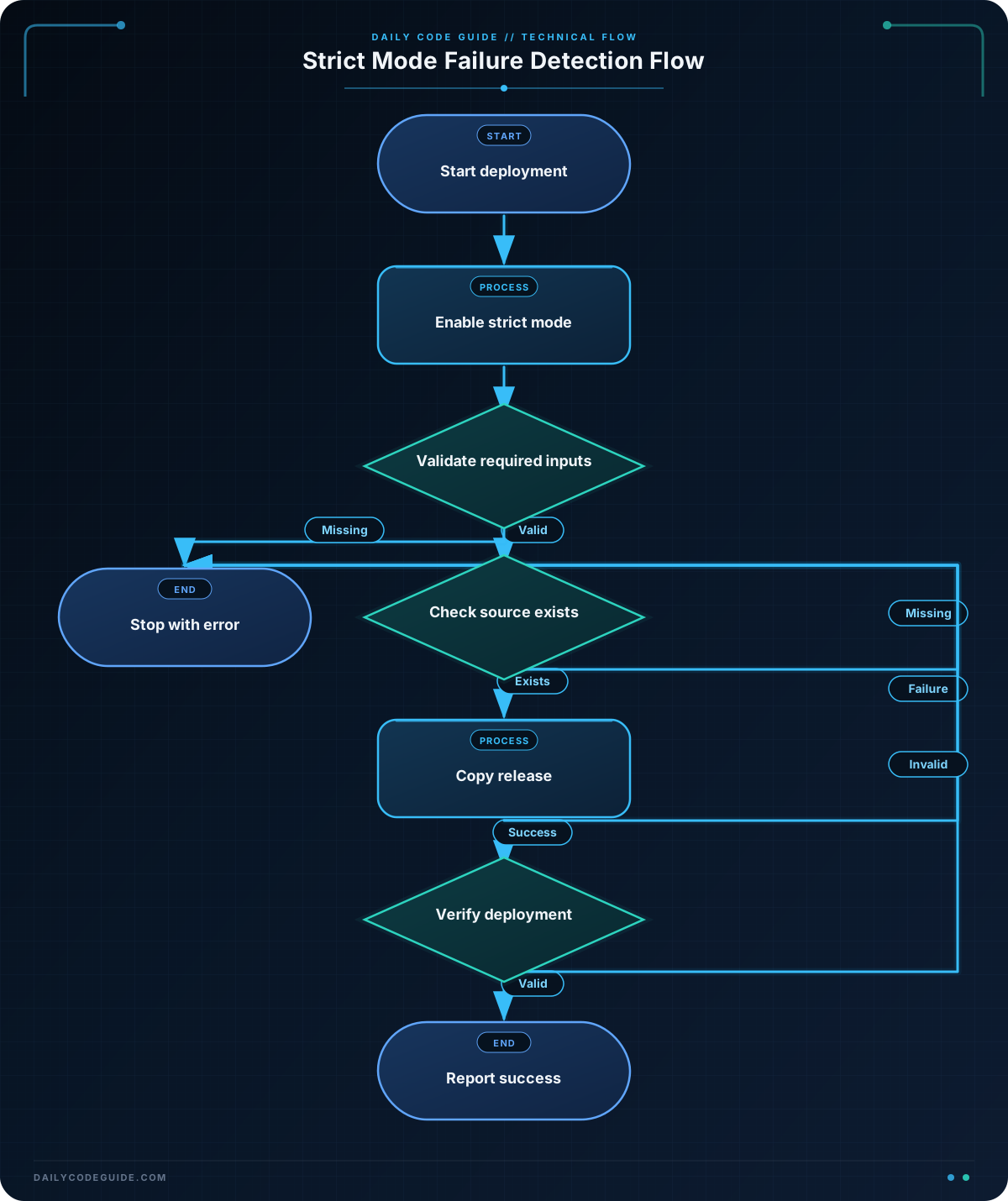
The shebang selects Bash, and the next line enables all three strict-mode behaviors:
#!/usr/bin/env bash
set -euo pipefail
The parameter checks use the Bash : builtin. The command does nothing when the variable is valid, but the ?... operator makes Bash print an error and exit when the variable is unset or empty.
: "${DEPLOY_ENV:?DEPLOY_ENV must be set}"Double quotes are important around variable expansions. They preserve spaces in directory names and prevent accidental word splitting or pathname expansion.
The directory check is explicit because strict mode does not automatically tell Bash that a missing source directory is a deployment configuration error. The script chooses a useful error message and exits before creating the destination.
If mkdir or cp fails, -e stops the script at that command. The final success message is therefore not printed after an ordinary command failure.
There is an important limitation: -e has exceptions. Commands used as the condition of if, while, or until, and some commands in lists using && or ||, are treated specially. Use explicit checks when a failure needs a particular response rather than relying on -e alone.
Another Example
Deployment scripts commonly run a remote command and then inspect its result. The following example validates a local release manifest before it is copied to a remote host. The pipeline uses pipefail so an upstream failure cannot be hidden by a successful final command.
#!/usr/bin/env bash
set -euo pipefail

: "${RELEASE_MANIFEST:?RELEASE_MANIFEST must be set}"
: "${REMOTE_HOST:?REMOTE_HOST must be set}"
: "${REMOTE_RELEASE_DIR:?REMOTE_RELEASE_DIR must be set}"

if [[ ! -f "$RELEASE_MANIFEST" ]]; then
    printf 'Manifest does not exist: %s\n' "$RELEASE_MANIFEST" >&2
    exit 1
fi

if ! grep -q '^status=ready$' "$RELEASE_MANIFEST"; then
    printf 'Manifest is not ready: %s\n' "$RELEASE_MANIFEST" >&2
    exit 1
fi

ssh "$REMOTE_HOST" "mkdir -p '$REMOTE_RELEASE_DIR'"
scp "$RELEASE_MANIFEST" "$REMOTE_HOST:$REMOTE_RELEASE_DIR/manifest.txt"

printf 'Uploaded ready manifest to %s:%s\n' "$REMOTE_HOST" "$REMOTE_RELEASE_DIR"
The explicit if ! grep check is intentional. It turns a normal search miss into a clear deployment error rather than relying on a general shell exit. For more remote-command patterns, including quoting and failure handling, see run remote commands securely with Bash and SSH.
Strict mode stops the script on a failed command, which is the same exit-status behavior covered in Bash exit statuses. See the Bash set builtin.
Common Mistakes
- Using
set -eby itself. A missing variable can expand to an empty string and cause a command to operate on the wrong path. Add-uand validate required configuration explicitly. - Assuming every pipeline failure stops the script. Without
pipefail, Bash normally reports only the status of the last command in a pipeline. An earlier failure can be hidden. - Expecting strict mode to validate business logic. A successful command can still produce an unhealthy application. Add checks for required files, expected content, service status, or health endpoints.
- Ignoring strict-mode behavior in conditionals. A command used in an
ifcondition is allowed to fail because its status is being tested. That is useful, but it means the script must handle the condition deliberately. - Debugging without seeing expansions. When strict mode stops a script, debug Bash scripts with set -x can help reveal which command ran and which values were expanded. Avoid exposing secrets in trace output.
Try It Yourself
Create a script that enables strict mode and accepts BACKUP_DIR and ARCHIVE_PATH as required variables. It should:
- Fail with a useful message if either variable is missing.
- Fail if
BACKUP_DIRis not a directory. - Create the parent directory for
ARCHIVE_PATH. - Copy a file named
release.txtfromBACKUP_DIRtoARCHIVE_PATH. - Print a success message only after the copy succeeds.
Test it once with valid values and once without defining BACKUP_DIR. Observe how the required-variable check prevents the script from continuing.
Challenge
Write a fail-safe deployment script for a release directory. The script must:
- Enable
set -euo pipefail. - Require
RELEASE_SOURCEandRELEASE_TARGET. - Verify that the source directory exists.
- Copy the source contents into the target directory.
- Verify that the copied release contains a file named
READY. - Print a success message only after all checks pass.
Use an explicit conditional for the final marker check so the error message identifies the deployment validation that failed.
Solution
#!/usr/bin/env bash
set -euo pipefail

: "${RELEASE_SOURCE:?RELEASE_SOURCE must be set}"
: "${RELEASE_TARGET:?RELEASE_TARGET must be set}"

if [[ ! -d "$RELEASE_SOURCE" ]]; then
    printf 'Release source does not exist: %s\n' "$RELEASE_SOURCE" >&2
    exit 1
fi

mkdir -p "$RELEASE_TARGET"
cp -R "$RELEASE_SOURCE"/. "$RELEASE_TARGET"/

if [[ ! -f "$RELEASE_TARGET/READY" ]]; then
    printf 'Deployment validation failed: READY marker is missing from %s\n' "$RELEASE_TARGET" >&2
    exit 1
fi

printf 'Deployment validated successfully: %s\n' "$RELEASE_TARGET"
The script stops on unexpected command failures because of strict mode, while the explicit checks provide deployment-specific messages. The success message can appear only after the source was found, the copy completed, and the target contained the required readiness marker.
Key Takeaways
set -euo pipefailhelps deployment scripts fail instead of silently continuing.-ucatches missing configuration values before they become empty arguments.pipefailprevents failures earlier in a pipeline from being hidden.- Strict mode complements explicit checks; it does not replace application health verification.
- Quote variable expansions and use clear conditional error messages for maintainable automation.

