


What You’ll Learn
In this lesson, you will learn how to use Terraform variables to make EC2 instance configurations easier to customize and reuse.
- Understand what a Terraform variable is.
- Declare variables with descriptions, types, and default values.
- Use variables in an AWS provider and EC2 instance resource.
- Set variable values in a
terraform.tfvarsfile.
The Concept
A Terraform variable is a named value that you can use throughout a configuration. Instead of writing a value directly inside a resource, you store it in a variable and refer to it with the var.variable_name syntax.
For example, an EC2 instance might use different instance types in different environments. You could write "t3.micro" directly in the resource, but a variable makes that setting easier to change:
variable "instance_type" {
    description = "The EC2 instance type"
    type        = string
    default     = "t3.micro"
}

resource "aws_instance" "web" {
    instance_type = var.instance_type
}
The variable block declares the variable. The var.instance_type expression reads its value wherever it is needed.
Variables are useful when you want to:
- Reuse the same Terraform configuration for multiple environments.
- Change settings without editing resource definitions.
- Make important configuration choices clear to other team members.
- Provide different values when running Terraform.
Basic Example
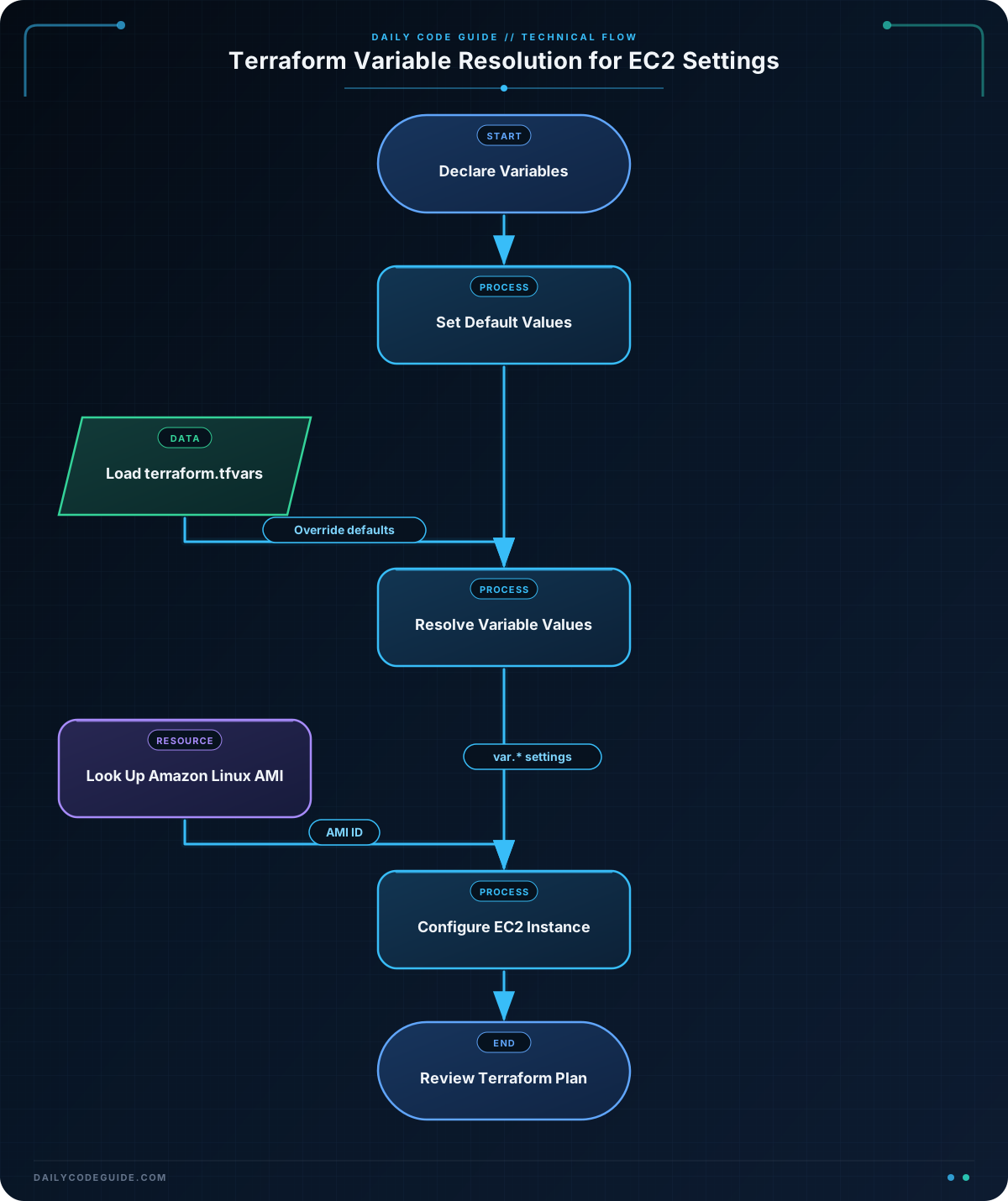
This example creates an EC2 instance configuration with variables for the AWS region, instance type, instance name, and monitoring setting. The AMI is selected automatically for the chosen region by using an AWS data source.
Save the following as main.tf:
terraform {
    required_providers {
        aws = {
            source  = "hashicorp/aws"
            version = "~> 6.0"
        }
    }

    required_version = ">= 1.5.0"
}

variable "region" {
    description = "The AWS region where the EC2 instance will be created"
    type        = string
    default     = "us-east-1"
}

variable "instance_type" {
    description = "The EC2 instance type"
    type        = string
    default     = "t3.micro"
}

variable "instance_name" {
    description = "The Name tag for the EC2 instance"
    type        = string
    default     = "training-web-server"
}

variable "monitoring" {
    description = "Whether detailed monitoring is enabled"
    type        = bool
    default     = false
}

provider "aws" {
    region = var.region
}

data "aws_ami" "amazon_linux" {
    most_recent = true
    owners      = ["amazon"]

    filter {
        name   = "name"
        values = ["al2023-ami-*-x86_64"]
    }

    filter {
        name   = "virtualization-type"
        values = ["hvm"]
    }
}

resource "aws_instance" "web" {
    ami           = data.aws_ami.amazon_linux.id
    instance_type = var.instance_type
    monitoring    = var.monitoring

    tags = {
        Name = var.instance_name
    }
}

output "instance_id" {
    description = "The ID of the created EC2 instance"
    value       = aws_instance.web.id
}
Terraform automatically loads values from a file named terraform.tfvars. Create that file to override the default values:
region        = "us-west-2"
instance_type = "t3.small"
instance_name = "practice-web-server"
monitoring    = true
After configuring your AWS credentials, initialize and review the configuration with these commands:
terraform init
terraform plan
Expected Output
The exact plan depends on your AWS account and the selected region, so the resource ID cannot be predicted in advance. The plan should show one aws_instance.web resource to be created. It should also show the values supplied by terraform.tfvars, such as the t3.small instance type and practice-web-server name.
How the Code Works
The first variable is region:
variable "region" {
    description = "The AWS region where the EC2 instance will be created"
    type        = string
    default     = "us-east-1"
}
variable "region"declares a variable namedregion.descriptiondocuments what the variable controls.type = stringsays that the value must be text.defaultprovides a value when no other value is supplied.
The provider reads the variable with var.region:
provider "aws" {
    region = var.region
}
This means changing region changes where Terraform asks AWS to create the resources.
The EC2 resource uses the other variables in the same way:
resource "aws_instance" "web" {
    ami           = data.aws_ami.amazon_linux.id
    instance_type = var.instance_type
    monitoring    = var.monitoring

    tags = {
        Name = var.instance_name
    }
}
var.instance_type controls the EC2 size, var.monitoring controls detailed monitoring, and var.instance_name becomes the instance’s Name tag.
The data "aws_ami" block looks up an existing Amazon Linux image instead of creating an AMI. Its ID is then passed to the EC2 resource through data.aws_ami.amazon_linux.id. This avoids hard-coding an AMI ID that may only work in one AWS region.
The terraform.tfvars file assigns values to variables. Values in that file override defaults, so the EC2 instance uses t3.small instead of t3.micro when you run terraform plan.
Another Example
Variables can also help the same configuration behave differently for development and production. In this example, the environment determines whether detailed monitoring is enabled, and a map variable allows additional tags to be supplied.
Save this configuration in a separate Terraform directory as main.tf:
terraform {
    required_providers {
        aws = {
            source  = "hashicorp/aws"
            version = "~> 6.0"
        }
    }

    required_version = ">= 1.5.0"
}

variable "region" {
    description = "The AWS region for the EC2 instance"
    type        = string
    default     = "us-east-1"
}

variable "environment" {
    description = "The environment for the EC2 instance"
    type        = string
    default     = "development"
}

variable "instance_type" {
    description = "The EC2 instance type"
    type        = string
    default     = "t3.micro"
}

variable "extra_tags" {
    description = "Additional tags for the EC2 instance"
    type        = map(string)
    default     = {}
}

provider "aws" {
    region = var.region
}

data "aws_ami" "amazon_linux" {
    most_recent = true
    owners      = ["amazon"]

    filter {
        name   = "name"
        values = ["al2023-ami-*-x86_64"]
    }

    filter {
        name   = "virtualization-type"
        values = ["hvm"]
    }
}

resource "aws_instance" "application" {
    ami           = data.aws_ami.amazon_linux.id
    instance_type = var.instance_type
    monitoring    = var.environment == "production"

    tags = merge(
        {
            Name        = "application-${var.environment}"
            Environment = var.environment
        },
        var.extra_tags
    )
}
A development configuration could use these values in terraform.tfvars:
environment   = "development"
instance_type = "t3.micro"

extra_tags = {
    Owner = "platform-team"
    CostCenter = "engineering"
}
For production, you could provide different values:
environment   = "production"
instance_type = "t3.small"

extra_tags = {
    Owner = "platform-team"
    CostCenter = "production"
}
The expression var.environment == "production" evaluates to true only for production. The merge function combines the standard tags with the tags supplied through extra_tags.
Common Mistakes
- Forgetting the
var.prefix: A declared variable is referenced asvar.instance_type, not simplyinstance_type. - Putting assignments in the wrong file: A declaration such as
variable "region" { ... }belongs in a Terraform configuration file. A value such asregion = "us-west-2"belongs interraform.tfvarsor another variable values file. - Using the wrong type: A Boolean variable uses
trueorfalsewithout quotation marks. Writing"false"creates text, not a Boolean value. - Assuming an AMI works everywhere: AMI IDs are usually region-specific. Looking up an AMI with a data source or supplying a region-appropriate AMI prevents this problem.
- Committing sensitive values: Do not place passwords, private keys, or other secrets in a committed
terraform.tfvarsfile. This lesson uses non-sensitive EC2 settings only.
Try It Yourself
Modify the basic example so that it creates a smaller development server:
- Use the
us-east-1region. - Use the
t3.microinstance type. - Set the instance name to
development-server. - Keep detailed monitoring disabled.
Place the values in terraform.tfvars, then run terraform plan and look for those values in the proposed EC2 resource.
Challenge
Create a Terraform configuration for an EC2 application server. Your configuration must:
- Declare variables named
region,project_name,instance_type, andmonitoring. - Use the
regionvariable in the AWS provider. - Use the other variables in an
aws_instanceresource. - Create a
Nametag with the valueproject_name. - Use a data source to select the latest Amazon Linux AMI.
Solution
Here is one complete solution:
terraform {
    required_providers {
        aws = {
            source  = "hashicorp/aws"
            version = "~> 6.0"
        }
    }

    required_version = ">= 1.5.0"
}

variable "region" {
    description = "The AWS region for the application server"
    type        = string
    default     = "us-east-1"
}

variable "project_name" {
    description = "The name assigned to the application server"
    type        = string
    default     = "inventory-api"
}

variable "instance_type" {
    description = "The EC2 instance type"
    type        = string
    default     = "t3.micro"
}

variable "monitoring" {
    description = "Whether detailed monitoring is enabled"
    type        = bool
    default     = false
}

provider "aws" {
    region = var.region
}

data "aws_ami" "amazon_linux" {
    most_recent = true
    owners      = ["amazon"]

    filter {
        name   = "name"
        values = ["al2023-ami-*-x86_64"]
    }

    filter {
        name   = "virtualization-type"
        values = ["hvm"]
    }
}

resource "aws_instance" "application" {
    ami           = data.aws_ami.amazon_linux.id
    instance_type = var.instance_type
    monitoring    = var.monitoring

    tags = {
        Name = var.project_name
    }
}
This works because every requested setting is declared as a variable and then referenced with var.. The AMI data source supplies a suitable image for the selected region, while the Name tag receives the project name variable.
Key Takeaways
- Terraform variables replace hard-coded configuration values with reusable inputs.
- Declare variables with a
variableblock and read them withvar.variable_name. - Defaults are used when no overriding value is provided.
- A
terraform.tfvarsfile is a convenient way to provide environment-specific values. - Variables make EC2 configurations easier to customize without changing resource definitions.

