


What You’ll Learn
In this lesson, you will use Terraform workspaces to manage separate development and production infrastructure from one shared configuration. You will also learn how to select environment-specific values and understand how Terraform keeps each workspace’s state separate.
- Create and select Terraform workspaces.
- Use
terraform.workspaceto identify the active environment. - Choose environment-specific infrastructure settings from a Terraform map.
- Understand workspace state separation and its limitations.
The Concept
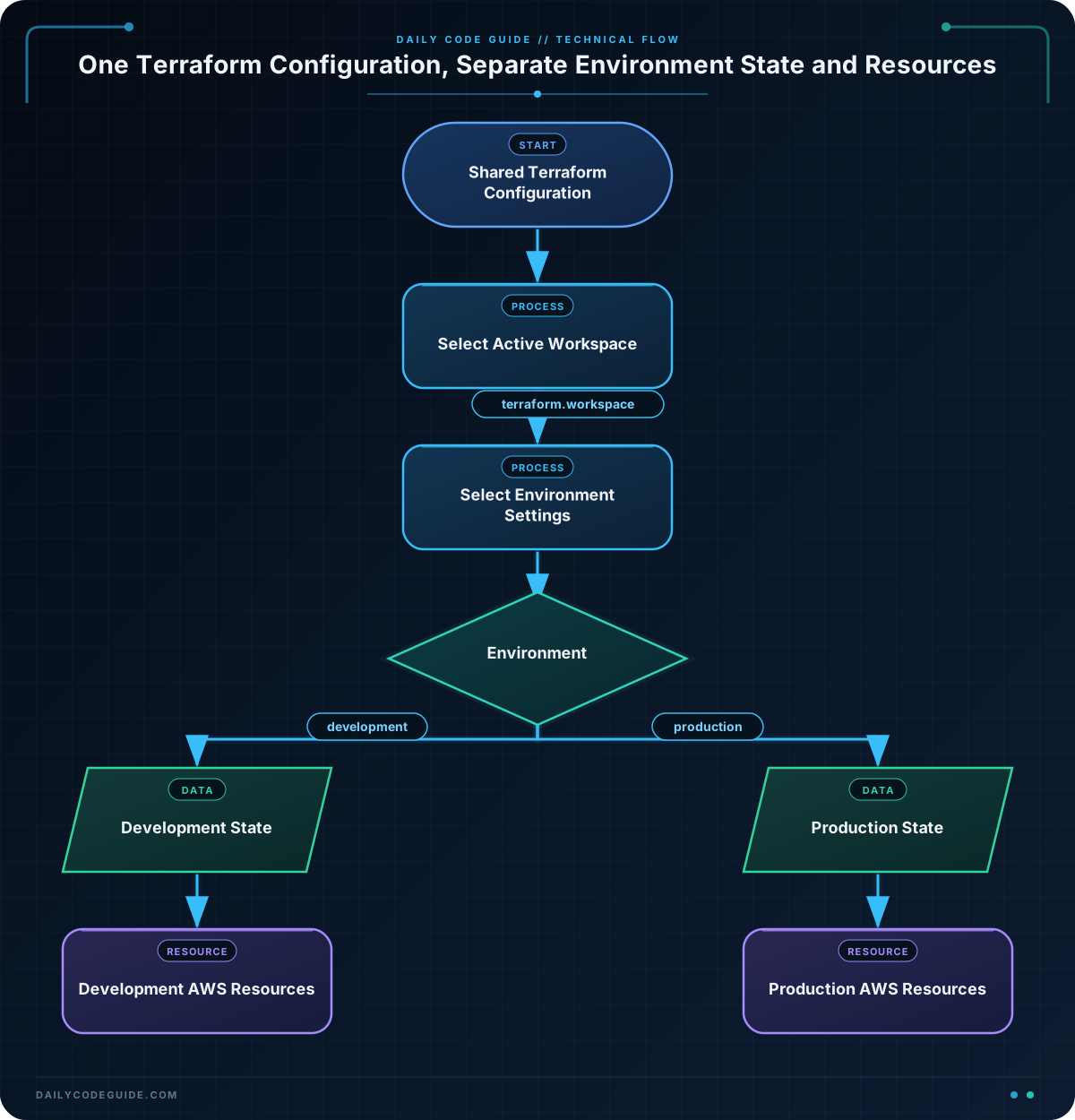
A Terraform workspace is an independent state environment that uses the same Terraform configuration. For example, a project can have development and production workspaces:
- The configuration defines the infrastructure once.
- Each workspace records its own resources in a separate state.
- Expressions can use the active workspace to select different values.
The active workspace is available through the built-in terraform.workspace expression. If you run Terraform in the development workspace, terraform.workspace evaluates to "development". Switching to production changes the value without changing the configuration files.
Workspaces are useful when environments have the same general architecture but differ in settings such as instance sizes, bucket names, replica counts, or enabled features. They are not a complete security boundary, however. The same users who can access the configuration and backend may be able to switch workspaces, and a shared configuration can still accidentally affect the wrong environment.
Basic Example
This example creates one Amazon S3 bucket per workspace. The development and production buckets use different names and versioning settings, but both are defined by the same configuration.
The example assumes that AWS credentials are already configured and that the caller has permission to create S3 buckets. Set bucket_suffix to a globally unique value because S3 bucket names are shared across AWS.
terraform {
  required_version = ">= 1.5.0"

  required_providers {
    aws = {
      source  = "hashicorp/aws"
      version = "~> 5.0"
    }
  }
}

provider "aws" {
  region = var.aws_region
}

variable "aws_region" {
  type    = string
  default = "us-east-1"
}

variable "bucket_suffix" {
  type        = string
  description = "Globally unique suffix for the S3 bucket name"
}

variable "environment_settings" {
  type = map(object({
    versioning = bool
    storage    = string
  }))

  default = {
    development = {
      versioning = false
      storage    = "development"
    }
    production = {
      versioning = true
      storage    = "production"
    }
  }
}

locals {
  environment = terraform.workspace
  settings    = var.environment_settings[local.environment]
  bucket_name = "dcg-app-${local.environment}-${var.bucket_suffix}"
}

resource "aws_s3_bucket" "application" {
  bucket = local.bucket_name

  tags = {
    Name        = local.bucket_name
    Environment = local.environment
    StorageTier = local.settings.storage
  }
}

resource "aws_s3_bucket_versioning" "application" {
  bucket = aws_s3_bucket.application.id

  versioning_configuration {
    status = local.settings.versioning ? "Enabled" : "Suspended"
  }
}

output "active_environment" {
  value = local.environment
}

output "bucket_name" {
  value = aws_s3_bucket.application.bucket
}

output "versioning_status" {
  value = local.settings.versioning ? "Enabled" : "Suspended"
}
Save this configuration in a directory such as workspace-demo. Initialize Terraform and create the two workspaces:
terraform init
terraform workspace new development
terraform workspace new production
terraform workspace select development
terraform plan -var="bucket_suffix=example-4821"
terraform apply -var="bucket_suffix=example-4821"
After applying the development workspace, select production and plan again. Terraform now evaluates the same files with a different workspace name and different settings.
terraform workspace select production
terraform plan -var="bucket_suffix=example-4821"
terraform output
Expected Output
The exact bucket name depends on the suffix you provide. In the production workspace, the outputs will have this shape:
active_environment = "production"
bucket_name = "dcg-app-production-example-4821"
versioning_status = "Enabled"
How the Code Works
The environment_settings variable is a map whose keys are workspace names. Each key points to an object containing settings for that environment:
developmentdisables bucket versioning.productionenables bucket versioning.storageis included as a tag value to make the selected configuration visible.
This expression reads the current workspace:
local.environment = terraform.workspaceTerraform then uses that value to select an object from the settings map:
local.settings = var.environment_settings[local.environment]When the active workspace is production, this becomes the equivalent of selecting var.environment_settings["production"]. The bucket name also includes the workspace, so development and production do not attempt to create the same bucket.
Each workspace has its own state. A resource created in development is not represented by the state Terraform uses for production. Consequently, switching workspaces changes what Terraform believes already exists.
To see the available workspaces and the current selection, use:
terraform workspace list
terraform workspace show
Another Example
Workspaces can also select networking values. This example creates a separate VPC and subnet range for each environment. The production network is larger than the development network, while the resource structure remains shared.
terraform {
  required_version = ">= 1.5.0"

  required_providers {
    aws = {
      source  = "hashicorp/aws"
      version = "~> 5.0"
    }
  }
}

provider "aws" {
  region = var.aws_region
}

variable "aws_region" {
  type    = string
  default = "us-east-1"
}

variable "network_settings" {
  type = map(object({
    vpc_cidr    = string
    subnet_cidr = string
  }))

  default = {
    development = {
      vpc_cidr    = "10.10.0.0/16"
      subnet_cidr = "10.10.1.0/24"
    }
    production = {
      vpc_cidr    = "10.20.0.0/16"
      subnet_cidr = "10.20.1.0/24"
    }
  }
}

locals {
  environment = terraform.workspace
  network     = var.network_settings[local.environment]
}

resource "aws_vpc" "application" {
  cidr_block           = local.network.vpc_cidr
  enable_dns_support   = true
  enable_dns_hostnames = true

  tags = {
    Name        = "dcg-${local.environment}-vpc"
    Environment = local.environment
  }
}

resource "aws_subnet" "application" {
  vpc_id            = aws_vpc.application.id
  cidr_block        = local.network.subnet_cidr
  availability_zone = "${var.aws_region}a"

  tags = {
    Name        = "dcg-${local.environment}-subnet"
    Environment = local.environment
  }
}

output "vpc_cidr" {
  value = local.network.vpc_cidr
}

output "subnet_cidr" {
  value = local.network.subnet_cidr
}
With the development workspace selected, Terraform uses the 10.10.0.0/16 VPC range. Selecting production makes Terraform use the separate 10.20.0.0/16 range. The different CIDRs prevent the two environments from representing the same network.
Common Mistakes
Applying in the wrong workspace
The most dangerous mistake is running terraform apply while the wrong workspace is active. Always check the workspace before planning or applying:
terraform workspace show
terraform plan -var="bucket_suffix=example-4821"
Many teams also include the workspace name in resource names, tags, and review procedures so that an environment is easier to identify.
Forgetting to define a map entry
If the active workspace is staging but environment_settings has only development and production keys, the lookup will fail. Add a matching entry before selecting a new workspace, or use validation and conditional logic when an environment is optional.
Assuming workspaces automatically select variable files
Terraform does not automatically load files such as development.tfvars merely because the workspace is named development. You must pass variable files explicitly, use a workspace-keyed map as shown above, or use another deliberate variable-loading process.
Using workspaces as a security boundary
Workspaces separate state, not necessarily permissions, credentials, or deployment ownership. For highly isolated production environments, separate Terraform root modules, backends, cloud accounts, or CI/CD permissions may be more appropriate.
Try It Yourself
Extend the S3 example so that it supports a third workspace named staging. Give staging these settings:
- Bucket versioning should be enabled.
- The storage tag should be
"staging". - The bucket name should automatically include
stagingwithout adding a new resource.
Create the workspace, select it, and run a plan using the same bucket suffix. Confirm that the plan refers to a staging bucket rather than the development or production bucket.
Challenge
Create a shared Terraform configuration for development and production application environments with these requirements:
- Use a workspace-keyed variable map.
- Development must use one instance type and production must use a different instance type.
- Both environments must have a workspace-specific application name.
- Expose the active environment, selected instance type, and application name as outputs.
- Do not create separate resource blocks for each environment.
You may use terraform_data to represent the selected deployment settings without requiring a cloud provider. This resource is useful for demonstrating Terraform planning behavior when the important part of the exercise is configuration selection.
Solution
terraform {
  required_version = ">= 1.5.0"
}

variable "application_settings" {
  type = map(object({
    application_name = string
    instance_type    = string
  }))

  default = {
    development = {
      application_name = "orders-api-development"
      instance_type    = "t3.small"
    }
    production = {
      application_name = "orders-api-production"
      instance_type    = "t3.large"
    }
  }
}

locals {
  environment = terraform.workspace
  settings    = var.application_settings[local.environment]
}

resource "terraform_data" "application" {
  input = {
    environment       = local.environment
    application_name  = local.settings.application_name
    instance_type     = local.settings.instance_type
  }
}

output "active_environment" {
  value = local.environment
}

output "application_name" {
  value = local.settings.application_name
}

output "instance_type" {
  value = local.settings.instance_type
}
Create and select the required workspaces before applying:
terraform init
terraform workspace new development
terraform workspace new production
terraform workspace select development
terraform apply
terraform output

terraform workspace select production
terraform apply
terraform output
The solution uses one terraform_data resource. Its input changes according to the active workspace, while the map supplies the environment-specific application name and instance type. Each workspace has separate state, so Terraform tracks the development and production instances of the resource independently.
Key Takeaways
- Terraform workspaces let one configuration manage multiple independent state environments.
terraform.workspaceidentifies the currently selected workspace.- Maps keyed by workspace names provide a clear way to select environment-specific values.
- Resource names and network ranges should differ across environments to avoid collisions.
- Workspaces separate state, but stronger production isolation may require separate backends, accounts, or configurations.

